
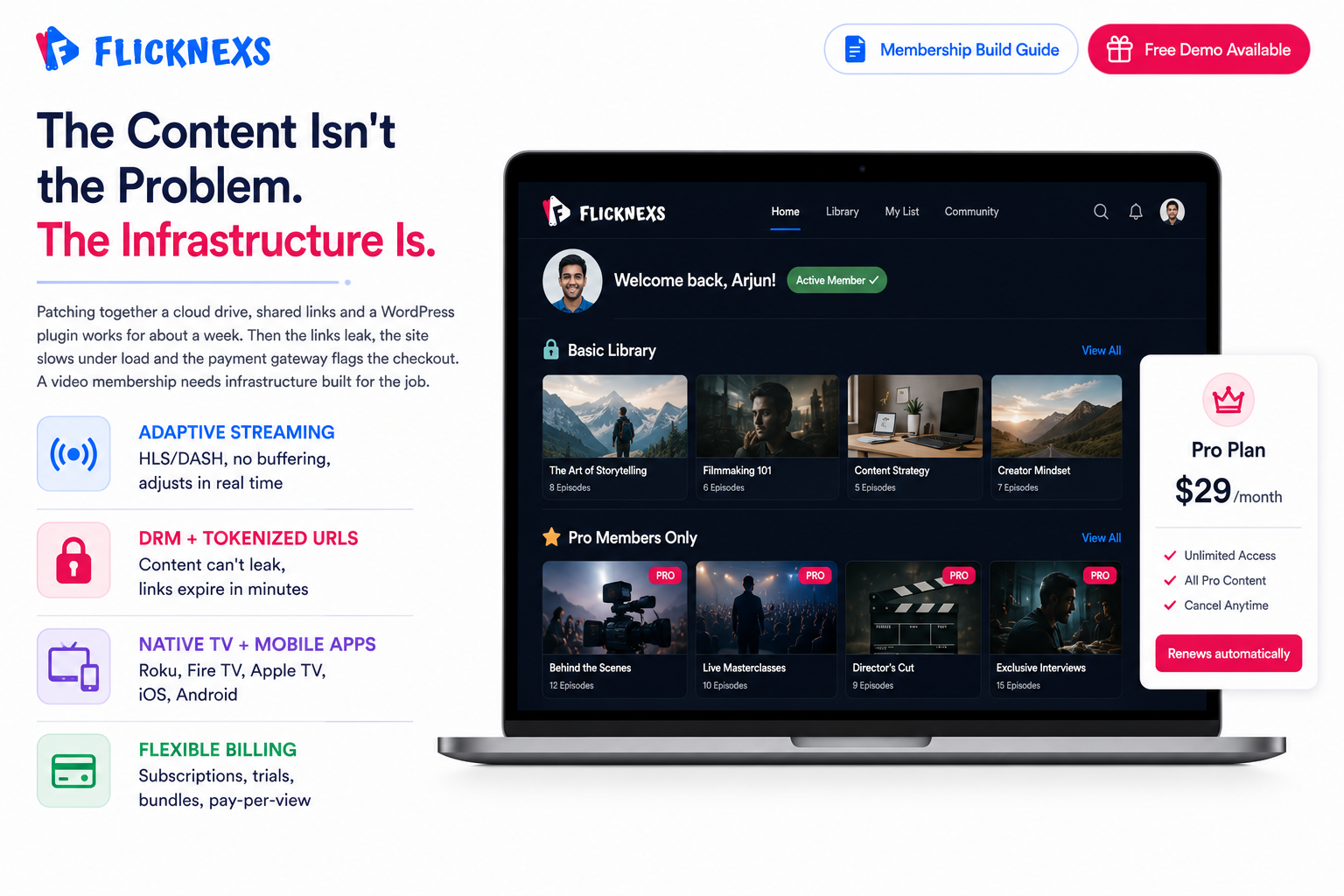
Quick Answer: Building a membership website for video content means choosing a white-label OTT platform, structuring your content library, setting tiered pricing, and securing playback with DRM and tokenized streaming. Flicknexs handles the video hosting, security, and native apps so you can focus on content and retention.
Building a membership website for video content involves selecting a platform, planning content, setting membership levels, ensuring secure access and integrating payment options. Focus on user experience, content quality and engagement strategies to retain members. The fastest way to launch is to choose a white-label OTT platform that handles video hosting, secure payment processing and multi-device apps, so you can focus on content strategy and member retention rather than technical maintenance.
You have a library of videos. Recorded workshops, exclusive interviews, training modules, behind-the-scenes footage. You know the content has value. Your audience wants it. But you’re stuck on the part that should be straightforward: actually delivering it in a way that feels professional, secure and worth paying for.
The content isn’t the problem. The infrastructure is.
Most creators start by patching something together. Upload files to a cloud drive, share the links, gate them with a basic WordPress plugin. It works for about a week. Then the links leak. The site slows down under load. The payment gateway flags a transaction because the checkout experience is too clunky to trust. Momentum dies, the audience gets a broken experience and you’re left with a dashboard full of errors and no clear path forward.
A video membership site isn’t just a folder with a paywall on it. It’s a digital destination where your audience should feel safe, engaged and valued enough to keep paying. That requires infrastructure built for the job: high-bandwidth streaming that doesn’t buffer, file encryption that prevents piracy, recurring billing that works across different countries and payment methods without falling over. Treat it like a simple website and it’ll behave like one. Treat it like a broadcast network and it’ll perform like one.
This guide cuts through the noise. We’ll walk through the exact steps to build a membership platform that scales, from choosing the right technology stack to pricing tiers that actually retain members, along with the hard truths about platform choices and how to avoid the technical debt that quietly sinks most video membership businesses before they find their footing.
Key Takeaways
- Infrastructure dictates success: A video membership built on a website builder with a video plugin will hit a ceiling fast. Streaming at any real scale needs dedicated video infrastructure underneath it, not a tool designed for something else with video bolted on.
- Security is non-negotiable: DRM, tokenized streaming and domain locking aren’t optional extras. Without them your content leaks, your paying members share access and the revenue you thought you were earning quietly goes elsewhere.
- Mobile and TV apps are essential: Your members will try to watch on their phones and their living room TVs whether you’ve built for those screens or not. A web-only strategy doesn’t protect you from that expectation, it just means you fail to meet it and they go somewhere that does.
- Retention beats acquisition: The number that actually determines whether your membership business grows isn’t new sign-ups. It’s how long members stay. That comes from consistent content delivery and an experience good enough that cancelling feels like a loss.
- Platform choice defines your ceiling: The platform you build on determines what you can do, how fast you can do it and whether you’ll need to rebuild everything in eighteen months. DIY builders, course platforms and white-label OTT solutions each set a different ceiling on your ability to scale, brand and monetize. Choose based on where you’re going, not just where you are now.
Adaptive Bitrate Streaming (ABR)
Your members aren’t all watching from the same connection. Someone in rural India and someone in downtown New York are having completely different network experiences and your platform needs to handle both without either of them thinking about it.
Adaptive bitrate streaming detects available bandwidth in real time and adjusts video quality accordingly. Connection drops, the video quietly steps down to prevent buffering. Connection improves, it steps back up. The viewer never has to choose a quality setting or sit through a loading screen. It just works.
Without ABR, you’ll see high abandonment rates. People don’t wait thirty seconds for a video to buffer on a service they’re paying for. They close it. Look for platforms that support HLS or DASH, the two industry standards for adaptive delivery. If a platform doesn’t support either, that’s a hard no regardless of what else it offers.
Multi-Device Compatibility
Your members are not sitting at their desks all day. They watch on the commute, at the gym and on the couch.
If your platform only offers a website, you are cutting off a massive portion of your potential revenue. You need native apps for mobile (iOS/Android) and TV (Roku, Apple TV, Fire TV, Android TV).
Why is this important? TV apps have higher retention. People are more likely to commit to a 20-minute session on a big screen than on a phone. They are also more likely to share the account with family members, increasing the perceived value of your subscription.
Advanced Security and DRM
Security isn’t an add-on you configure after launch. It’s a requirement you build around from day one.
Domain Locking: Restricts your video player to your specific domain. If someone lifts your embed code and drops it on an unauthorized site, the video simply won’t play. One configuration, one meaningful layer of protection.
Tokenized Streaming: Generates a unique, temporary URL for every single stream. That URL expires within minutes. Even if someone copies and shares the link, it’s dead before anyone else can use it. No persistent URLs sitting around waiting to be exploited.
DRM (Digital Rights Management): The strongest protection available. It encrypts the video stream so standard screen recording tools and download managers can’t capture it. Decryption only happens inside a secure, certified player. Netflix uses it. Disney+ uses it. If you’re charging serious money for premium content, you should be using it too.
Monetization Flexibility
You need more than just a “Subscribe” button. You need a flexible pricing engine.
- Recurring Subscriptions: Monthly, quarterly and annual billing that runs automatically without manual intervention on your end or friction on the member’s.
- Tiered Access: Basic, Pro and Enterprise levels with distinct content libraries behind each one, so members see exactly what their subscription entitles them to and nothing more.
- Free Trials: Automatic activation of a seven or fourteen day trial that converts to a paid subscription at the end without requiring the member to do anything extra.
- Bundles: The ability to sell a course pack or a curated group of videos together as a single purchase rather than forcing individual transactions.
- Pay-Per-View: Individual video or live event access for a one-time fee, separate from any subscription the member might already hold.
The platform needs to handle the logic of all these combinations automatically and reliably. A member who buys a bundle shouldn’t have to contact support to access what they paid for. A trial that doesn’t convert cleanly to billing is a revenue leak you’ll spend time cleaning up manually. The monetization engine running underneath your content is only as good as its ability to execute these scenarios without you having to intervene.
How Do You Compare the Top Membership Platforms for Video?
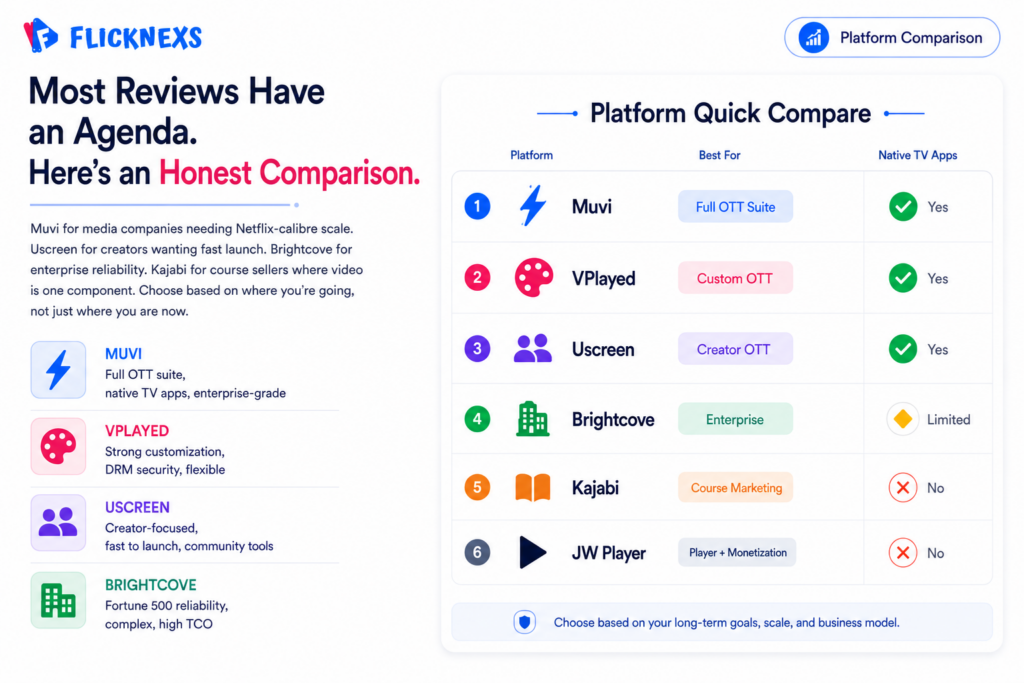
The market is crowded, the ads are everywhere and most reviews have an agenda. What you actually need is an honest comparison that helps you match the tool to your specific situation, not a ranked list that declares one platform the winner for everyone.
Here’s how the major players actually stack up.
Muvi vs VPlayed vs Uscreen: The OTT Powerhouses
These three are the strongest contenders for building a full-scale branded streaming service.
Muvi
- Overview: A comprehensive white-label solution covering video, audio and even gaming streaming under one roof.
- Features: Native apps across all major platforms, extensive monetization options, built-in marketing tools and a robust CMS that handles large catalogs without breaking down.
- Pros: Built to scale. Handles a significant portion of the setup work for you, which matters if you’re moving fast. Solid for enterprise-level requirements.
- Cons: The initial setup has a real learning curve. The interface is powerful but not immediately intuitive. Pricing reflects the feature depth, which means it’s not the right fit for early-stage operators watching costs carefully.
- Best For: Media companies and larger organizations that need a Netflix-calibre experience and want maximum control over how it’s built.
VPlayed
- Overview: A white-label streaming platform built around
customizationand flexibility as its primary selling points. - Features:
Customizable player, multi-device support, live streaming and security features that go deeper than most competitors at this price point. - Pros: Strong branding control. Reasonable balance between feature depth and usability. Takes security seriously in a way that shows up in the actual product rather than just the marketing page.
- Cons: The UI feels dated next to newer entrants. Support response times are inconsistent depending on when and how you reach out.
- Best For: Businesses that need significant
customizationwithout the complexity and cost of building something from scratch.
Uscreen
- Overview: A popular choice for creators and smaller businesses that want to get to market quickly without a steep learning curve.
- Features: All-in-one solution combining website, apps and marketing tools, with a genuine focus on community features that most competitors treat as an afterthought.
- Pros: The most user-friendly setup in this category. Fast to launch. Customer support and educational resources that actually help rather than just pointing you to documentation.
- Cons: Less suited to complex
customization. The template-based approach that makes it easy to launch is the same thing that limits you later when your requirements outgrow what the templates can do. - Best For: Creators, coaches and small to mid-sized businesses that want to launch fast, focus on content and aren’t yet at the scale where platform flexibility becomes a constraint.
Dacast vs Brightcove vs Kaltura: The Enterprise Giants
These three aren’t really competing for the same customers as the OTT platforms above. They’re built for broadcasters, universities and large corporations and the product decisions reflect that at every level.
Dacast is the most accessible of the three. Live streaming is where it genuinely shines, reliable infrastructure, pay-per-view support and transparent pricing that doesn’t hide the real cost until you’re locked in. The weak spot is on-demand. If your business is a curated membership library rather than a live events operation, the on-demand experience feels underdeveloped and the interface lacks the consumer-facing polish a paying audience expects.
Brightcove is what you use when reliability at Fortune 500 scale is the only metric that matters. The analytics are deep, the CDN is global, the enterprise security meets requirements that most platforms don’t even attempt. It also costs accordingly and requires a dedicated technical team to run properly. For a small or mid-sized operator it’s both overkill and out of reach. For a large enterprise with serious infrastructure requirements and the budget to match, it’s genuinely hard to fault on performance.
Kaltura sits in its own category because it’s open-source. You can self-host it, customize it down to the pixel and build functionality that no closed SaaS platform would ever let you near. Educational institutions use it heavily for exactly this reason. The trade-off is that the out-of-the-box experience is noticeably rougher than any managed SaaS competitor, self-hosting demands real technical resources and the complexity scales with how much you try to customize. If you have the team to handle it, the flexibility is unmatched. If you don’t, it becomes a maintenance burden that consumes more than it delivers.
JW Player vs Vimeo OTT vs Kajabi: The Hybrid Options
These platforms sit in the middle, stronger on video than on membership infrastructure and the gaps show up at different points depending on what you’re building.
JW Player
- Overview: Started as a video player and has grown into a broader video platform over time, though the player remains the strongest part of the product.
- Features: Best-in-class player performance, solid analytics and
monetizationtools that work well for publishers already running their own sites. - Pros: The player is genuinely excellent. If you want better video and
monetizationon top of an existing website, it delivers. - Cons: It’s a player and
monetizationlayer, not a membership site builder. You still need separate CMS and access control logic around it, which adds complexity and cost. - Best For: Publishers and media sites that already have a website and need a better video and
monetizationlayer, not someone building a membership business from the ground up.
Vimeo OTT
- Overview: The streaming arm of Vimeo, built for creators who want a branded channel without leaving the Vimeo ecosystem entirely.
- Features: Branded apps, subscription management and live streaming wrapped in a player most creators already trust.
- Pros: High-quality video, familiar brand and straightforward enough to get running without a long setup process.
- Cons: Less flexible than dedicated OTT platforms and the transaction fees stack up faster than the headline pricing implies.
- Best For: Creators already using Vimeo who want a quick path to a branded channel and aren’t yet at the scale where platform flexibility becomes a constraint.
Kajabi
- Overview: A marketing platform built for selling courses and digital products, with video as one component rather than the core infrastructure.
- Features: Strong all-in-one marketing, sales funnels and course delivery tools that are genuinely hard to match in a single product.
- Pros: The marketing automation and email tools are excellent. Landing pages and sales funnels work well for structured course selling.
- Cons: Video hosting isn’t what it was built for. High-volume streaming strains it and there are no native TV apps, which matters the moment members want to watch on a living room screen.
- Best For: Coaches and consultants selling structured courses where video is one part of a broader product, not the product itself.
.
Comparison Summary Table
| Feature | Muvi | VPlayed | Uscreen | Brightcove | Kajabi |
|---|---|---|---|---|---|
| Primary Focus | Full OTT Suite | Custom OTT | Creator OTT | Enterprise Video | Course Marketing |
| Native TV Apps | Yes | Yes | Yes | Limited | No |
| Video Hosting | Included | Included | Included | Included | Included (Basic) |
| Security | High (DRM) | High (DRM) | High | Very High | Medium |
| Ease of Use | Medium | Medium | High | Low (Complex) | High |
| Best For | Media Companies | Custom Needs | Creators | Enterprise | Course Sellers |
How Do You Structure Your Content and User Journey?
Once you have chosen your platform, the real work begins. You need to design a user journey that converts visitors into loyal members.
The Content Audit and Organization
Do not just dump your videos into a folder. You need a taxonomy.
* Categories: Broad topics (e.g., “Fitness,” “Nutrition,” “Mindset”).
* Series: Grouped content that tells a story or follows a progression (e.g., “30-Day Challenge”).
* Tags: Specific attributes (e.g., “Beginner,” “Advanced,” “Interview”).
A clear structure helps members find what they need and encourages them to binge-watch. If a user finishes one video, the platform should immediately suggest the next logical step.
The Onboarding Flow
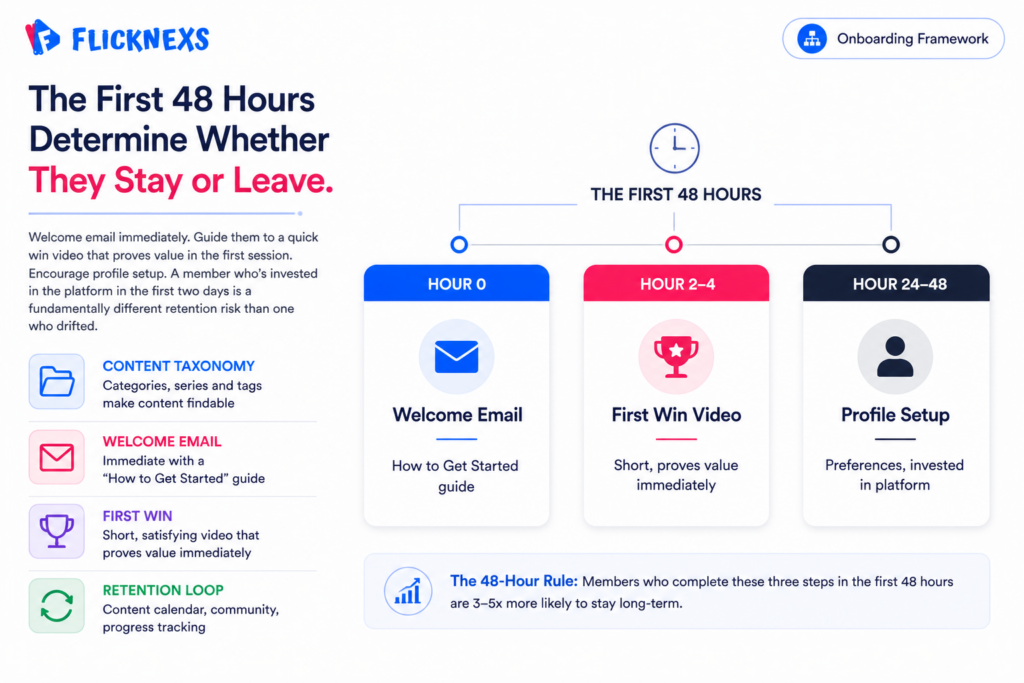
The first 48 hours are critical. How you welcome a new member determines if they stay or leave.
1. Welcome Email: Immediate confirmation with a “How to Get Started” guide.
2. First Win: Guide them to a “quick win” video. Something short and satisfying that proves the value of the membership immediately.
3. Profile Setup: Encourage them to set up their profile and preferences.
The Retention Loop
Retention is about consistency and engagement.
* Content Calendar: Release new content on a predictable schedule. This gives members a reason to come back.
* Community Features: Enable comments, forums or live Q&A sessions. Members stay for the people, not just the videos.
* Progress Tracking: Show users how far they have come. “You have completed 80% of the series.”
What Are the Best Practices for Pricing and Monetization?
Pricing is not just about covering costs. It is about signaling value.
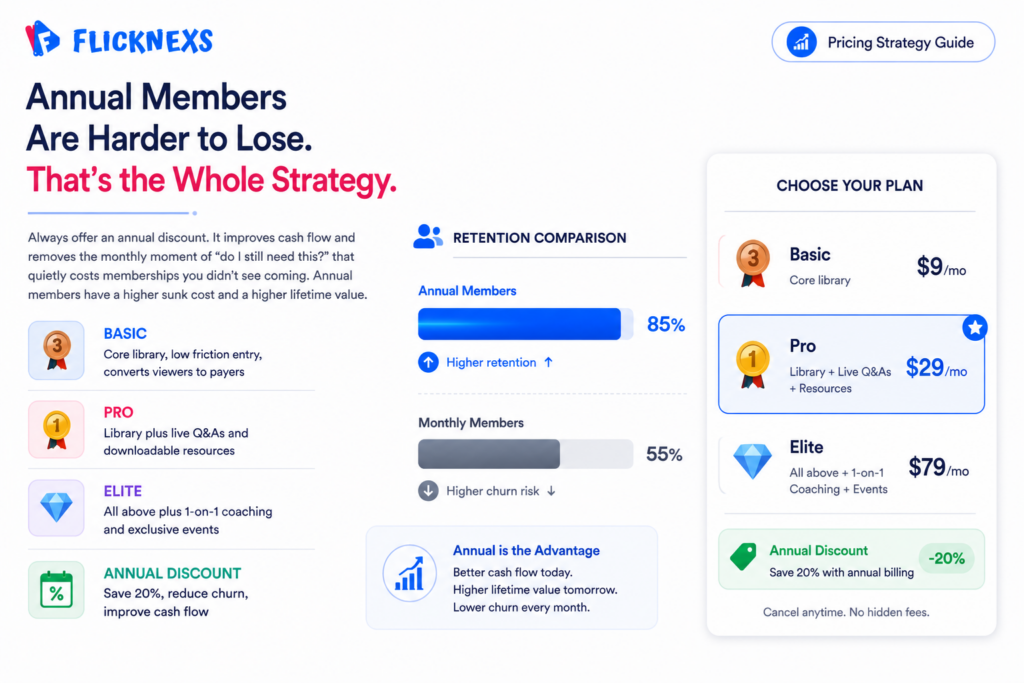
Tiered Pricing Models
Don’t offer just one price. Offer options.
* Basic: Access to the core library. Lower price point.
* Pro: Access to the library plus live Q&A sessions or downloadable resources.
* Elite: All of the above plus 1-on-1 coaching or exclusive events.
This allows you to capture different segments of your market. Some users will take the basic option, but many will upgrade if they see the value in the higher tiers.
Free Trials and Freemium
A free trial is the most effective way to convert a visitor. Let them taste the content.
* 7-Day Trial: Long enough to watch a few videos, short enough to not lose revenue.
* Freemium: Offer a small amount of free content to build trust, then gate the premium stuff.
Be careful with the “freemium” model. If you give away too much, people will never pay. If you give away too little, they will never buy. Find the sweet spot.
Annual vs Monthly
Always offer an annual discount. It improves your cash flow and reduces churn.
For example, a $29/month plan might offer $290/year annually, a common ~20% discount pattern
Annual members are much more likely to stay for the long term. They have a higher “sunk cost” and are less likely to cancel.
How Do You Launch and Market Your Video Membership?
You have the tech. You have the content. Now you need the audience.
Pre-Launch Hype
Do not launch to an empty room. Build an email list before you go live.
* Waitlist: Create a landing page describing the upcoming membership. Collect emails.
* Teasers: Release short clips of your best content. Show, don’t just tell.
* Early Bird Pricing: Offer an early-bird discount to your first wave of signups.
Content Marketing
Use your free content to drive traffic to your paid membership.
* Blog Posts: Write articles related to your video topics. Embed a teaser video and a call to action.
* Social Media: Post clips on TikTok, Instagram and LinkedIn. Drive traffic to your landing page.
* SEO: Optimize your landing pages for keywords like “how to [topic]” or “[topic] training.”
Paid Advertising
Once you have a working model, scale with paid ads.
* Retargeting: Show ads to people who visited your site but didn’t buy.
* Lookalike Audiences: Find people who look like your current best members.
How Do You Scale and Optimize Your Platform Over Time?
Launching is just the beginning. The real work is optimization.
Analytics and Data
You need to know what is happening.
* Churn Rate: How many people are canceling? Why?
* Engagement: Which videos are being watched the most? Which are abandoned?
* LTV (Lifetime Value): How much does an average member pay over their lifetime?
Use this data to make decisions. If a specific video has a high drop-off rate, re-edit it. If a specific tier has low conversion, adjust the price or the offering.
Continuous Content Improvement
Your content library should never be static.
* Update Old Content: Keep your videos fresh.
* User Feedback: Ask your members what they want to see next.
* Live Events: Host monthly live streams to keep the community alive.
Technical Optimization
Keep an eye on your platform’s performance.
* Speed: Is the site loading fast?
* Uptime: Is the video always available?
* Security: Are there any new threats?
How Do You Navigate Common Challenges in Video Membership?
Every business faces hurdles. Here is how to handle the most common ones.
Content Piracy
If someone steals your video, what do you do?
* Prevention: Use DRM and tokenized streaming.
* Detection: Use services that scan the web for your content.
* Action: Send takedown notices. Have a legal template ready.
High Churn
If people are leaving, don’t panic.
* Exit Surveys: Ask why they are leaving.
* Win-Back Campaigns: Offer a discount or a free month to return.
* Content Gap: Are you delivering enough value?
Technical Glitches
Things will break.
* Communication: Be transparent with your members.
* Backup: Have a backup plan for live events.
* Support: Have a responsive support team ready to help.
How Do You Transition from a Course to a Full Membership Community?
Many creators start with a course and want to move to a membership. This is a strategic shift.
From Linear to Infinite: A course has a start and end. A membership is infinite. You need to change your mindset from “completing a program” to “ongoing learning.”
From Content to Connection: In a course, the value is the content. In a membership, the value is the community. Focus on building forums, live calls and peer interactions.
From One-Time to Recurring: You need to constantly produce new content to justify the recurring fee.
How Do You Integrate Third-Party Tools for Maximum Efficiency?
Your membership platform is the hub, but you will need spokes.
* Email Marketing: Connect to Mailchimp, ConvertKit or ActiveCampaign for automated sequences.
* CRM: Connect to HubSpot or Salesforce to track leads and customers.
* Analytics: Connect to Google Analytics or Mixpanel for deep insights.
* Community: Connect to Circle or Discord for advanced community features (if your platform doesn’t include them).
Make sure your chosen platform has open APIs or pre-built integrations. You don’t want to be stuck with a walled garden.
How Do You Ensure Your Membership Site is Future-Proof?
The video industry changes fast. You need a platform that can adapt.
* AI Integration: Look for platforms that are integrating AI for personalization and content tagging.
* New Devices: Ensure the platform supports new devices as they come out (e.g., Meta Quest, new Smart TV models).
* Scalability: Can the platform handle the traffic?
How Do You Measure Success Beyond Revenue?
Revenue is important, but it is not the only metric.
* Engagement: Are members watching?
* Satisfaction: Are they happy? (NPS scores).
* Community Health: Are they talking to each other?
A healthy community is more valuable than a short-term revenue spike.
Conclusion
Building a video membership business isn’t a project you finish. It’s a system you run. The technology, the content strategy, the community, the pricing, all of it needs ongoing attention. Anyone who tells you otherwise is selling a fantasy.
But the upside is real. Done properly, you’re building an asset that compounds. A library that grows more valuable with every piece you add. A community that becomes harder to leave the longer someone is part of it. A revenue stream that shows up every month without you having to sell something new.
The foundation matters more than most people realize when they’re starting out. Cutting corners on video infrastructure to save money early is one of the most expensive decisions you can make. A poor member experience doesn’t generate complaints. It generates quiet cancellations from people who never tell you why they left.
If you’re done patching together tools that weren’t built for this and ready to build something that actually scales, a dedicated white-label OTT platform is where that starts. Not a website builder with a video plugin. Not a course platform that treats streaming as a secondary feature. Infrastructure built specifically for what you’re trying to do.
Flicknexs helps creators and media businesses launch branded streaming services with the full stack already in place: video hosting, security, monetization and native apps across web, mobile and TV. The technology is handled. You focus on the content and the community.
Ready to build something that lasts? Let’s talk about what that looks like for your specific business.
Frequently Asked Questions
Related Guides for Your Journey
To dive deeper into specific aspects of your membership business, check out these related guides:
- How to Turn Zoom Recordings Into a Recurring Video Membership
- How to Sell Online Courses With Video: Pricing, Drip and Delivery
- Building an Online Community Around Your Video Content
- Membership Pricing Models for Video: Tiers, Trials and Retention
- Kajabi vs Patreon vs Self-Hosted: Best Membership Platforms for Video Creators Compared
Ready to build?
If you’re planning your next OVP project, Flicknexs handles the video infrastructure end-to-end — so you can ship in weeks, not months.
- launch an OVP
- get a quote
More video platform guides
Continue exploring more on this topic across the Flicknexs blog.

