
Quick answer: An online video platform (OVP) hosts and delivers video you embed on your own site. An OTT platform adds a full branded streaming service: viewer accounts, payments, and mobile and TV apps. Choose an OVP when video supports your business, a video API when video lives inside your software, and an OTT platform when video is the product.
Key takeaways
- OVPs deliver video; OTT platforms run a video business with accounts, billing, and apps.
- Monetization and TV apps are the two factors that decide between the paths.
- Use the screen-count test to see how much you would have to build yourself.
- Compare vendors on month 1, month 12, and 3× growth cost, not the sticker price.
- Match security to your content licenses; DRM is only needed when rights holders require it.
What Is the Difference Between an OVP and an OTT Platform?
The terms get used interchangeably, and vendors blur them on purpose. Here is the practical distinction.
An online video platform (OVP) handles the video itself. You upload files, the platform transcodes them into streaming formats, stores them, and delivers them through a player you embed. Analytics, privacy settings, and sometimes live streaming come included. The viewer usually watches inside your website, a landing page, or a learning portal.
What is an online video platform?
An OTT platform (over-the-top, meaning delivered over the internet rather than through cable or satellite) handles the whole viewer relationship. On top of hosting and delivery, it gives you:
- A branded destination (website and apps) where viewers browse a catalog
- Viewer sign-up, login, and profiles
- Subscription (SVOD), rental or pay-per-view (TVOD), or ad-supported (AVOD) monetization
- Native apps for iOS, Android, and TV platforms like Roku, Fire TV, Apple TV, and smart TVs
- Content scheduling, categories, and recommendation rails
Put simply: an OVP answers “how do I deliver this video?” An OTT platform answers “how do I run a video business?”
| OVP | OTT platform | |
|---|---|---|
| Core job | Host and deliver video | Run a branded streaming service |
| Where viewers watch | Embedded on your site or portal | Your own branded web and TV apps |
| Viewer accounts | Usually not included | Included |
| Payments | Rare or limited | Subscriptions, PPV, ads |
| TV apps | Rarely | Typically included or available |
| Typical buyer | Marketing, training, comms teams | Media companies, creators, broadcasters, educators selling content |
Bottom line: If your viewers never pay you directly and never log in, you probably need an OVP. If they do either, you need OTT capabilities, whether you buy them or build them.
Online video platform vs video hosting
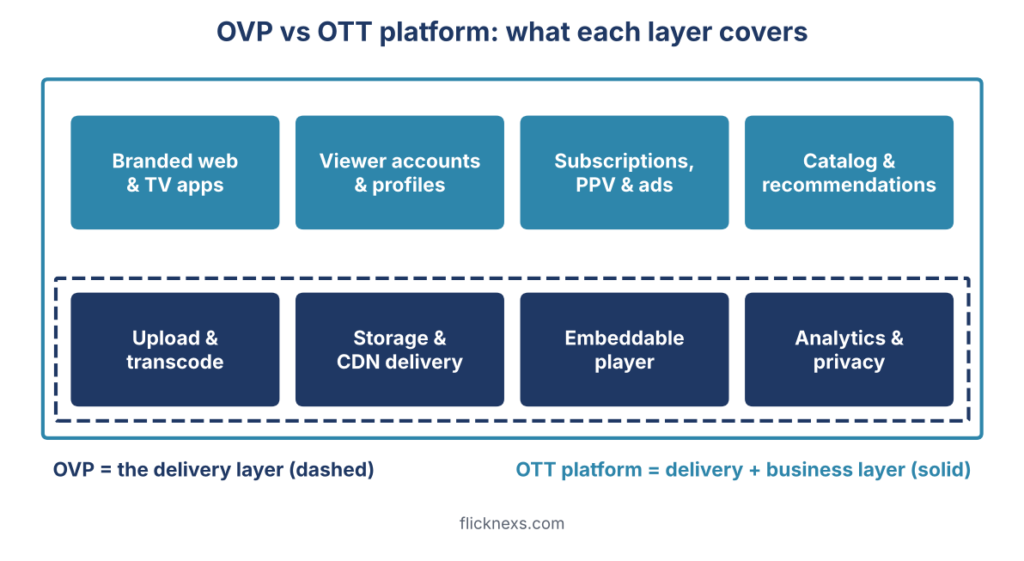
Alt text: Diagram comparing the OVP layer (upload, transcode, store, deliver, player) with the OTT layer that adds accounts, payments, catalog, and TV apps ·
What Are the Three Ways to Get Video Into Your Business?
There are really three paths, not two.
Path 1: Buy a ready-made OVP
You sign up, upload, and embed. The vendor handles encoding, storage, the player, and the content delivery network (CDN). Your team needs no engineering skills.
Works best for: marketing videos, product demos, internal training, customer education, webinars.
Trade-off: you work within the vendor’s workflow. When you later want viewers to pay, log in, or watch on Roku, you usually need another product.
Path 2: Build on a video API
Developer platforms expose encoding, storage, streaming, and playback through APIs. Your engineers stitch them into your own software and design every screen.
Works best for: SaaS products where video is one feature among many (a fitness app, a telehealth tool, a social platform, an e-learning product with its own interface).
Trade-off: you get infrastructure, not a product. Admin tools, catalog management, viewer accounts, billing, and apps are all yours to build and maintain, for as long as the service runs.
Build your own online video platform
Path 3: Blend with an OTT platform
A branded OTT platform bundles the video infrastructure with the business layer: catalog, accounts, monetization, and multi-device apps. You configure rather than code.
Works best for: content businesses where video is the product, such as subscription channels, faith and community networks, sports and event streaming, fitness libraries, and paid course catalogs.
Trade-off: less low-level control than a pure API build. You should confirm that the platform’s apps, payment options, and roadmap fit your plans.
Flicknexs provides a branded OTT and video hosting platform that lets businesses launch their own streaming service on web, mobile, and connected TV without building the infrastructure from scratch.
How Do You Compare Platforms? Use the Screen-Count Test
This is the fastest way we know to cut through a vendor demo.
List every screen a viewer will touch, from first visit to repeat viewing. Then mark which ones each shortlisted platform gives you out of the box. (If you only need the hosting and delivery rows, start with a dedicated Video Hosting Platform.)
| Viewer screen | Ready-made OVP | Video API | OTT platform |
|---|---|---|---|
| Landing / home page | Your site | You build | Included |
| Browse catalog and categories | Partial (galleries) | You build | Included |
| Search | Limited | You build | Included |
| Video player | Included | Player SDK | Included |
| Sign up / log in | Rarely | You build | Included |
| Choose plan and pay | Rarely | You build plus payment gateway | Included |
| Account and billing settings | No | You build | Included |
| Continue watching / watchlist | No | You build | Typically included |
| iOS and Android apps | No | You build | Included or add-on |
| Roku, Fire TV, Apple TV, smart TV apps | No | You build per platform | Included or add-on |
| Admin: upload and publish | Included | You build | Included |
| Admin: subscribers and revenue reports | No | You build | Included |
Count the “you build” cells. Each one is engineering time before launch and maintenance time after it. A TV app, for example, means separate code for each platform, separate store submissions, and updates whenever the platform changes its requirements. If you count more than four or five “you build” cells and you don’t have a dedicated video engineering team, a pure API approach is probably the wrong fit.
Bottom line: The platform with the most “included” cells for the screens you need is usually the cheapest over three years, even if its monthly fee is higher.
Which Platforms Fit Each Path?
The point of this section isn’t ranking. It’s showing which path each well-known vendor is built for, so you compare like with like. (For full OTT vendor reviews, see our guide to the best OTT platform software.)
Ready-made OVPs
- Vimeo: professional hosting, a clean player, collaboration tools, and enterprise tiers with SSO.
- Wistia: marketing-focused, with engagement analytics and lead capture tied to marketing automation.
- Vidyard: personalized one-to-one video for sales teams, with CRM integration.
- SproutVideo: privacy-focused hosting for internal and customer-only content.
- Dacast: live streaming plus on-demand hosting, popular for events.
Enterprise video suites
- Brightcove and Kaltura: large-scale video management for media companies, enterprises, and universities, with deep integrations and contract-based pricing.
Developer video APIs
- Mux: API-first encoding, streaming, and playback analytics for software teams.
- Cloudflare Stream: usage-based storage, encoding, and delivery on Cloudflare’s network.
Branded OTT platforms
- Flicknexs: the Flicknexs Online Video Platform combines content management, HLS adaptive streaming, transcoding up to 1440p, signed playback URLs, geo-restrictions, a branded player, web, mobile, and selected connected-TV apps, plus subscription and pay-per-view monetization.
Features and plan limits change often. Always confirm current capabilities and pricing on each vendor’s official site.
Should You Build, Buy, or Blend?
Answer these five questions in order. The first “yes” usually decides your path.
1. Will viewers pay you directly for video?
Yes → you need monetization, accounts, and billing. That points to an OTT platform, or a large API build.
2. Must viewers watch on TV screens through their own app?
Yes → you need native TV apps. Building these per platform is expensive, so an OTT platform with TV apps is usually the faster route.
3. Is video a feature inside software you already sell?
Yes → a video API keeps the experience inside your product. Budget for the screens you’ll build.
4. Is video mainly supporting marketing, sales, or training?
Yes → a ready-made OVP is usually enough, and the cheapest to run.
5. Do you have engineers who can own video for years, not months?
No → avoid a pure API build. Every screen you build becomes something you maintain.
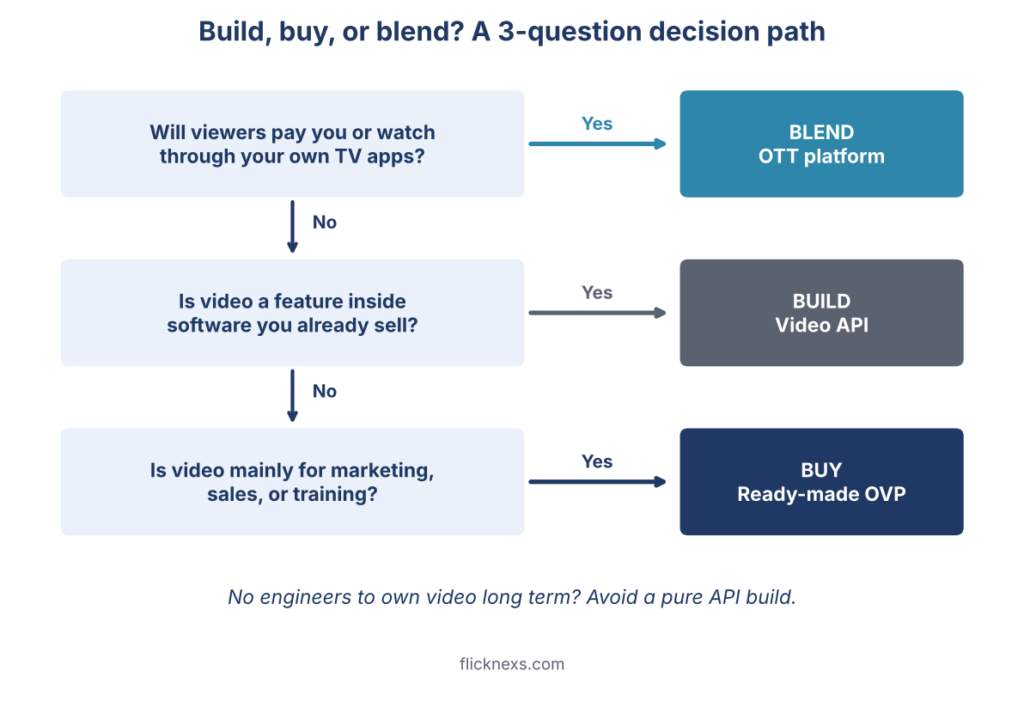
Alt text: Decision flowchart: monetization and TV apps lead to OTT, in-product video leads to API, marketing and training lead to OVP ·
Three example scenarios
A B2B software company adding product tutorials. Videos live on the help center and in onboarding emails. Nobody pays to watch. → Buy an OVP. Engagement analytics matter more than catalog features.
A fitness startup with its own mobile app. Workouts play inside an app that also tracks progress and nutrition. → Build on an API if the team has mobile engineers, because video is one feature in a larger product.
A regional sports league selling season passes. Fans want to watch live games and replays on their phones and TVs, and pay monthly or per match. → Blend with an OTT platform. Accounts, payments, live streaming, and TV apps are all core requirements. (See our guide to starting an OTT platform for the full launch sequence.)
Bottom line: The deciding factors are monetization and TV apps. If you need both, a branded OTT platform is almost always faster and less risky than building.
How Much Does Each Path Really Cost?
The monthly fee is the least useful number in a video platform comparison. Here’s what actually drives total cost.
The three pricing models
Flat subscription. A monthly or annual fee covers a feature set plus storage and bandwidth allowances. It’s predictable until you exceed the allowance, so check overage rates.
Usage-based. You pay per minute stored, per minute delivered, or per GB of bandwidth. It’s cheap at small scale but grows directly with your audience. Common with developer APIs.
Enterprise contract. A custom quote based on volume, support level, integrations, and implementation. Common with enterprise suites and larger OTT deployments.
The hidden cost lines
Whichever model you choose, add these lines to your budget:
| Cost line | OVP | API build | OTT platform |
|---|---|---|---|
| Platform fee | Low to medium | Low (usage) | Medium |
| Storage and delivery overages | Possible | Grows with usage | Possible |
| Engineering to build screens | None | High | Low |
| TV and mobile app development | N/A | High, per platform | Included or add-on |
| App store developer accounts | N/A | Yes | Sometimes |
| Payment gateway fees | N/A | Yes | Yes |
| DRM licensing | Rarely needed | If required | If required |
| Ongoing maintenance | Vendor handles | Your team | Mostly vendor |
The cost worksheet
Build one usage profile and send the same numbers to every vendor. This is the only way to compare quotes fairly.
| Input | Your estimate |
|---|---|
| Hours of new video uploaded per month | |
| Total library size after 12 months | |
| Monthly viewing hours | |
| Peak concurrent viewers (for live events) | |
| Highest resolution you need | |
| Target devices (web, iOS, Android, Roku, Fire TV, Apple TV, smart TVs) | |
| Number of admin users | |
| DRM required? | |
| Monetization model (SVOD, TVOD, AVOD, none) |
Then ask each vendor for three numbers:
- Month 1 cost (launch)
- Month 12 cost (at your projected library and audience)
- 3× growth cost (if your audience triples)
The third number exposes which pricing models punish success. Usage-based pricing that looks cheap at launch can become your largest line item once a show takes off.
Bottom line: Compare three-year total cost, including the engineering and app costs that never appear on a vendor’s pricing page.
How Much Security and DRM Do You Need?
Security requirements depend on what you’re protecting and what your content licenses demand. Over-buying security wastes money. Under-buying it can breach a rights agreement.
Levels of protection
Basic access controls. Password protection, private links, and domain restrictions (the video only plays on your website). Suitable for internal training and customer-only content.
Signed URLs and tokens. Each playback link is generated for a specific viewer and expires after a set time, so links can’t be shared or hotlinked. Suitable for most paid content.
Geo-restrictions. Playback is limited to specific countries, which is often required when you license content by territory.
DRM (digital rights management). Video is encrypted and only plays in authorized players that hold a decryption license. Studios, sports leagues, and premium content owners often require it contractually. The three main systems are Google’s Widevine (Chrome, Android, many smart TVs), Apple’s FairPlay Streaming (Safari, iOS, Apple TV), and Microsoft’s PlayReady (Edge, Windows, many TVs). Full device coverage usually means supporting all three.
Matching protection to content
| Content type | Recommended protection |
|---|---|
| Marketing and public videos | Basic (domain restriction optional) |
| Internal training | Login-gated access or private links |
| Paid courses and member content | Signed URLs plus login |
| Territory-licensed films and series | Signed URLs, geo-restrictions, DRM |
| Live sports and premium events | DRM plus signed URLs and geo-restrictions |
Bottom line: Check your content licenses first. If a rights holder requires DRM, confirm in writing that your platform supports Widevine, FairPlay, and PlayReady on every device you plan to launch on.
Which Devices and Apps Does Your Platform Support?
Most OVPs deliver video to web browsers well. Where platforms really differ is everywhere else.
Modern streaming relies on adaptive bitrate formats like HTTP Live Streaming (HLS), which adjusts quality to each viewer’s connection. HLS playback works broadly, but a native app for each TV platform is a separate piece of software with its own store, review process, and update cycle. Roku, for example, publishes its own developer program and requirements, and Apple, Amazon, Google, Samsung, and LG each have theirs.
Ask every vendor:
- Which devices have native apps today, not on the roadmap?
- Who builds, submits, and maintains those apps in each store?
- Are the apps branded with our name and logo, published under our developer account?
- What happens to the apps when a TV platform changes its requirements?
For a deeper look at each TV ecosystem, see our hub on OTT apps for every device.
Bottom line: If TV viewing matters to your audience, treat app coverage as a top-three requirement, not an afterthought.
Which Path Fits Your Industry?
The same framework plays out differently depending on your sector. Here is how the choice typically lands.
Education and online courses. If courses sit inside an existing learning management system, an OVP or enterprise video suite that integrates with the LMS is usually enough. If you sell a course catalog directly to learners, with subscriptions or one-time purchases, you need accounts and payments, which points to an OTT platform. Look for progress tracking, category rails, and mobile apps learners can use offline or on the go.
Faith and community networks. Churches and community broadcasters often start with live streaming on an OVP. As the archive grows and members ask for TV apps, a branded OTT channel lets them offer live services, sermon libraries, and donations or memberships in one place, under their own name.
Fitness and wellness. Studios selling a workout library on a monthly plan are classic SVOD businesses. Viewers expect phone, tablet, and TV playback, so app coverage is a priority. If the fitness brand already has a custom app with tracking features, an API approach can make sense instead.
Sports and live events. Leagues, clubs, and event organizers need reliable live streaming, replays, pay-per-view or season passes, and geo-restrictions for broadcast rights. Concurrency at peak moments matters more than anything else, so test the platform under realistic load.
Media and entertainment. Independent studios, regional broadcasters, and niche content owners launching a streaming channel need the full OTT stack: catalog, monetization, DRM for licensed titles, and TV apps. This is where a blended OTT platform saves the most build time. Our guide to white-label OTT platform providers covers this segment in more depth.
Corporate communications. Town halls, internal training, and executive updates need secure access and integration with single sign-on. An enterprise OVP or private hosting platform fits better than OTT here, because nobody pays to watch.
Video-on-demand libraries. Businesses with a back catalog to monetize, from documentaries to cooking shows, should compare dedicated VOD capabilities. See our breakdown of VOD platform options for what to evaluate.
How Long Does Each Path Take to Launch?
Speed to market is often the hidden deciding factor. These are typical ranges for a small to mid-sized business, not guarantees, and real timelines depend on scope and team size.
| Milestone | Ready-made OVP | Video API build | OTT platform |
|---|---|---|---|
| Account set up and first video live | Same day | Days (after integration) | Same Day |
| Branded website experience | Use your existing site | Weeks to months | Days to weeks for apps launching / approvals |
| Viewer accounts and payments | Usually not available | Weeks to months | Configured during setup |
| iOS and Android apps | Usually not available | Months | Weeks (store review included) |
| TV apps (Roku, Fire TV, Apple TV) | Usually not available | Months per platform | Weeks |
| Ongoing maintenance load | Minimal | High | Low to medium |
The pattern is consistent. An OVP is fastest for embedding video. An API build is slowest to reach a full streaming service but gives the most control. An OTT platform reaches a complete multi-device service fastest, because the screens and apps already exist and only need configuring and branding.
When you talk to vendors, ask for a written implementation plan with named milestones, who owns each step, and what you need to supply (logos, content, metadata, payment gateway credentials, app store accounts). Vague timelines usually mean the vendor hasn’t scoped your project yet.
Bottom line: If you need to launch on TV and mobile within a quarter, building from APIs is rarely realistic without a dedicated video engineering team.
What Should You Ask Every Vendor?
Vendor websites list features across all plans. Send these questions in writing and ask for written answers tied to the plan you’re being quoted.
- Which features on your website are included in the specific plan you’re quoting us?
- What happens, technically and financially, when we exceed storage or bandwidth limits?
- Which streaming protocols and maximum resolutions are supported?
- Is adaptive bitrate streaming included by default?
- Which access controls are included: signed URLs, domain restriction, geo-blocking, login gating?
- Is DRM supported, and which systems: Widevine, FairPlay, PlayReady?
- Which devices have native apps today, and who builds and maintains them?
- Which monetization models are supported: SVOD, TVOD/pay-per-view, AVOD?
- Which payment gateways integrate natively, and in which countries?
- What analytics are available: views, watch time, completion rate, quality of experience?
- What support SLA and onboarding help are included?
- Can we export our content, metadata, and viewer data if we leave?
Question 12 matters most. Moving a large library and a subscriber base between platforms is painful when your data is locked in.
What Buying Mistakes Should You Avoid?
Buying a video host when you need a video business. A host plays files. A streaming business also needs accounts, billing, catalog management, and apps. Map the whole workflow before you sign.
Demo-testing with the wrong content. A two-minute clip tells you nothing about how a platform handles a 90-minute 1440p film or a three-hour live event. Trial with your real content.
Over-buying or under-buying security. Public demos don’t need DRM, but licensed premium content usually does. Let your contracts decide.
Ignoring year-two costs. Library and audience growth push up storage and delivery costs. Model the 3× scenario before choosing a pricing model.
Underestimating build maintenance. An API build isn’t finished at launch. TV platforms update, payment rules change, and security patches arrive. Someone on your team owns that work permanently.
Final Verdict: OVP or OTT Platform?
The OVP vs OTT platform question comes down to what happens after a viewer presses play.
- Video supports your marketing, sales, or training? Buy a ready-made OVP.
- Video is a feature inside software you already sell? Build on a video API, with engineers who will own it long term.
- Video is the product, with paying viewers and TV apps? Blend with a branded OTT platform and spend your budget on content and audience instead of infrastructure.
Run the screen-count test, fill in the cost worksheet, and get every critical answer in writing before you commit.
Launch Your Own Branded Streaming Service
If your plans include subscribers, payments, or TV apps, Flicknexs gives you the video infrastructure and the business layer in one platform: centralized content management, secure HLS delivery up to 1440p, signed URLs and geo-restrictions, and subscription or pay-per-view monetization across web, mobile, and connected TV.
👉 Explore the Flicknexs Online Video Platform
Ready to launch subscriptions and TV apps? Create your OTT platform with Flicknexs.
Frequently Asked Questions
What is the difference between an OVP and an OTT platform?
An OVP hosts, encodes, and delivers video that you embed on your own website or portal. An OTT platform includes those capabilities and adds a full branded streaming service: viewer accounts, subscriptions or pay-per-view, a browsable catalog, and apps for mobile and connected TVs.
Should I build my own video platform or buy one?
Build on a video API if video is one feature inside software you already sell and you have engineers to maintain it long term. Buy a ready-made OVP if video supports marketing or training. Choose an OTT platform if video is the product and you need payments and TV apps.
How much does an online video platform cost?
Costs vary by pricing model: flat subscriptions, usage-based billing, or enterprise contracts. The real total also includes overages, engineering, app development, payment fees, and DRM licensing. Request quotes for month 1, month 12, and a 3× growth scenario using the same usage profile.
Do I need DRM for my streaming service?
You need DRM if your content licenses require it, which is common for studio films, series, and live sports. For marketing videos, training, and most member content, signed URLs, login gating, and geo-restrictions are usually enough.
Can an OVP support subscriptions and paid viewing?
Some OVPs offer limited paid-access features, but most focus on hosting and delivery. If subscriptions, pay-per-view, and recurring billing are central to your business, an OTT platform built around monetization is usually a better fit.
Which devices should a streaming service support?
At minimum, web, iOS, and Android. If your audience watches on TV, add Roku, Amazon Fire TV, Apple TV, and smart TV platforms such as Samsung and LG. Confirm whether each app is native, branded, and maintained by the vendor.
What is HLS and why does it matter?
HLS (HTTP Live Streaming) is a widely used streaming format that splits video into small segments at several quality levels. The player switches between them based on the viewer’s connection, which reduces buffering on slow networks.
Can I move from an OVP to an OTT platform later?
Yes, but plan for it. Confirm that your current platform lets you export video files, metadata, and viewer data. Choosing an OTT platform early avoids a migration if you already expect to charge viewers or launch TV apps.