
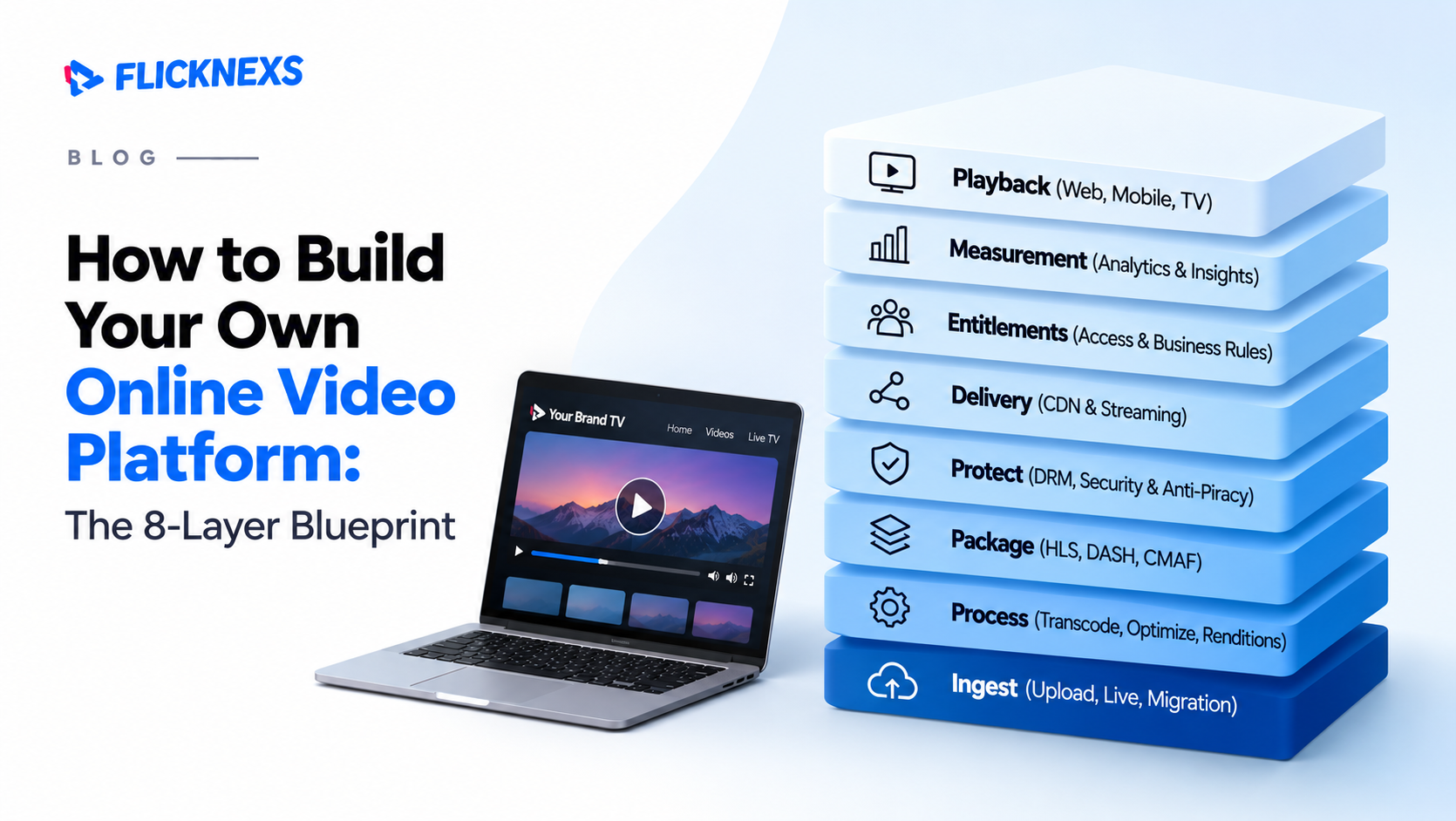
Quick answer: An online video platform is a pipeline of eight layers: ingest, processing, packaging, protection, delivery, playback, entitlements, and measurement. To build one, write a one-page spec, decide which layers you will own and which you will rent, launch on one screen with one way to pay, and add devices only once the first version works.
Key takeaways
- Think of a video platform as a pipeline, not a website with a player. Each layer can fail on its own.
- Keep your original master files. Every rendition can be re-made from them, but they can’t be re-made from renditions.
- The entitlement service, which decides who can watch what, is the core of any paid platform. Payments only feed it.
- Own the layers that make you different. Rent the plumbing.
- Ship in phases: web first, then mobile, then TV. Each phase needs exit criteria before you start the next.
Flicknexs provides a branded OTT and video hosting platform that lets businesses launch their own streaming service on web, mobile, and connected TV without building every layer from scratch. This guide is written for teams weighing that choice, and for teams who will build anyway.
Most guides on this topic list features. This one explains how the parts actually connect, what to decide at each layer, and the order to build them in. If you’re still deciding whether to build at all, start with our comparison of OVP vs OTT platforms, then come back here.
Step 0: Write a One-Page Platform Spec
Before any architecture diagram, put six answers on one page. Every technical decision later points back to this sheet.
| Question | Example answer (fitness library) | Why it matters |
|---|---|---|
| What content, and how long? | 300 workouts, 20–45 min, 10 new per month | Sizes storage and encoding volume |
| Live, on-demand, or both? | On-demand only at launch | Live adds ingest servers, latency targets, and concurrency planning |
| Highest quality needed? | 1080p | Sets the top of your encoding ladder |
| Where do people watch? | Phone first, then TV | Decides your launch screen and app order |
| How do they pay? | Monthly subscription, 7-day trial | Defines the entitlement rules |
| What must never happen? | Paying member locked out; free user streams premium | Becomes your top test cases |
The last row is the one teams skip. Writing down your two worst failures turns vague “security” and “reliability” goals into things you can test.
Bottom line: If you can’t fill in all six rows, you’re not ready to choose technology. The spec decides the architecture, not the other way round.
The 8 Layers of an Online Video Platform
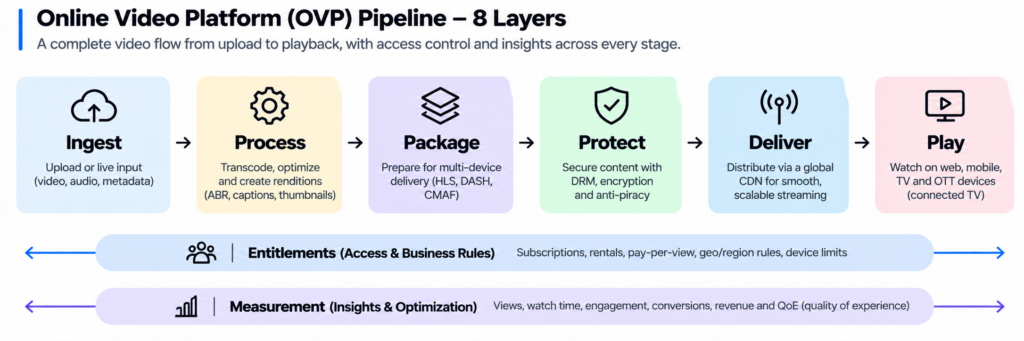
Here’s what each layer does, the decision you have to make there, and the mistake that most often breaks it.
Layer 1: Ingest (getting video in)
What it does: accepts uploads from admins or creators and stores the original file safely.
Decide:
- Upload method. Large video files fail over browser uploads that can’t resume. Use resumable or chunked uploads so a dropped connection doesn’t restart a 20 GB upload.
- Mezzanine spec. A mezzanine file is the high-quality master you encode from. Publish a short spec for anyone supplying content: container, codec, resolution, frame rate, audio format, and caption file type. Rejecting a bad file at upload is far cheaper than fixing it after encoding.
- Metadata at the door. Require title, category, rights territory, and availability dates at upload. Metadata added “later” usually never gets added.
Common failure: deleting the master after encoding to save storage. When you later add a higher resolution, a new codec, or fix an encoding error, you have nothing to re-encode from. Move masters to cheaper archive storage instead.
Layer 2: Processing (transcoding)
What it does: turns one master file into several versions at different resolutions and bitrates, plus thumbnails and preview images.
Decide your encoding ladder. An encoding ladder is the set of quality levels the player can switch between. A reasonable starting point for 1080p on-demand content:
| Rung | Resolution | Typical use |
|---|---|---|
| 1 | 416×234 | Very weak mobile connections |
| 2 | 640×360 | Mobile data |
| 3 | 960×540 | Average mobile and tablet |
| 4 | 1280×720 | Laptops, good Wi-Fi |
| 5 | 1920×1080 | Large screens, fast connections |
Treat this as a starting point, not a standard. Apple’s HLS Authoring Specification publishes recommended bitrates for each rung if you need a reference. Fast-moving content (sport, workouts) needs more bitrate per rung than talking-head lectures, which is why larger platforms move to per-title encoding, tuning the ladder to each video’s complexity.
Decide your codec plan. H.264 plays almost everywhere, so it’s the safe launch choice. Newer codecs such as HEVC and AV1 deliver the same quality at lower bitrates, which cuts delivery cost, but device support is uneven. Add them later as an extra layer for devices that support them.
Build it as a job queue. Encoding is slow and sometimes fails. Every upload should become a job with a status (queued, processing, failed, ready), automatic retries, and an alert when a job fails twice. Admins should see the status, not guess.
Common failure: publishing a video before every rendition is ready, so some viewers get errors.
Bottom line: Launch with H.264 and a five-rung ladder, run encoding as a monitored job queue, and only add newer codecs once delivery costs justify the extra work.
Layer 3: Packaging (making it streamable)
What it does: cuts each rendition into short segments and writes a playlist (manifest) the player reads.
Decide:
- Format. HLS is the widest-supported adaptive format and the natural default. MPEG-DASH is common on Android and many smart TVs. CMAF lets you produce one set of segment files usable by both HLS and DASH, so you don’t store everything twice.
- Segment length. Shorter segments let the player react to network changes faster but create more requests. A few seconds per segment is typical for on-demand video.
- Captions and audio tracks. Package subtitles (WebVTT is widely supported) and alternate audio languages as separate tracks the player can switch between, not burned into the picture.
Common failure: treating packaging as a one-off. When you add DRM, a new device, or a new caption language, you’ll re-package. Keep it automated.
Layer 4: Protection (controlling who can play)
What it does: makes sure only allowed viewers can fetch the video.
The key design rule: the player never gets a permanent link. The flow should look like this:
- Viewer presses play.
- The player asks your backend for a playback link.
- The backend checks the entitlement service: is this account allowed to watch this title, in this country, right now?
- If yes, it returns a signed URL that expires after a short time.
- The CDN checks the signature before serving any segment.
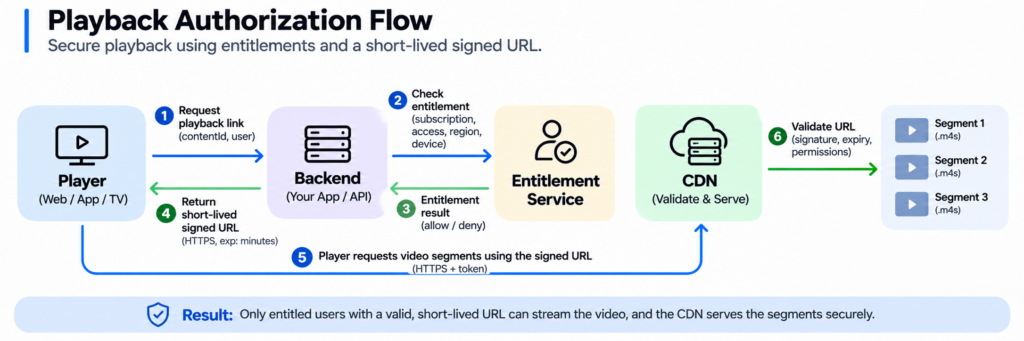
That flow stops casual link sharing and hotlinking. Geo-restrictions plug in at step 3. DRM adds encryption on top for content whose license demands it; we cover when you need it in the security section of our OVP vs OTT guide.
Common failure: signing URLs but never checking entitlement first, so anyone logged in can play anything.
Bottom line: Every play request should pass an entitlement check and receive a link that expires. Permanent video URLs are the most common security gap in self-built platforms.
Layer 5: Delivery (CDN)
What it does: caches video segments on servers close to viewers so playback starts fast and your origin storage isn’t overwhelmed.
Decide:
- Single or multi-CDN. One CDN is fine at launch. Large live events and global audiences often justify a second CDN for failover. Don’t hard-code one provider’s URLs into your apps, or switching later means an app release.
- Origin shielding. A shield layer between the CDN and your storage means a popular new release is fetched from storage once, not once per CDN location.
- Cache hit ratio. Watch this number. A low ratio means you’re paying for origin traffic you shouldn’t be.
Watch the bill: delivery (data sent to viewers) is usually the cost that grows fastest, because it scales with every minute watched. Storage grows with your library; delivery grows with your audience. If you only need reliable hosting and delivery rather than a full streaming service, a managed video hosting platform covers Layers 1 to 5 for you.
Bottom line: Rent the CDN, keep it swappable, and track delivery cost per watched hour from day one. It is the number that decides whether growth is profitable.
Layer 6: Playback (the player)
What it does: everything the viewer actually experiences.
Get these right before adding features:
- Startup time: how long from pressing play to the first frame.
- Rebuffering: how often and how long playback stalls.
- Resume: picking up where the viewer left off, across devices.
- Captions and audio switching that work on every target device.
- Error messages people understand. “This title isn’t available in your country” beats “Error 403.”
On the web, open-source players such as hls.js, Shaka Player, and Video.js cover most needs. Native apps use each platform’s own player framework. Whatever you choose, the player should report events to Layer 8.
Layer 7: Entitlements and Payments
This is the layer most build guides underplay, and the one that generates most support tickets on paid platforms.
The principle: your payment gateway knows who paid. Your entitlement service decides who can watch. Keep them separate, and make the entitlement service the single source of truth that Layer 4 checks.
Payment providers notify you of events through webhooks. Map each one to an access change explicitly:
| Payment event | Entitlement change |
|---|---|
| Trial started | Grant access until trial end date |
| First payment succeeded | Grant access until period end |
| Renewal succeeded | Extend access to new period end |
| Renewal failed | Keep access during a short grace period, notify viewer |
| Grace period ended, still unpaid | Revoke access |
| Subscription canceled | Keep access until the paid period ends, then revoke |
| Refund issued | Revoke access (or per your refund policy) |
| Pay-per-view purchase | Grant access to that title or event for its rental window |
Build rules that prevent most disasters:
- Make webhook handling idempotent. Providers can send the same event twice. Processing it twice must not double-extend or double-revoke.
- Reconcile nightly. Compare your entitlement records with the payment provider’s records and flag mismatches. Webhooks occasionally get missed.
- Log every change with the event that caused it, so support can answer “why was I locked out?” in one lookup.
- Respect app store rules. In-app purchases on iOS and Android often must go through the store’s own billing, which sends its own events. Feed those into the same entitlement service.
Common failure: a paying member gets locked out because a renewal webhook failed silently. Your Step 0 spec already listed this as a “must never happen,” so test it first.
Bottom line: Payments tell you who paid; the entitlement service decides who watches. Build it with idempotent webhooks, nightly reconciliation, and a full change log.
Layer 8: Measurement (analytics)
What it does: tells you whether the platform works technically and commercially.
Track two families of metrics, because they answer different questions:
| Quality of experience (is it working?) | Business (is it paying off?) |
|---|---|
| Startup time | Trial-to-paid conversion |
| Rebuffering ratio | Monthly churn |
| Playback failure rate | Watch time per subscriber |
| Average bitrate delivered | Most-watched and least-watched titles |
Define events up front: play_requested, play_started, rebuffer_start, rebuffer_end, heartbeat (every 30–60 seconds), quality_change, error, completed. Use the same event names on every device, or cross-device reports become impossible.
Common failure: adding analytics after launch. You lose the baseline you need to tell whether later changes helped or hurt.
Bottom line: Define one event schema for every device before launch, and review experience metrics and business metrics side by side.
Worked Example: One Workout Video Through All 8 Layers
To see how the layers connect, follow a single 30-minute workout video from the Step 0 fitness library, from upload to a paying member’s TV.
- Ingest. The studio’s editor uploads a 1080p master through a resumable uploader. The form won’t submit until title, category, trainer name, and release date are filled in. The master goes to standard storage now and archive storage after 90 days.
- Processing. An encoding job starts automatically and produces the five ladder rungs, a thumbnail set, and a short preview clip. The admin dashboard shows “processing,” then “ready.”
- Packaging. Each rendition is cut into short segments with a single manifest, and the trainer’s English captions are packaged as a separate track.
- Protection. The video is marked “members only.” When a member presses play, the backend confirms an active subscription and returns a signed URL that expires shortly after.
- Delivery. The first member in a region pulls segments through the CDN from origin storage. Every member after that is served from cache.
- Playback. On a weak mobile connection, the player starts on the 540p rung and climbs to 1080p when the member switches to home Wi-Fi. When they stop halfway, the resume position is saved.
- Entitlements. That night, the member’s renewal fails. The entitlement service keeps access open for the grace period and sends a reminder. The member updates their card, the renewal webhook arrives, and access extends to the new period end. Nobody contacts support.
- Measurement. The dashboard records startup time, one rebuffer event, 15 minutes watched, and a completion two days later on the TV app.
If any step in this walkthrough would need a manual workaround on your platform, that’s where your build effort should go first.
What Changes When You Add Live Streaming?
On-demand and live streaming share most of the eight layers, but live puts each one under time pressure. Plan for these differences before promising a live launch:
| Layer | On-demand | Live |
|---|---|---|
| Ingest | File upload | A continuous stream from an encoder or camera, usually over RTMP or SRT |
| Processing | Encode once, any time | Encode in real time, with no chance to retry |
| Packaging | Segments written once | Segments and manifests updated every few seconds |
| Protection | Check entitlement at play | Check entitlement at play, plus blackout and geo rules per event |
| Delivery | Traffic spread over time | Everyone arrives at the same moment |
| Playback | Start anywhere | Choose a latency target; lower latency means less buffer to absorb network problems |
| Entitlements | Subscription or rental | Often pay-per-view or event passes that open and close on a schedule |
| Measurement | Daily reports are fine | Real-time monitoring during the event, with someone watching it |
Two practices matter most. First, run a redundant ingest path, a backup encoder and stream feeding a second ingest point, so one failed connection doesn’t end the broadcast. Second, rehearse with a private test event at realistic audience size before the real one. For a full live build sequence, see our guide on how to build a live streaming platform.
Bottom line: Live streaming reuses the same eight layers but removes your margin for error. Add it after on-demand is stable unless live events are your core product.
Which Layers Should You Build, and Which Should You Rent?
You don’t have to build all eight layers to “build your own platform.” Most successful teams own what makes them different and rent the rest.
| Layer | Usually rent | Consider building when… |
|---|---|---|
| 1. Ingest | Yes | You have unusual content-supply workflows (many external creators) |
| 2. Processing | Yes | Encoding cost or quality is a core competitive edge |
| 3. Packaging | Yes | Rarely |
| 4. Protection | Mostly | You have complex rights rules by territory and window |
| 5. Delivery | Always | Never; use CDNs |
| 6. Playback | Partly | The viewing experience is your differentiator |
| 7. Entitlements | Sometimes | Your pricing model is unusual (bundles, credits, corporate seats) |
| 8. Measurement | Partly | You need analytics joined with your own business data |
A useful rule: if a layer isn’t something a customer would ever notice or pay you more for, rent it.
Bottom line: Most businesses that “build their own platform” really own two or three layers (usually playback, entitlements, and analytics) and rent the rest.
If your main goal is a branded viewer-facing website rather than the pipeline behind it, our video streaming website development guide covers the front-end side in more detail.
Who You Need on the Team (for a Custom Build)
A full custom build typically needs these roles, whether in-house or contracted:
- Backend engineer: APIs, entitlement service, webhooks, admin tools.
- Video engineer: encoding ladder, packaging, CDN, DRM integration, playback debugging.
- Frontend engineer: website and web player experience.
- Mobile engineers: iOS and Android apps, including in-app billing.
- TV app developer: each connected-TV platform has its own SDK and store review. See our OTT apps for every device hub.
- QA engineer: device matrix testing and payment-flow testing.
- DevOps or platform engineer: monitoring, alerting, deployments, cost tracking.
The team doesn’t disappear at launch. TV platforms change their requirements, payment rules change, and security patches arrive. Plan for an ongoing maintenance team, not a one-off project.
The Phased Build Roadmap
Building everything at once is the most common reason video projects stall. Ship in phases, and don’t start a phase until the previous one meets its exit criteria.
Phase 1: Minimum viable platform
Scope: website, admin upload and publishing, one encoding ladder, HLS delivery through a CDN, signed URLs, viewer accounts, one payment model, core analytics events.
Exit criteria:
- Upload to published in a predictable time, with failed jobs alerting someone.
- Every payment event in the table above tested end to end.
- Startup time and failure rate measured on your top three browsers.
- First real paying viewers, not just internal testers.
Phase 2: Mobile
Scope: iOS and Android apps, in-app billing feeding the same entitlement service, offline downloads if your audience needs them, push notifications.
Exit criteria: store approval on both platforms; a viewer who subscribes on the web can watch in the app and the other way round; crash rate tracked.
Phase 3: Connected TV
Scope: apps for the TV platforms your analytics show demand for (Roku, Fire TV, Android TV, Apple TV, smart TVs), with TV-friendly login such as an activation code entered on a phone.
Exit criteria: remote-control navigation tested on real hardware, not just emulators; login works without typing a password on a TV keyboard.
Phase 4: Scale and optimize
Scope: per-title encoding, newer codecs for supported devices, multi-CDN failover, recommendations, A/B testing on pricing pages, live streaming if it wasn’t in Phase 1.
Exit criteria: delivery cost per watched hour trending down; churn and conversion measured monthly.
Bottom line: Phase 1 should prove that people will pay and that playback works. Everything after it is expansion, so don’t let Phase 3 ambitions delay Phase 1.
For the business side of launching (content strategy, pricing, and marketing), see our guide on how to start an OTT platform.
Break It Before Your Viewers Do: Six Pre-Launch Drills
Checklists confirm that things work. Drills confirm what happens when they don’t. Run each one on staging before launch:
- Kill the encoder mid-job. Does the job retry, and does the video stay unpublished until it’s complete?
- Expire a test card. Does the renewal-failed flow trigger the grace period, the email, and finally revocation?
- Send the same webhook twice. Does access extend once, not twice?
- Share a signed URL. Does it stop working after expiry and from a different session?
- Throttle the connection. Does the player drop to a lower rung smoothly instead of stalling?
- Spike traffic. Simulate a release-day rush. Does the CDN absorb it, or does your origin buckle?
Write down what happened in each drill and fix anything that surprised you. These six scenarios cover most of the incidents new platforms face in their first months.
Five Build Mistakes That Are Expensive to Undo
Deleting master files. You can always re-encode from a master. You can never get a master back from a 720p rendition.
Letting payments decide access directly. When the payment gateway is your source of truth for access, every missed webhook becomes a locked-out customer. Put an entitlement service in between.
Hard-coding one CDN or player into apps. Abstract them behind your own API so a switch is a configuration change, not an app release.
Inconsistent analytics events across devices. If iOS calls it start and Roku calls it play_begin, cross-device reporting becomes a cleanup project.
No takedown process. Licenses expire and rights disputes happen. You need a way to pull a title from every device, every cache, and every download quickly, with availability dates enforced automatically.
Building on Flicknexs Instead of From Scratch
If your spec points to a branded streaming service rather than video inside your own software, you don’t need to build every layer yourself. Flicknexs covers most of the pipeline as configurable platform features. Depending on the selected configuration:
| Layer | Flicknexs capability |
|---|---|
| Ingest and library | Centralized video content management |
| Processing | Video transcoding, including resolutions up to 1440p |
| Packaging and delivery | HLS-based adaptive streaming |
| Protection | Signed playback URLs and geographic playback restrictions |
| Playback | Branded video player options |
| Devices | Web, mobile, and selected connected-TV applications |
| Monetization | Subscription and pay-per-view service options |
That leaves your team free to focus on what viewers notice: the content, the brand, and the audience. Confirm application availability, payment integrations, DRM arrangements, implementation scope, and any additional costs with the Flicknexs team for your launch plan.
👉 Explore the Flicknexs Online Video Platform
Ready to launch with subscriptions and apps? Create your OTT platform with Flicknexs.
Frequently Asked Questions
What are the main components of an online video platform?
Eight layers: ingest (uploads), processing (transcoding), packaging (HLS or DASH segments), protection (signed URLs, geo-restriction, DRM), delivery (CDN), playback (the player), entitlements and payments (who can watch), and measurement (analytics).
How long does it take to build an online video platform?
It depends on scope and team. A minimum viable web platform built on rented infrastructure can come together far faster than a full custom stack with mobile and TV apps, which usually takes many months and an ongoing team. Using a ready-made OTT platform shortens the timeline the most, because the layers and apps already exist.
What is an encoding ladder?
An encoding ladder is the set of resolutions and bitrates created from each video, such as 360p, 540p, 720p, and 1080p. The player switches between rungs as the viewer’s connection changes, which reduces buffering.
Should I use HLS or DASH?
HLS has the widest device support and is a sensible default. DASH is common on Android and many smart TVs. CMAF packaging lets you serve both from one set of files, so many platforms support both without doubling storage.
What is a mezzanine file?
A mezzanine file is the high-quality master version of a video that all streaming renditions are encoded from. Keep it in archive storage so you can re-encode later for new resolutions, codecs, or fixes.
How do I connect payments to video access?
Use an entitlement service that records what each viewer can watch. Your payment gateway sends events (payment succeeded, renewal failed, cancellation) by webhook, and the entitlement service updates access. The player checks entitlements before receiving a signed playback link.
How do I stop people sharing video links?
Never give the player a permanent URL. Check entitlement on every play request, then issue a short-lived signed URL that the CDN validates. Add device or concurrent-stream limits if sharing accounts is a concern, and DRM if your content licenses require it.
Can I build a video platform without a development team?
Yes, if you use a ready-made platform that already provides the eight layers and apps. You’ll configure branding, content, and pricing rather than write code. Custom integrations or unusual features may still need some development work.