
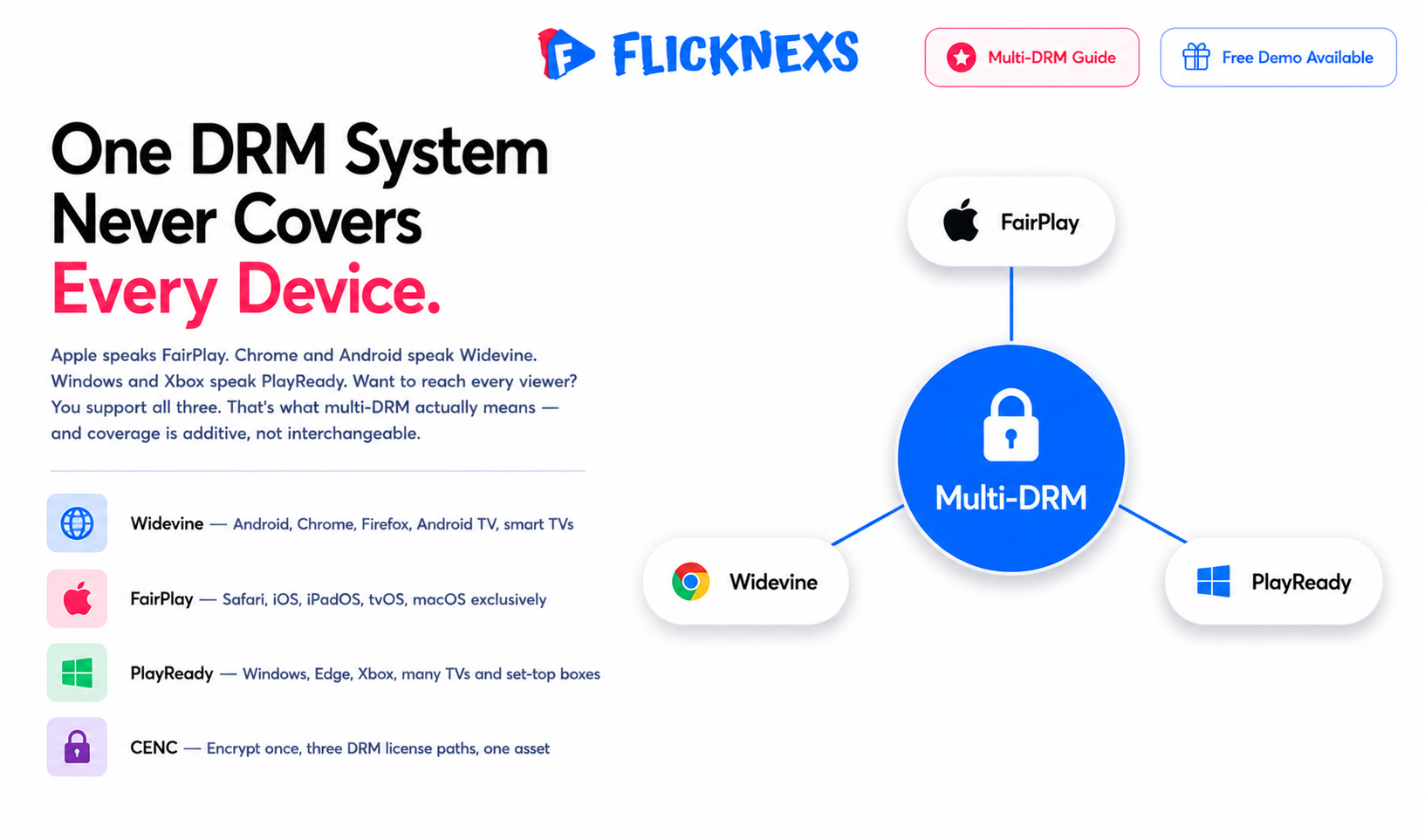
Multi-DRM means running Widevine, FairPlay and PlayReady together so your protected video plays everywhere your audience actually watches. Widevine covers Google’s side, Android and Chrome. FairPlay covers Apple, Safari and iOS. PlayReady covers Microsoft, Windows and Xbox. Support just one and a large share of your viewers can never load a protected stream.
The reason is not technical difficulty. Each vendor built its own system, and none of them honors a competitor’s licence. There is no shared standard to fall back on and no negotiating your way around it. Coverage is additive: you add DRMs until you have covered the devices your audience owns.
Skip one and the failure is quiet. There is no outage and nothing in your dashboard. A viewer opens your app on the wrong platform, hits a playback error or drops to unprotected fallback, and you find out weeks later from a support ticket that reads like a one-off.
By the Flicknexs team. We build white-label OTT/VOD/IPTV platforms, so this comes from hands-on streaming-platform experience.
What multi-DRM actually means for an OTT platform
DRM is the licensing and key-management layer sitting on top of your encrypted video. The video file itself gets scrambled with a content key, sure. But DRM decides who actually gets that key, on what device and under what rules. Is offline playback allowed? Is screen recording blocked? Does output only work on HDCP-protected displays? That’s the layer doing the deciding.
Here’s the catch, and it’s a real one: every major platform vendor built its own DRM, and none of them honor a competitor’s. Apple devices speak FairPlay. Chrome and Android speak Widevine. Windows and Xbox speak PlayReady. Want to reach every viewer? You support all three. That’s what multi-DRM actually means.
Worth clearing up early, because people get this wrong constantly multi-DRM doesn’t mean three copies of your library sitting around eating storage. Modern packaging encrypts the video once, using the Common Encryption (CENC) standard, then attaches multiple DRM signals, called PSSH boxes, so each ecosystem can find its own license server. One encrypted asset. Three license paths. That’s the whole trick.
Why one DRM is never enough
Ship Widevine only and every Safari and iOS user either gets an error or falls back to unprotected playback. Apple’s mobile install base is far too large to wave off like that. Ship FairPlay only and you lock out Android, the world’s largest mobile platform. The platform vendors deliberately do not interoperate, so coverage is additive: you add DRMs until you have covered your audience. For a serious VOD or live service, that means all three.
Widevine, FairPlay and PlayReady compared
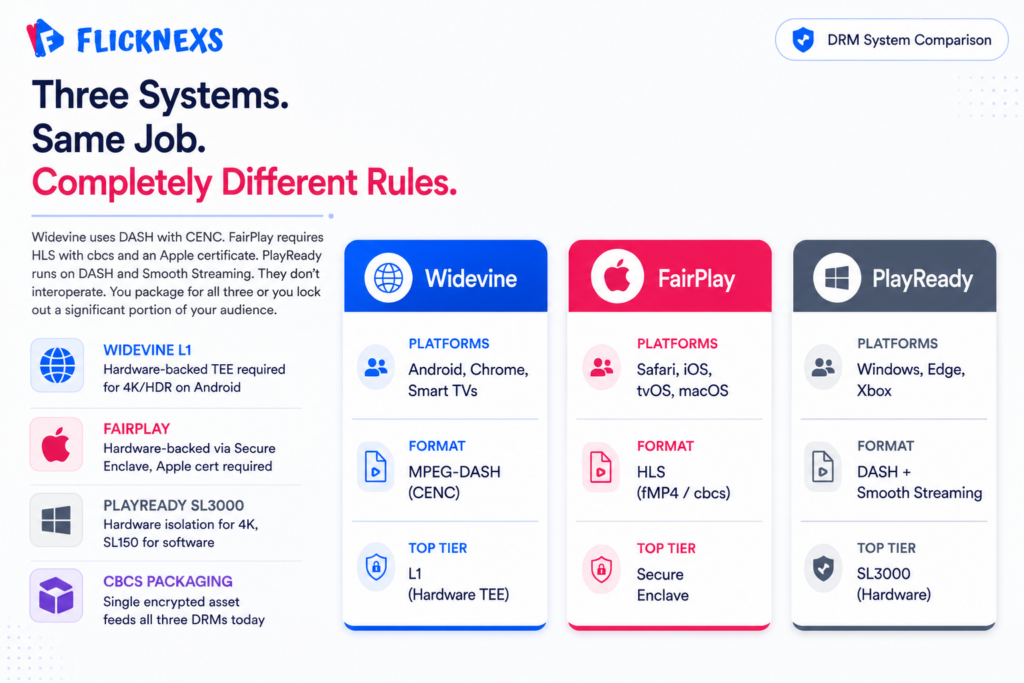
The three systems do the same job but differ in packaging format, streaming protocol, security tiers and where they run. The table below sums up the practical differences an operator actually cares about.
| Attribute | Widevine (Google) | FairPlay (Apple) | PlayReady (Microsoft) |
|---|---|---|---|
| Primary platforms | Android, Chrome, Firefox, Android TV, many smart TVs | Safari, iOS, iPadOS, tvOS, macOS | Windows, Edge, Xbox, many TVs & set-top boxes |
| Streaming format | MPEG-DASH (CENC) | HLS (fMP4) | MPEG-DASH (CENC) and Smooth Streaming |
| Encryption scheme | cenc / cbcs | cbcs only | cenc / cbcs |
| Security tiers | L1 (hardware), L2, L3 (software) | Hardware-backed via Secure Enclave | SL3000 (hardware), SL2000, SL150 |
| Licence format | License request/response over HTTPS | SPC/CKC exchange (requires Apple cert) | License acquisition over HTTPS |
| 4K / HDR gating | Usually requires L1 | Requires hardware-backed playback | Usually requires SL3000 |
Security levels: why “DRM enabled” is not the whole story
Each DRM system runs on tiers, and what those tiers actually govern is how tightly decryption stays isolated from the rest of the operating system. At the top end, Widevine L1 keeps keys and decoding locked inside a hardware-backed Trusted Execution Environment. PlayReady’s SL3000 does the same thing on Microsoft’s side. That hardware isolation is non-negotiable for studios before they’ll clear anything for 4K or HDR.
Drop down a tier and you’re in software territory. Widevine L3 and PlayReady’s SL150 still technically encrypt the stream, but the keys end up touching the application layer instead of staying walled off in hardware. That’s soft enough that rights holders usually cap those devices at SD or HD, no exceptions.
Which is exactly why you’ll get the support ticket. A customer emails saying 4K won’t play on their old Android tablet, and nine times out of ten, the device simply only certifies for L3. Nothing’s broken. The system is doing precisely what it was built to do. Expect that ticket more than once, so have the explanation ready before it lands in your inbox.
cenc vs cbcs encryption modes
Two block-encryption schemes sit under Common Encryption. cbcs, pattern-based AES-CBC, is the one Apple FairPlay requires, and by now Widevine and PlayReady both support it too. cenc, AES-CTR, is the older DASH-native mode that’s been around longer. For most operators today, the practical move is packaging in cbcs so a single encrypted asset satisfies all three DRMs with minimal duplication. If you’re still supporting legacy devices, though, you may need to keep a cenc variant around too.
How a multi-DRM playback request actually works
Once you understand the license flow, most production issues stop feeling like mysteries and start feeling like predictable outcomes. The sequence looks roughly the same across vendors.
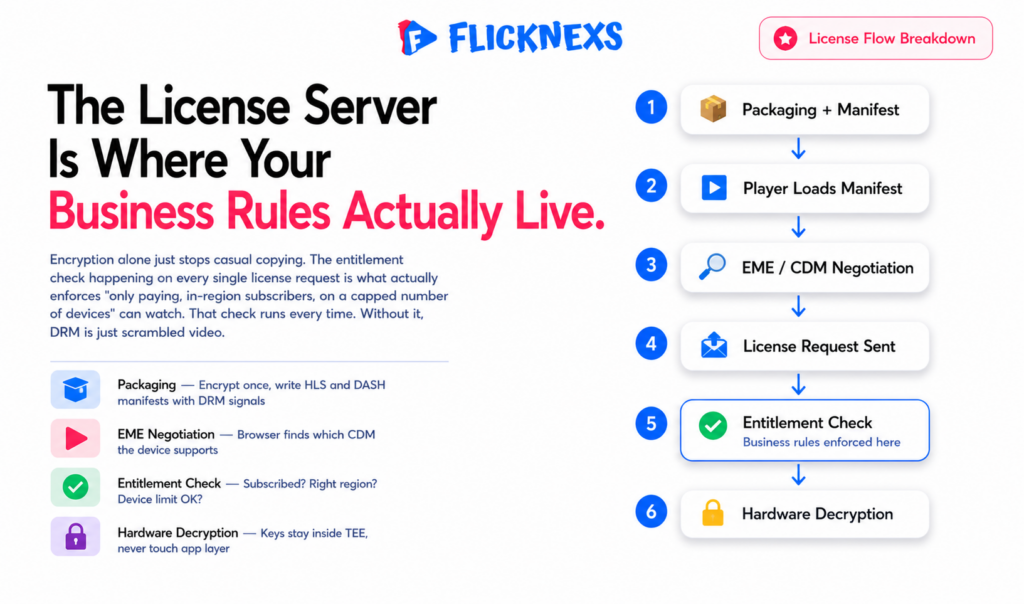
First, packaging. Your transcoder encrypts each rendition with a content key and writes the manifest, HLS for FairPlay, DASH for Widevine and PlayReady, along with the DRM signaling that ties it all together.
Then playback starts. The player loads the manifest, figures out which DRM the device’s Content Decryption Module actually supports through the browser’s Encrypted Media Extensions, and generates a license challenge from there.
That challenge goes out as a license request, usually to a multi-DRM service. Before handing over anything, the server checks entitlement. Is this user actually subscribed? Are they in the right region? Are they within their device limit?
If everything checks out, the license response comes back with the content key wrapped specifically for that device, plus whatever policy applies, offline duration, output protection, expiry.
Last comes decryption, where the CDM decrypts inside its own security boundary and hands the frames off to the protected video pipeline.
Here’s the part worth remembering: the license server is where your actual business rules live. Encryption alone just stops casual copying, that’s it. The entitlement check happening on every single license request is what actually enforces “only paying, in-region subscribers, on a capped number of devices” can watch. For more on how encryption and DRM divide the work between them, see our companion guide on AES encryption vs DRM for video.
The role of EME and the CDM in the browser
On the web, multi-DRM is standardised through the W3C’s Encrypted Media Extensions, which let JavaScript players talk to the browser’s built-in CDM without a plugin. You can read the specification at the W3C Encrypted Media Extensions page. EME is the reason the same HTML5 player can drive Widevine in Chrome and PlayReady in Edge. Your player code negotiates whichever one the browser exposes.
What multi-DRM does and does not protect against
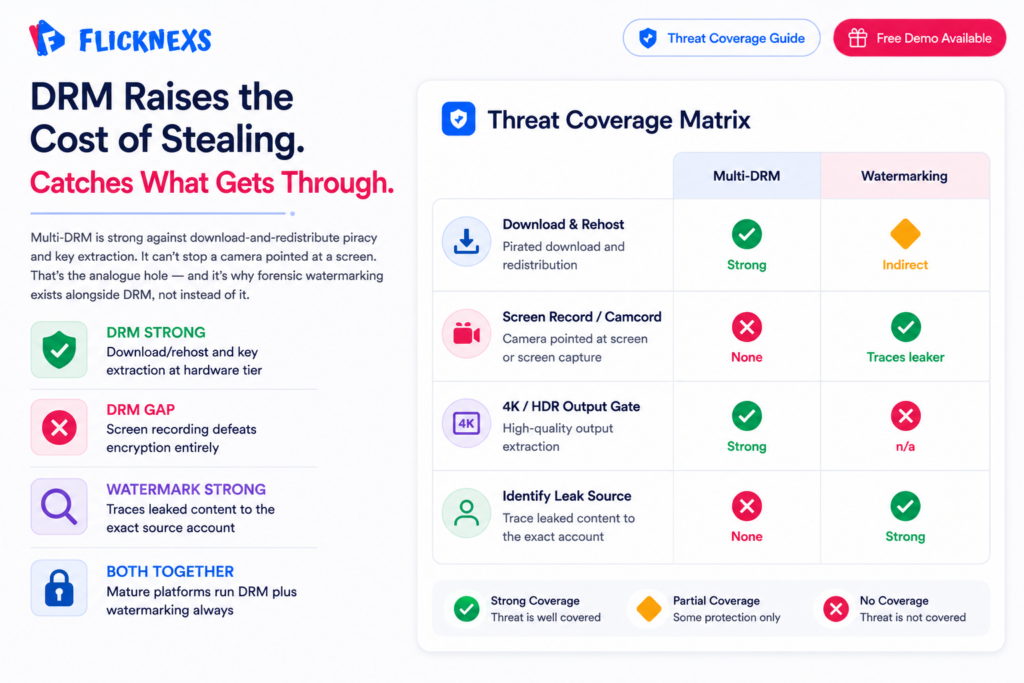
Worth setting honest expectations here, because vendors love to oversell this. Multi-DRM is a strong, studio-grade barrier against download-and-redistribute piracy and casual key extraction. Pair it with hardware-level security, L1 or SL3000, and it also gates 4K behind a properly protected pipeline while enforcing HDCP on the video output.
What it can’t stop is the analogue hole. Someone pointing a camera at their screen defeats DRM entirely, because at that point you’re not dealing with encryption anymore, you’re dealing with physics. And if a determined attacker does manage to capture content, DRM alone gives you no way to trace who actually leaked it.
That’s the job of forensic video watermarking instead, which embeds an invisible per-user identifier so a leaked stream can be traced straight back to the account it came from. Mature platforms run both together, and for good reason. DRM raises the cost of stealing in the first place. Watermarking catches and traces whatever gets through anyway.
| Threat | Multi-DRM | Forensic watermarking |
|---|---|---|
| Download & rehost the file | Strong | Indirect |
| Key/CDM extraction on hardware tier | Strong | n/a |
| Screen-record / camcord (“analogue hole”) | None | Traces the leaker |
| Identify the leaking account | None | Strong |
| Enforce 4K/HDR output protection | Strong | n/a |
Practical guidance for OTT operators
Build vs use a managed multi-DRM service
Running your own Widevine, FairPlay, and PlayReady license infrastructure sounds straightforward until you actually try it. You need a Widevine service certificate from Google, a FairPlay Streaming deployment package from Apple (which means a formal request, not just a signup form), and PlayReady licensing from Microsoft, each with its own process and its own timeline. On top of all that, you’re now operating high-availability license servers yourself, which is its own full-time job.
Most operators skip this entirely and go with a managed multi-DRM provider that hides all three behind a single API, or a platform that bundles it in already. The trade-off here is control versus speed-to-market, and honestly, for the vast majority of services, managed or bundled is the right call. Full stop.
Here’s where people actually get burned going DIY, and it’s rarely the dramatic stuff. It’s the boring things nobody thought to own: a certificate renewal that slips through the cracks, or a license server that quietly falls over the exact night your biggest title drops.
Package once, in cbcs and signal all three
Encrypt with cbcs under Common Encryption so one asset feeds Widevine (DASH), PlayReady (DASH) and FairPlay (HLS) with the least storage overhead. Generate proper PSSH/key signalling for each DRM in the manifest. This is where a lot of “plays on Chrome but not Safari” bugs come from. Nine times out of ten the FairPlay HLS variant or its key delivery was misconfigured.
Match security tiers to your licensing obligations
If your content deals require hardware-level protection for HD/4K, configure your licence policy to issue high-resolution keys only to L1 / SL3000 / hardware-FairPlay devices and to down-rezz everyone else. Auditing this is often a contractual requirement, so log the security level granted per licence.
Don’t forget device limits and concurrency
DRM gives you the hook to enforce how many devices and simultaneous streams an account may use, because every play needs a fresh licence you can count and deny. Pair DRM with a session/concurrency service so credential sharing does not quietly erode revenue. Our platform’s streaming platform features bundle multi-DRM with concurrency control and watermarking so these layers work together out of the box.
For background reading on how the three CDMs and EME fit into the wider web video stack, Google’s developer site keeps practical guidance at developers.google.com, and a neutral overview of the standards lives on Wikipedia’s Encrypted Media Extensions article.
Run your own 24/7 channel — try the Flicknexs playout engine →
Frequently asked questions
Related guides
- OTT Content Security: The Complete Guide to Protecting Your Video Revenue (start here)
- Forensic Video Watermarking: How to Trace and Stop Stream Piracy
- AES Encryption vs DRM for Video: What Actually Protects Your Content
Ready to build?
If you’re planning your next DRM / Security project, Flicknexs handles the video infrastructure end-to-end — so you can ship in weeks, not months.
- launch OTT with multi-DRM
- check plan pricing
More on video DRM and security
Continue exploring more on this topic across the Flicknexs blog.
- Deep dive: How to Start OTT Platform in 2026
- What is DRM? How Does It Works: Best Guide for DRM in 2025
- The Ultimate Guide to Geo Blocking: How It Works, Its Implications, and How to Bypass
- AES Encryption vs DRM for Video: What Actually Protects Your Content
Ready to build?
If you’re planning your next DRM / Security project, Flicknexs handles the video infrastructure end-to-end — so you can ship in weeks, not months.
- launch OTT with multi-DRM
- check plan pricing
More on video DRM and security
Continue exploring more on this topic across the Flicknexs blog.
- Deep dive: How to Start OTT Platform in 2026
- What is DRM? How Does It Works: Best Guide for DRM in 2025
- The Ultimate Guide to Geo Blocking: How It Works, Its Implications, and How to Bypass
- AES Encryption vs DRM for Video: What Actually Protects Your Content
Ready to build?
If you’re planning your next DRM / Security project, Flicknexs handles the video infrastructure end-to-end — so you can ship in weeks, not months.
- launch OTT with multi-DRM
- check plan pricing
More on video DRM and security
Continue exploring more on this topic across the Flicknexs blog.
- Deep dive: How to Start OTT Platform in 2026
- What is DRM? How Does It Works: Best Guide for DRM in 2025
- The Ultimate Guide to Geo Blocking: How It Works, Its Implications, and How to Bypass
- AES Encryption vs DRM for Video: What Actually Protects Your Content
Ready to build?
If you’re planning your next DRM / Security project, Flicknexs handles the video infrastructure end-to-end — so you can ship in weeks, not months.
- launch OTT with multi-DRM
- check plan pricing
More on video DRM and security
Continue exploring more on this topic across the Flicknexs blog.
- Deep dive: How to Start OTT Platform in 2026
- What is DRM? How Does It Works: Best Guide for DRM in 2025
- The Ultimate Guide to Geo Blocking: How It Works, Its Implications, and How to Bypass
- AES Encryption vs DRM for Video: What Actually Protects Your Content
Ready to build?
If you’re planning your next DRM / Security project, Flicknexs handles the video infrastructure end-to-end — so you can ship in weeks, not months.
- launch OTT with multi-DRM
- check plan pricing
More on video DRM and security
Continue exploring more on this topic across the Flicknexs blog.
- Deep dive: How to Start OTT Platform in 2026
- What is DRM? How Does It Works: Best Guide for DRM in 2025
- The Ultimate Guide to Geo Blocking: How It Works, Its Implications, and How to Bypass
- AES Encryption vs DRM for Video: What Actually Protects Your Content
Ready to build?
If you’re planning your next DRM / Security project, Flicknexs handles the video infrastructure end-to-end — so you can ship in weeks, not months.
- launch OTT with multi-DRM
- check plan pricing
More on video DRM and security
Continue exploring more on this topic across the Flicknexs blog.
- Deep dive: How to Start OTT Platform in 2026
- What is DRM? How Does It Works: Best Guide for DRM in 2025
- The Ultimate Guide to Geo Blocking: How It Works, Its Implications, and How to Bypass
- AES Encryption vs DRM for Video: What Actually Protects Your Content
Ready to build?
If you’re planning your next DRM / Security project, Flicknexs handles the video infrastructure end-to-end — so you can ship in weeks, not months.
- launch OTT with multi-DRM
- check plan pricing
More on video DRM and security
Continue exploring more on this topic across the Flicknexs blog.
- Deep dive: How to Start OTT Platform in 2026
- What is DRM? How Does It Works: Best Guide for DRM in 2025
- The Ultimate Guide to Geo Blocking: How It Works, Its Implications, and How to Bypass
- AES Encryption vs DRM for Video: What Actually Protects Your Content
Ready to build?
If you’re planning your next DRM / Security project, Flicknexs handles the video infrastructure end-to-end — so you can ship in weeks, not months.
- launch OTT with multi-DRM
- check plan pricing
More on video DRM and security
Continue exploring more on this topic across the Flicknexs blog.
- Deep dive: How to Start OTT Platform in 2026
- What is DRM? How Does It Works: Best Guide for DRM in 2025
- The Ultimate Guide to Geo Blocking: How It Works, Its Implications, and How to Bypass
- AES Encryption vs DRM for Video: What Actually Protects Your Content
Ready to build?
If you’re planning your next DRM / Security project, Flicknexs handles the video infrastructure end-to-end — so you can ship in weeks, not months.
- launch OTT with multi-DRM
- check plan pricing
More on video DRM and security
Continue exploring more on this topic across the Flicknexs blog.
- Deep dive: How to Start OTT Platform in 2026
- What is DRM? How Does It Works: Best Guide for DRM in 2025
- The Ultimate Guide to Geo Blocking: How It Works, Its Implications, and How to Bypass
- AES Encryption vs DRM for Video: What Actually Protects Your Content
Ready to build?
If you’re planning your next DRM / Security project, Flicknexs handles the video infrastructure end-to-end — so you can ship in weeks, not months.
- launch OTT with multi-DRM
- check plan pricing
More on video DRM and security
Continue exploring more on this topic across the Flicknexs blog.
- Deep dive: How to Start OTT Platform in 2026
- What is DRM? How Does It Works: Best Guide for DRM in 2025
- The Ultimate Guide to Geo Blocking: How It Works, Its Implications, and How to Bypass
- AES Encryption vs DRM for Video: What Actually Protects Your Content
Ready to build?
If you’re planning your next DRM / Security project, Flicknexs handles the video infrastructure end-to-end — so you can ship in weeks, not months.
- launch OTT with multi-DRM
- check plan pricing
More on video DRM and security
Continue exploring more on this topic across the Flicknexs blog.
- Deep dive: How to Start OTT Platform in 2026
- What is DRM? How Does It Works: Best Guide for DRM in 2025
- The Ultimate Guide to Geo Blocking: How It Works, Its Implications, and How to Bypass
- AES Encryption vs DRM for Video: What Actually Protects Your Content
Ready to build?
If you’re planning your next DRM / Security project, Flicknexs handles the video infrastructure end-to-end — so you can ship in weeks, not months.
- launch OTT with multi-DRM
- check plan pricing
More on video DRM and security
Continue exploring more on this topic across the Flicknexs blog.
- Deep dive: How to Start OTT Platform in 2026
- What is DRM? How Does It Works: Best Guide for DRM in 2025
- The Ultimate Guide to Geo Blocking: How It Works, Its Implications, and How to Bypass
- AES Encryption vs DRM for Video: What Actually Protects Your Content
Ready to build?
If you’re planning your next DRM / Security project, Flicknexs handles the video infrastructure end-to-end — so you can ship in weeks, not months.
- launch OTT with multi-DRM
- check plan pricing
More on video DRM and security
Continue exploring more on this topic across the Flicknexs blog.
- Deep dive: How to Start OTT Platform in 2026
- What is DRM? How Does It Works: Best Guide for DRM in 2025
- The Ultimate Guide to Geo Blocking: How It Works, Its Implications, and How to Bypass
- AES Encryption vs DRM for Video: What Actually Protects Your Content
Ready to build?
If you’re planning your next DRM / Security project, Flicknexs handles the video infrastructure end-to-end — so you can ship in weeks, not months.
- launch OTT with multi-DRM
- check plan pricing
More on video DRM and security
Continue exploring more on this topic across the Flicknexs blog.
- Deep dive: How to Start OTT Platform in 2026
- What is DRM? How Does It Works: Best Guide for DRM in 2025
- The Ultimate Guide to Geo Blocking: How It Works, Its Implications, and How to Bypass
- AES Encryption vs DRM for Video: What Actually Protects Your Content
Ready to build?
If you’re planning your next DRM / Security project, Flicknexs handles the video infrastructure end-to-end — so you can ship in weeks, not months.
- launch OTT with multi-DRM
- check plan pricing
More on video DRM and security
Continue exploring more on this topic across the Flicknexs blog.
- Deep dive: How to Start OTT Platform in 2026
- What is DRM? How Does It Works: Best Guide for DRM in 2025
- The Ultimate Guide to Geo Blocking: How It Works, Its Implications, and How to Bypass
- AES Encryption vs DRM for Video: What Actually Protects Your Content
Ready to build?
If you’re planning your next DRM / Security project, Flicknexs handles the video infrastructure end-to-end — so you can ship in weeks, not months.
- launch OTT with multi-DRM
- check plan pricing
More on video DRM and security
Continue exploring more on this topic across the Flicknexs blog.
- Deep dive: How to Start OTT Platform in 2026
- What is DRM? How Does It Works: Best Guide for DRM in 2025
- The Ultimate Guide to Geo Blocking: How It Works, Its Implications, and How to Bypass
- AES Encryption vs DRM for Video: What Actually Protects Your Content
Ready to build?
If you’re planning your next DRM / Security project, Flicknexs handles the video infrastructure end-to-end — so you can ship in weeks, not months.
- launch OTT with multi-DRM
- check plan pricing
More on video DRM and security
Continue exploring more on this topic across the Flicknexs blog.
- Deep dive: How to Start OTT Platform in 2026
- What is DRM? How Does It Works: Best Guide for DRM in 2025
- The Ultimate Guide to Geo Blocking: How It Works, Its Implications, and How to Bypass
- AES Encryption vs DRM for Video: What Actually Protects Your Content
Ready to build?
If you’re planning your next DRM / Security project, Flicknexs handles the video infrastructure end-to-end — so you can ship in weeks, not months.
- launch OTT with multi-DRM
- check plan pricing
More on video DRM and security
Continue exploring more on this topic across the Flicknexs blog.
- Deep dive: How to Start OTT Platform in 2026
- What is DRM? How Does It Works: Best Guide for DRM in 2025
- The Ultimate Guide to Geo Blocking: How It Works, Its Implications, and How to Bypass
- AES Encryption vs DRM for Video: What Actually Protects Your Content
Ready to build?
If you’re planning your next DRM / Security project, Flicknexs handles the video infrastructure end-to-end — so you can ship in weeks, not months.
More on video DRM and security
Continue exploring more on this topic across the Flicknexs blog.

