
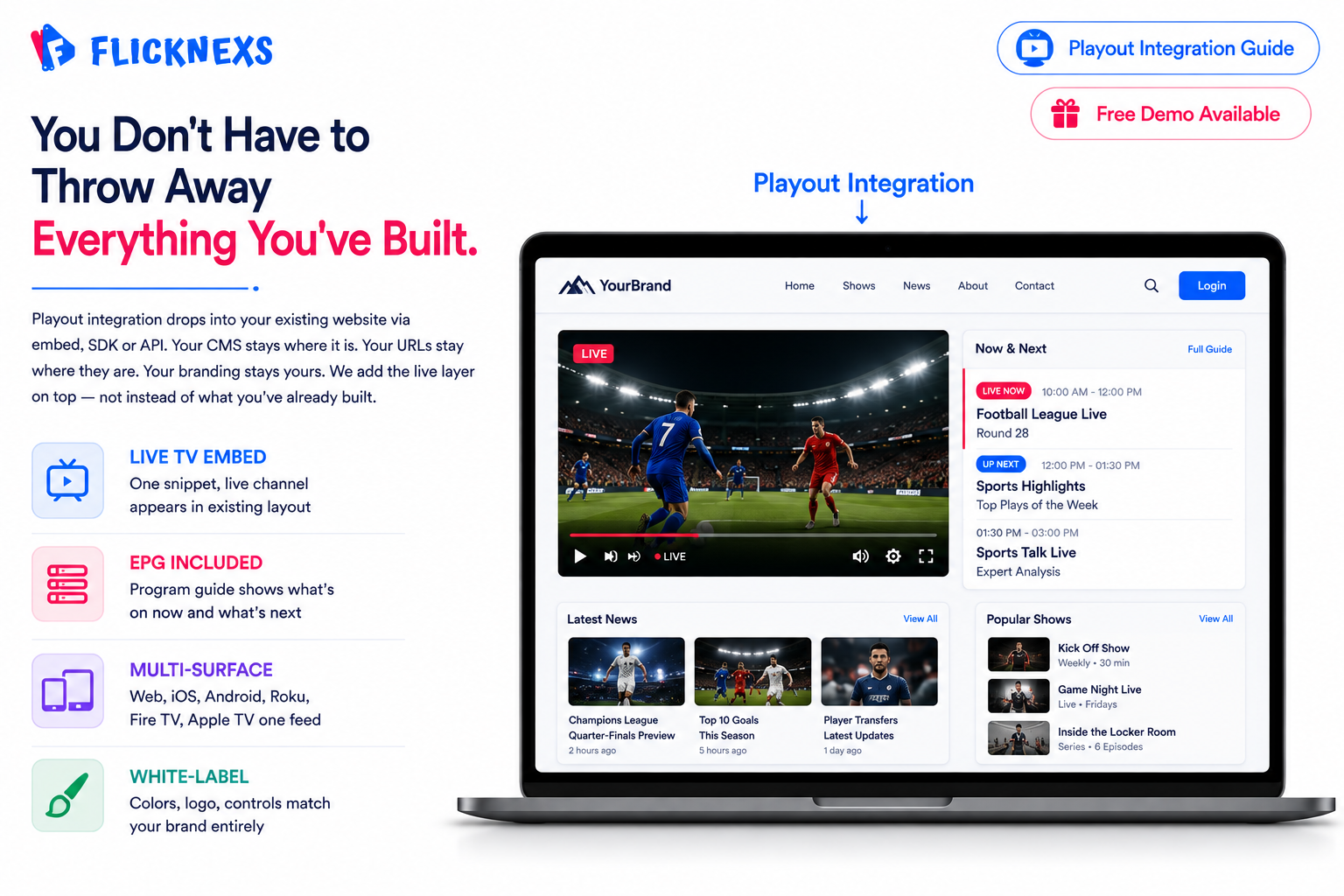
Yes, Flicknexs playout integration allows you to integrate live television, linear channel, EPG and live events into your existing website. You do not need to start from scratch as you only have to add them on top of your already running website. We integrate the television player, connect programme guide, and stream clean HLS video streams through your current website, OTT Apps, mobile apps and smart TV apps. Your CMS stays where it is. Your URLs stay where they are. We add a live layer on top, and white-label the solution to match with your branding.
Key takeaways
- No migration required. Playout integration drops into your existing website via embed, SDK or API — keep your current CMS and site structure.
- One feed, many surfaces. The same channel reaches web, mobile and connected TV without separate rebuilds for each.
- EPG included. An electronic program guide ships alongside the player so viewers see what’s on now and what’s next.
- White-label by default. Colors, logo and controls match your brand viewers never see ours.
- Light on your site. The player loads asynchronously, so adding live TV does not weigh down your existing pages.
What “playout integration” actually means for your site
When a buyer asks us whether Flicknexs can sit on top of an existing website, what they usually mean is: “Do I have to throw away everything I’ve built?” The answer is no. Playout integration is the practice of taking your live channel — the scheduled, broadcast-style output of your playout system — and delivering it into surfaces you already own. We hand you an embeddable player and a set of endpoints; you place them where you want them. The rest of your site keeps running exactly as it did yesterday.
This is critically important because the majority of teams that we discuss these technologies with, have put in years of work to build out their content management systems (CMS), build their marketing sites, build their membership systems, and build their search engine optimization (SEO). Asking them to migrate everything just to build a live channel is simply not feasible. Our approach treats live TV as an addition, not a replacement. If you’re weighing the broader picture of live streaming video on websites, the integration question is usually the deciding factor — and it’s the one we’ve designed around.
The embeddable player: live TV without touching your stack
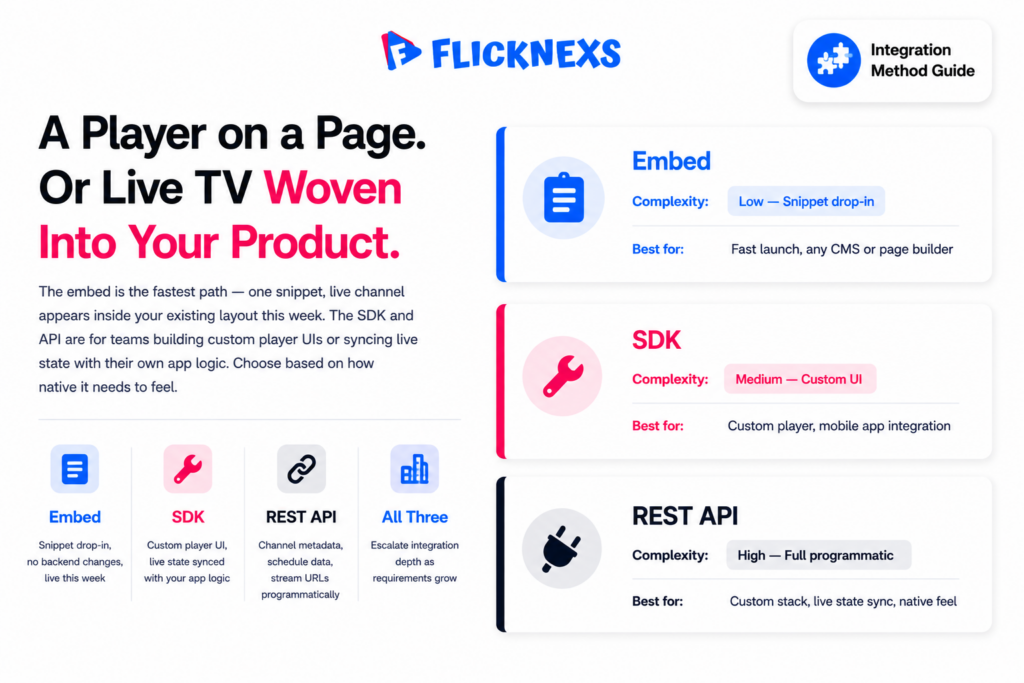
The simplest path is the embeddable player. You add a small snippet to a page — much like you’d embed a video — and the live channel appears inside your existing layout. No backend changes, no database migration, no new hosting. For teams that just want a channel live this week, this is the route we recommend first.
When it comes to the live streaming aspect of our player, it streams adaptive HLS video. This means that it can automatically adjust quality based on the speed of the connection that is originally created for the viewer. Additionally, it provides a smooth experience for both desktop and mobile users. If you would like to understand how the HLS streaming technology works, you can read more detail in our HLS explainer, which also demonstrates how HLS is the industry standard format for low-friction playback on the web. The short version: HLS is what lets one stream reach every browser without plugins.
When you want deeper control: SDK and API
If an embed isn’t enough — say you’re building a custom player UI or syncing live state with your own app logic — we expose SDKs and a REST API. This is where playout integration goes from “a player on a page” to “live TV woven into your product.” You pull channel metadata, schedule data, and stream URLs programmatically, then render them however your design demands. Teams running their own live TV streaming software stack often choose this path so the live layer feels native, not bolted on.
EPG, linear channels and live events
A live channel without a guide is just a video that happens to be playing. The electronic program guide (EPG) is what turns it into a TV experience: viewers see what’s on now, what’s coming up, and can plan around it. We integrate the EPG alongside the player so your schedule is visible inside your site, pulling from the same playout source that drives the channel.
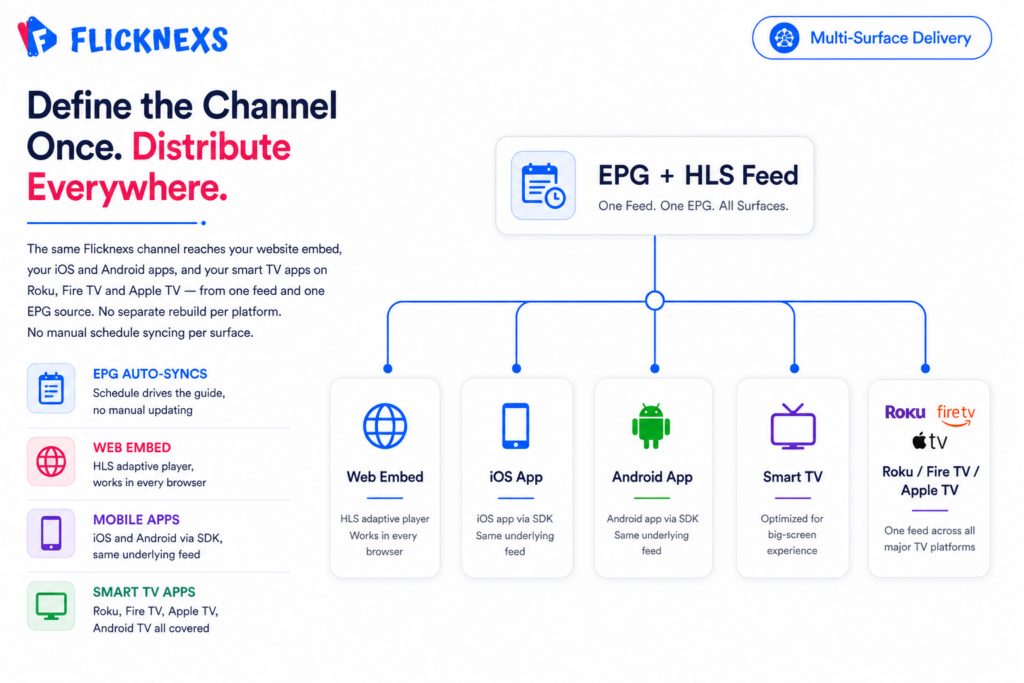
The same integration handles three related things people often treat as separate projects: 24/7 linear channels, scheduled programming blocks, and one-off live events. Because they all flow from one feed, you don’t rebuild for each. That single-source efficiency is the same principle behind sending one HLS feed to multiple platforms — define the channel once, distribute everywhere. And if you’re moving away from legacy hardware, it’s worth understanding why modern channels don’t need a traditional broadcast setup to look and feel like real television.
Multi-surface: web, mobile, and connected TV from one source
Your website is usually the first surface, but rarely the last. The same Flicknexs channel can appear in your iOS and Android apps and your smart TV apps — Roku, Fire TV, Apple TV, Android TV — using the same underlying feed and EPG. You integrate once and reach every screen, rather than commissioning a separate build per platform.
| What you add | Website (embed/API) | Mobile apps (SDK) | Smart TV apps |
|---|---|---|---|
| Live TV player (HLS) | Yes | Yes | Yes |
| Linear channels | Yes | Yes | Yes |
| EPG (program guide) | Yes | Yes | Yes |
| Live events | Yes | Yes | Yes |
| White-label branding | Yes | Yes | Yes |
This is the reassuring part for teams who fear lock-in: you’re not committing to one screen. If you later decide to launch a full OTT app, the live layer you already built carries over. For the bigger roadmap, our guides on how to start an OTT platform and building a successful live streaming platform show how the website integration becomes the foundation for everything else.
The three worries we hear most — and the honest answers
Will it slow my site down?
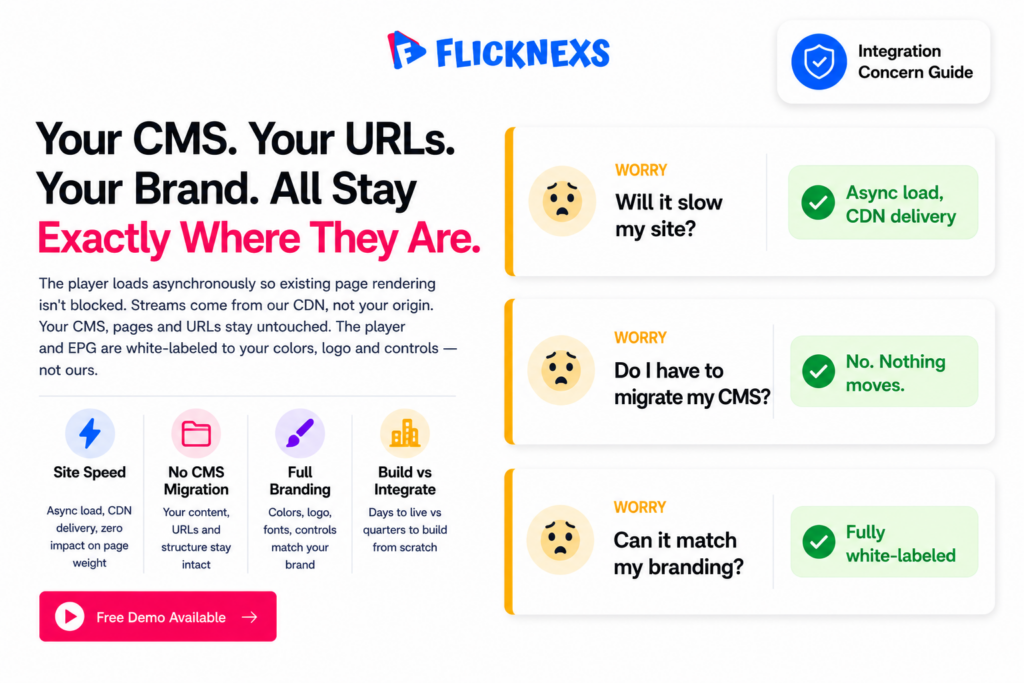
No. The Flicknexs player is loaded asynchronously so your page is rendered before the live layer is initialized. Streams are delivered from a cdn instead of your own origin server, meaning bandwidth will not be affected by your existing hosting. The result is that when you add the Flicknexs player your page-weight impact will be almost identical to embedding any other modern video element.
Do I have to migrate my CMS?
No. This is the worry we hear most, and the answer is the most freeing: your CMS, your pages, your content, and your URLs all stay exactly where they are. We add the live layer on top through embed or API. Nothing about your current setup gets torn down or moved.
Can it match my branding?
Yes — fully. The player and EPG are white-labeled to your colors, logo, fonts, and control styling. Viewers see your brand, not ours. If a fully branded, end-to-end product is your goal, our roundup of white-label OTT platform providers explains how deep that branding control can go.
Build from scratch vs integrate Flicknexs
You could build all of this yourself — encoding, packaging, the player, the EPG, CDN delivery, and apps for every platform. Many teams underestimate that lift. Integrating instead means we handle the live-delivery plumbing while you keep ownership of your site, your audience, and your brand. You move in days rather than quarters, and you avoid maintaining a streaming stack that isn’t your core business. That trade — speed and reliability now, without surrendering control of your existing website — is why most buyers choose integration over a from-scratch build.
Frequently Asked Questions
Written by the Flicknexs team — we build live TV, linear channel, and OTT delivery that slots into the website you already run. Talk to us about adding live TV to your existing site.
Ready to build?
If you’re planning your next Playout project, Flicknexs handles the video infrastructure end-to-end — so you can ship in weeks, not months.
- get cloud playout from Flicknexs
- see Flicknexs pricing
More cloud playout guides
Continue exploring more on this topic across the Flicknexs blog.
- Complete guide: OTT Playout Platform: The Complete Guide to Launching Your Own TV Channel IN 2026
- How Cloud Playout Reduces Traditional Satellite Broadcasting Costs
Ready to build?
If you’re planning your next Playout project, Flicknexs handles the video infrastructure end-to-end — so you can ship in weeks, not months.
- get cloud playout from Flicknexs
- see Flicknexs pricing
More cloud playout guides
Continue exploring more on this topic across the Flicknexs blog.
- Complete guide: OTT Playout Platform: The Complete Guide to Launching Your Own TV Channel IN 2026
- How Cloud Playout Reduces Traditional Satellite Broadcasting Costs
Ready to build?
If you’re planning your next Playout project, Flicknexs handles the video infrastructure end-to-end — so you can ship in weeks, not months.
- get cloud playout from Flicknexs
- see Flicknexs pricing
More cloud playout guides
Continue exploring more on this topic across the Flicknexs blog.
- Complete guide: OTT Playout Platform: The Complete Guide to Launching Your Own TV Channel IN 2026
- How Cloud Playout Reduces Traditional Satellite Broadcasting Costs
Ready to build?
If you’re planning your next Playout project, Flicknexs handles the video infrastructure end-to-end — so you can ship in weeks, not months.
- get cloud playout from Flicknexs
- see Flicknexs pricing
More cloud playout guides
Continue exploring more on this topic across the Flicknexs blog.
- Complete guide: OTT Playout Platform: The Complete Guide to Launching Your Own TV Channel IN 2026
- How Cloud Playout Reduces Traditional Satellite Broadcasting Costs
Ready to build?
If you’re planning your next Playout project, Flicknexs handles the video infrastructure end-to-end — so you can ship in weeks, not months.
- get cloud playout from Flicknexs
- see Flicknexs pricing
More cloud playout guides
Continue exploring more on this topic across the Flicknexs blog.
- Complete guide: OTT Playout Platform: The Complete Guide to Launching Your Own TV Channel IN 2026
- How Cloud Playout Reduces Traditional Satellite Broadcasting Costs
Ready to build?
If you’re planning your next Playout project, Flicknexs handles the video infrastructure end-to-end — so you can ship in weeks, not months.
- get cloud playout from Flicknexs
- see Flicknexs pricing
More cloud playout guides
Continue exploring more on this topic across the Flicknexs blog.
- Complete guide: OTT Playout Platform: The Complete Guide to Launching Your Own TV Channel IN 2026
- How Cloud Playout Reduces Traditional Satellite Broadcasting Costs
Ready to build?
If you’re planning your next Playout project, Flicknexs handles the video infrastructure end-to-end — so you can ship in weeks, not months.
- get cloud playout from Flicknexs
- see Flicknexs pricing
More cloud playout guides
Continue exploring more on this topic across the Flicknexs blog.
- Complete guide: OTT Playout Platform: The Complete Guide to Launching Your Own TV Channel IN 2026
- How Cloud Playout Reduces Traditional Satellite Broadcasting Costs
Ready to build?
If you’re planning your next Playout project, Flicknexs handles the video infrastructure end-to-end — so you can ship in weeks, not months.
- get cloud playout from Flicknexs
- see Flicknexs pricing
More cloud playout guides
Continue exploring more on this topic across the Flicknexs blog.
- Complete guide: OTT Playout Platform: The Complete Guide to Launching Your Own TV Channel IN 2026
- How Cloud Playout Reduces Traditional Satellite Broadcasting Costs
Ready to build?
If you’re planning your next Playout project, Flicknexs handles the video infrastructure end-to-end — so you can ship in weeks, not months.
- get cloud playout from Flicknexs
- see Flicknexs pricing
More cloud playout guides
Continue exploring more on this topic across the Flicknexs blog.
- Complete guide: OTT Playout Platform: The Complete Guide to Launching Your Own TV Channel IN 2026
- How Cloud Playout Reduces Traditional Satellite Broadcasting Costs
Ready to build?
If you’re planning your next Playout project, Flicknexs handles the video infrastructure end-to-end — so you can ship in weeks, not months.
- get cloud playout from Flicknexs
- see Flicknexs pricing
More cloud playout guides
Continue exploring more on this topic across the Flicknexs blog.
- Complete guide: OTT Playout Platform: The Complete Guide to Launching Your Own TV Channel IN 2026
- How Cloud Playout Reduces Traditional Satellite Broadcasting Costs
Ready to build?
If you’re planning your next Playout project, Flicknexs handles the video infrastructure end-to-end — so you can ship in weeks, not months.
- get cloud playout from Flicknexs
- see Flicknexs pricing
More cloud playout guides
Continue exploring more on this topic across the Flicknexs blog.
- Complete guide: OTT Playout Platform: The Complete Guide to Launching Your Own TV Channel IN 2026
- How Cloud Playout Reduces Traditional Satellite Broadcasting Costs
Ready to build?
If you’re planning your next Playout project, Flicknexs handles the video infrastructure end-to-end — so you can ship in weeks, not months.
- get cloud playout from Flicknexs
- see Flicknexs pricing
More cloud playout guides
Continue exploring more on this topic across the Flicknexs blog.
- Complete guide: OTT Playout Platform: The Complete Guide to Launching Your Own TV Channel IN 2026
- How Cloud Playout Reduces Traditional Satellite Broadcasting Costs
Ready to build?
If you’re planning your next Playout project, Flicknexs handles the video infrastructure end-to-end — so you can ship in weeks, not months.
- get cloud playout from Flicknexs
- see Flicknexs pricing
More cloud playout guides
Continue exploring more on this topic across the Flicknexs blog.
- Complete guide: OTT Playout Platform: The Complete Guide to Launching Your Own TV Channel IN 2026
- How Cloud Playout Reduces Traditional Satellite Broadcasting Costs
Ready to build?
If you’re planning your next Playout project, Flicknexs handles the video infrastructure end-to-end — so you can ship in weeks, not months.
- get cloud playout from Flicknexs
- see Flicknexs pricing
More cloud playout guides
Continue exploring more on this topic across the Flicknexs blog.
- Complete guide: OTT Playout Platform: The Complete Guide to Launching Your Own TV Channel IN 2026
- How Cloud Playout Reduces Traditional Satellite Broadcasting Costs
Ready to build?
If you’re planning your next Playout project, Flicknexs handles the video infrastructure end-to-end — so you can ship in weeks, not months.
- get cloud playout from Flicknexs
- see Flicknexs pricing
More cloud playout guides
Continue exploring more on this topic across the Flicknexs blog.
- Complete guide: OTT Playout Platform: The Complete Guide to Launching Your Own TV Channel IN 2026
- How Cloud Playout Reduces Traditional Satellite Broadcasting Costs
Ready to build?
If you’re planning your next Playout project, Flicknexs handles the video infrastructure end-to-end — so you can ship in weeks, not months.
- get cloud playout from Flicknexs
- see Flicknexs pricing
More cloud playout guides
Continue exploring more on this topic across the Flicknexs blog.
- Complete guide: OTT Playout Platform: The Complete Guide to Launching Your Own TV Channel IN 2026
- How Cloud Playout Reduces Traditional Satellite Broadcasting Costs
Ready to build?
If you’re planning your next Playout project, Flicknexs handles the video infrastructure end-to-end — so you can ship in weeks, not months.
- get cloud playout from Flicknexs
- see Flicknexs pricing
More cloud playout guides
Continue exploring more on this topic across the Flicknexs blog.
- Complete guide: OTT Playout Platform: The Complete Guide to Launching Your Own TV Channel IN 2026
- How Cloud Playout Reduces Traditional Satellite Broadcasting Costs
Ready to build?
If you’re planning your next Playout project, Flicknexs handles the video infrastructure end-to-end — so you can ship in weeks, not months.
- get cloud playout from Flicknexs
- see Flicknexs pricing
More cloud playout guides
Continue exploring more on this topic across the Flicknexs blog.
- Complete guide: OTT Playout Platform: The Complete Guide to Launching Your Own TV Channel IN 2026
- How Cloud Playout Reduces Traditional Satellite Broadcasting Costs
Ready to build?
If you’re planning your next Playout project, Flicknexs handles the video infrastructure end-to-end — so you can ship in weeks, not months.
- get cloud playout from Flicknexs
- see Flicknexs pricing
More cloud playout guides
Continue exploring more on this topic across the Flicknexs blog.
- Complete guide: OTT Playout Platform: The Complete Guide to Launching Your Own TV Channel IN 2026
- How Cloud Playout Reduces Traditional Satellite Broadcasting Costs
Ready to build?
If you’re planning your next Playout project, Flicknexs handles the video infrastructure end-to-end — so you can ship in weeks, not months.
- get cloud playout from Flicknexs
- see Flicknexs pricing
More cloud playout guides
Continue exploring more on this topic across the Flicknexs blog.
- Complete guide: OTT Playout Platform: The Complete Guide to Launching Your Own TV Channel IN 2026
- How Cloud Playout Reduces Traditional Satellite Broadcasting Costs
Ready to build?
If you’re planning your next Playout project, Flicknexs handles the video infrastructure end-to-end — so you can ship in weeks, not months.
- get cloud playout from Flicknexs
- see Flicknexs pricing
More cloud playout guides
Continue exploring more on this topic across the Flicknexs blog.
- Complete guide: OTT Playout Platform: The Complete Guide to Launching Your Own TV Channel IN 2026
- How Cloud Playout Reduces Traditional Satellite Broadcasting Costs
Ready to build?
If you’re planning your next Playout project, Flicknexs handles the video infrastructure end-to-end — so you can ship in weeks, not months.
- get cloud playout from Flicknexs
- see Flicknexs pricing
More cloud playout guides
Continue exploring more on this topic across the Flicknexs blog.
- Complete guide: OTT Playout Platform: The Complete Guide to Launching Your Own TV Channel IN 2026
- How Cloud Playout Reduces Traditional Satellite Broadcasting Costs
Ready to build?
If you’re planning your next Playout project, Flicknexs handles the video infrastructure end-to-end — so you can ship in weeks, not months.
- get cloud playout from Flicknexs
- see Flicknexs pricing
More cloud playout guides
Continue exploring more on this topic across the Flicknexs blog.
- Complete guide: OTT Playout Platform: The Complete Guide to Launching Your Own TV Channel IN 2026
- How Cloud Playout Reduces Traditional Satellite Broadcasting Costs
Ready to build?
If you’re planning your next Playout project, Flicknexs handles the video infrastructure end-to-end — so you can ship in weeks, not months.
- get cloud playout from Flicknexs
- see Flicknexs pricing
More cloud playout guides
Continue exploring more on this topic across the Flicknexs blog.
- Complete guide: OTT Playout Platform: The Complete Guide to Launching Your Own TV Channel IN 2026
- How Cloud Playout Reduces Traditional Satellite Broadcasting Costs
Ready to build?
If you’re planning your next Playout project, Flicknexs handles the video infrastructure end-to-end — so you can ship in weeks, not months.
- get cloud playout from Flicknexs
- see Flicknexs pricing
More cloud playout guides
Continue exploring more on this topic across the Flicknexs blog.
- Complete guide: OTT Playout Platform: The Complete Guide to Launching Your Own TV Channel IN 2026
- How Cloud Playout Reduces Traditional Satellite Broadcasting Costs
Ready to build?
If you’re planning your next Playout project, Flicknexs handles the video infrastructure end-to-end — so you can ship in weeks, not months.
- get cloud playout from Flicknexs
- see Flicknexs pricing
More cloud playout guides
Continue exploring more on this topic across the Flicknexs blog.
- Complete guide: OTT Playout Platform: The Complete Guide to Launching Your Own TV Channel IN 2026
- How Cloud Playout Reduces Traditional Satellite Broadcasting Costs
Ready to build?
If you’re planning your next Playout project, Flicknexs handles the video infrastructure end-to-end — so you can ship in weeks, not months.
- get cloud playout from Flicknexs
- see Flicknexs pricing
More cloud playout guides
Continue exploring more on this topic across the Flicknexs blog.
- Complete guide: OTT Playout Platform: The Complete Guide to Launching Your Own TV Channel IN 2026
- How Cloud Playout Reduces Traditional Satellite Broadcasting Costs
Ready to build?
If you’re planning your next Playout project, Flicknexs handles the video infrastructure end-to-end — so you can ship in weeks, not months.
- get cloud playout from Flicknexs
- see Flicknexs pricing
More cloud playout guides
Continue exploring more on this topic across the Flicknexs blog.
- Complete guide: OTT Playout Platform: The Complete Guide to Launching Your Own TV Channel IN 2026
- How Cloud Playout Reduces Traditional Satellite Broadcasting Costs
Ready to build?
If you’re planning your next Playout project, Flicknexs handles the video infrastructure end-to-end — so you can ship in weeks, not months.
- get cloud playout from Flicknexs
- see Flicknexs pricing
More cloud playout guides
Continue exploring more on this topic across the Flicknexs blog.
- Complete guide: OTT Playout Platform: The Complete Guide to Launching Your Own TV Channel IN 2026
- How Cloud Playout Reduces Traditional Satellite Broadcasting Costs
Ready to build?
If you’re planning your next Playout project, Flicknexs handles the video infrastructure end-to-end — so you can ship in weeks, not months.
- get cloud playout from Flicknexs
- see Flicknexs pricing
More cloud playout guides
Continue exploring more on this topic across the Flicknexs blog.
- Complete guide: OTT Playout Platform: The Complete Guide to Launching Your Own TV Channel IN 2026
- How Cloud Playout Reduces Traditional Satellite Broadcasting Costs
Ready to build?
If you’re planning your next Playout project, Flicknexs handles the video infrastructure end-to-end — so you can ship in weeks, not months.
- get cloud playout from Flicknexs
- see Flicknexs pricing
More cloud playout guides
Continue exploring more on this topic across the Flicknexs blog.
- Complete guide: OTT Playout Platform: The Complete Guide to Launching Your Own TV Channel IN 2026
- How Cloud Playout Reduces Traditional Satellite Broadcasting Costs
Ready to build?
If you’re planning your next Playout project, Flicknexs handles the video infrastructure end-to-end — so you can ship in weeks, not months.
- get cloud playout from Flicknexs
- see Flicknexs pricing
More cloud playout guides
Continue exploring more on this topic across the Flicknexs blog.
- Complete guide: OTT Playout Platform: The Complete Guide to Launching Your Own TV Channel IN 2026
- How Cloud Playout Reduces Traditional Satellite Broadcasting Costs
Ready to build?
If you’re planning your next Playout project, Flicknexs handles the video infrastructure end-to-end — so you can ship in weeks, not months.
- get cloud playout from Flicknexs
- see Flicknexs pricing
More cloud playout guides
Continue exploring more on this topic across the Flicknexs blog.
- Complete guide: OTT Playout Platform: The Complete Guide to Launching Your Own TV Channel IN 2026
- How Cloud Playout Reduces Traditional Satellite Broadcasting Costs
Ready to build?
If you’re planning your next Playout project, Flicknexs handles the video infrastructure end-to-end — so you can ship in weeks, not months.
- get cloud playout from Flicknexs
- see Flicknexs pricing
More cloud playout guides
Continue exploring more on this topic across the Flicknexs blog.
- Complete guide: OTT Playout Platform: The Complete Guide to Launching Your Own TV Channel IN 2026
- How Cloud Playout Reduces Traditional Satellite Broadcasting Costs
Ready to build?
If you’re planning your next Playout project, Flicknexs handles the video infrastructure end-to-end — so you can ship in weeks, not months.
- get cloud playout from Flicknexs
- see Flicknexs pricing
More cloud playout guides
Continue exploring more on this topic across the Flicknexs blog.
- Complete guide: OTT Playout Platform: The Complete Guide to Launching Your Own TV Channel IN 2026
- How Cloud Playout Reduces Traditional Satellite Broadcasting Costs
Ready to build?
If you’re planning your next Playout project, Flicknexs handles the video infrastructure end-to-end — so you can ship in weeks, not months.
- get cloud playout from Flicknexs
- see Flicknexs pricing
More cloud playout guides
Continue exploring more on this topic across the Flicknexs blog.
- Complete guide: OTT Playout Platform: The Complete Guide to Launching Your Own TV Channel IN 2026
- How Cloud Playout Reduces Traditional Satellite Broadcasting Costs
Ready to build?
If you’re planning your next Playout project, Flicknexs handles the video infrastructure end-to-end — so you can ship in weeks, not months.
- get cloud playout from Flicknexs
- see Flicknexs pricing
More cloud playout guides
Continue exploring more on this topic across the Flicknexs blog.
- Complete guide: OTT Playout Platform: The Complete Guide to Launching Your Own TV Channel IN 2026
- How Cloud Playout Reduces Traditional Satellite Broadcasting Costs
Ready to build?
If you’re planning your next Playout project, Flicknexs handles the video infrastructure end-to-end — so you can ship in weeks, not months.
- get cloud playout from Flicknexs
- see Flicknexs pricing
More cloud playout guides
Continue exploring more on this topic across the Flicknexs blog.
- Complete guide: OTT Playout Platform: The Complete Guide to Launching Your Own TV Channel IN 2026
- How Cloud Playout Reduces Traditional Satellite Broadcasting Costs
Ready to build?
If you’re planning your next Playout project, Flicknexs handles the video infrastructure end-to-end — so you can ship in weeks, not months.
- get cloud playout from Flicknexs
- see Flicknexs pricing
More cloud playout guides
Continue exploring more on this topic across the Flicknexs blog.
- Complete guide: OTT Playout Platform: The Complete Guide to Launching Your Own TV Channel IN 2026
- How Cloud Playout Reduces Traditional Satellite Broadcasting Costs
Ready to build?
If you’re planning your next Playout project, Flicknexs handles the video infrastructure end-to-end — so you can ship in weeks, not months.
- get cloud playout from Flicknexs
- see Flicknexs pricing
More cloud playout guides
Continue exploring more on this topic across the Flicknexs blog.
- Complete guide: OTT Playout Platform: The Complete Guide to Launching Your Own TV Channel IN 2026
- How Cloud Playout Reduces Traditional Satellite Broadcasting Costs
Ready to build?
If you’re planning your next Playout project, Flicknexs handles the video infrastructure end-to-end — so you can ship in weeks, not months.
- get cloud playout from Flicknexs
- see Flicknexs pricing
More cloud playout guides
Continue exploring more on this topic across the Flicknexs blog.
- Complete guide: OTT Playout Platform: The Complete Guide to Launching Your Own TV Channel IN 2026
- How Cloud Playout Reduces Traditional Satellite Broadcasting Costs
Ready to build?
If you’re planning your next Playout project, Flicknexs handles the video infrastructure end-to-end — so you can ship in weeks, not months.
- get cloud playout from Flicknexs
- see Flicknexs pricing
More cloud playout guides
Continue exploring more on this topic across the Flicknexs blog.
- Complete guide: OTT Playout Platform: The Complete Guide to Launching Your Own TV Channel IN 2026
- How Cloud Playout Reduces Traditional Satellite Broadcasting Costs
Ready to build?
If you’re planning your next Playout project, Flicknexs handles the video infrastructure end-to-end — so you can ship in weeks, not months.
- get cloud playout from Flicknexs
- see Flicknexs pricing
More cloud playout guides
Continue exploring more on this topic across the Flicknexs blog.
- Complete guide: OTT Playout Platform: The Complete Guide to Launching Your Own TV Channel IN 2026
- How Cloud Playout Reduces Traditional Satellite Broadcasting Costs
Ready to build?
If you’re planning your next Playout project, Flicknexs handles the video infrastructure end-to-end — so you can ship in weeks, not months.
- get cloud playout from Flicknexs
- see Flicknexs pricing
More cloud playout guides
Continue exploring more on this topic across the Flicknexs blog.
- Complete guide: OTT Playout Platform: The Complete Guide to Launching Your Own TV Channel IN 2026
- How Cloud Playout Reduces Traditional Satellite Broadcasting Costs
Ready to build?
If you’re planning your next Playout project, Flicknexs handles the video infrastructure end-to-end — so you can ship in weeks, not months.
- get cloud playout from Flicknexs
- see Flicknexs pricing
More cloud playout guides
Continue exploring more on this topic across the Flicknexs blog.
- Complete guide: OTT Playout Platform: The Complete Guide to Launching Your Own TV Channel IN 2026
- How Cloud Playout Reduces Traditional Satellite Broadcasting Costs
Ready to build?
If you’re planning your next Playout project, Flicknexs handles the video infrastructure end-to-end — so you can ship in weeks, not months.
- get cloud playout from Flicknexs
- see Flicknexs pricing
More cloud playout guides
Continue exploring more on this topic across the Flicknexs blog.
- Complete guide: OTT Playout Platform: The Complete Guide to Launching Your Own TV Channel IN 2026
- How Cloud Playout Reduces Traditional Satellite Broadcasting Costs
Ready to build?
If you’re planning your next Playout project, Flicknexs handles the video infrastructure end-to-end — so you can ship in weeks, not months.
- get cloud playout from Flicknexs
- see Flicknexs pricing
More cloud playout guides
Continue exploring more on this topic across the Flicknexs blog.
- Complete guide: OTT Playout Platform: The Complete Guide to Launching Your Own TV Channel IN 2026
- How Cloud Playout Reduces Traditional Satellite Broadcasting Costs
Ready to build?
If you’re planning your next Playout project, Flicknexs handles the video infrastructure end-to-end — so you can ship in weeks, not months.
- get cloud playout from Flicknexs
- see Flicknexs pricing
More cloud playout guides
Continue exploring more on this topic across the Flicknexs blog.
- Complete guide: OTT Playout Platform: The Complete Guide to Launching Your Own TV Channel IN 2026
- How Cloud Playout Reduces Traditional Satellite Broadcasting Costs
Ready to build?
If you’re planning your next Playout project, Flicknexs handles the video infrastructure end-to-end — so you can ship in weeks, not months.
- get cloud playout from Flicknexs
- see Flicknexs pricing
More cloud playout guides
Continue exploring more on this topic across the Flicknexs blog.
- Complete guide: OTT Playout Platform: The Complete Guide to Launching Your Own TV Channel IN 2026
- How Cloud Playout Reduces Traditional Satellite Broadcasting Costs
Ready to build?
If you’re planning your next Playout project, Flicknexs handles the video infrastructure end-to-end — so you can ship in weeks, not months.
- get cloud playout from Flicknexs
- see Flicknexs pricing
More cloud playout guides
Continue exploring more on this topic across the Flicknexs blog.
- Complete guide: OTT Playout Platform: The Complete Guide to Launching Your Own TV Channel IN 2026
- How Cloud Playout Reduces Traditional Satellite Broadcasting Costs
Ready to build?
If you’re planning your next Playout project, Flicknexs handles the video infrastructure end-to-end — so you can ship in weeks, not months.
- get cloud playout from Flicknexs
- see Flicknexs pricing
More cloud playout guides
Continue exploring more on this topic across the Flicknexs blog.
- Complete guide: OTT Playout Platform: The Complete Guide to Launching Your Own TV Channel IN 2026
- How Cloud Playout Reduces Traditional Satellite Broadcasting Costs
Ready to build?
If you’re planning your next Playout project, Flicknexs handles the video infrastructure end-to-end — so you can ship in weeks, not months.
- get cloud playout from Flicknexs
- see Flicknexs pricing
More cloud playout guides
Continue exploring more on this topic across the Flicknexs blog.
- Complete guide: OTT Playout Platform: The Complete Guide to Launching Your Own TV Channel IN 2026
- How Cloud Playout Reduces Traditional Satellite Broadcasting Costs
Ready to build?
If you’re planning your next Playout project, Flicknexs handles the video infrastructure end-to-end — so you can ship in weeks, not months.
- get cloud playout from Flicknexs
- see Flicknexs pricing
More cloud playout guides
Continue exploring more on this topic across the Flicknexs blog.
- Complete guide: OTT Playout Platform: The Complete Guide to Launching Your Own TV Channel IN 2026
- How Cloud Playout Reduces Traditional Satellite Broadcasting Costs
Ready to build?
If you’re planning your next Playout project, Flicknexs handles the video infrastructure end-to-end — so you can ship in weeks, not months.
- get cloud playout from Flicknexs
- see Flicknexs pricing
More cloud playout guides
Continue exploring more on this topic across the Flicknexs blog.
- Complete guide: OTT Playout Platform: The Complete Guide to Launching Your Own TV Channel IN 2026
- How Cloud Playout Reduces Traditional Satellite Broadcasting Costs
Ready to build?
If you’re planning your next Playout project, Flicknexs handles the video infrastructure end-to-end — so you can ship in weeks, not months.
- get cloud playout from Flicknexs
- see Flicknexs pricing
More cloud playout guides
Continue exploring more on this topic across the Flicknexs blog.
- Complete guide: OTT Playout Platform: The Complete Guide to Launching Your Own TV Channel IN 2026
- How Cloud Playout Reduces Traditional Satellite Broadcasting Costs
Ready to build?
If you’re planning your next Playout project, Flicknexs handles the video infrastructure end-to-end — so you can ship in weeks, not months.
- get cloud playout from Flicknexs
- see Flicknexs pricing
More cloud playout guides
Continue exploring more on this topic across the Flicknexs blog.
- Complete guide: OTT Playout Platform: The Complete Guide to Launching Your Own TV Channel IN 2026
- How Cloud Playout Reduces Traditional Satellite Broadcasting Costs
Ready to build?
If you’re planning your next Playout project, Flicknexs handles the video infrastructure end-to-end — so you can ship in weeks, not months.
- get cloud playout from Flicknexs
- see Flicknexs pricing
More cloud playout guides
Continue exploring more on this topic across the Flicknexs blog.
- Complete guide: OTT Playout Platform: The Complete Guide to Launching Your Own TV Channel IN 2026
- How Cloud Playout Reduces Traditional Satellite Broadcasting Costs
Ready to build?
If you’re planning your next Playout project, Flicknexs handles the video infrastructure end-to-end — so you can ship in weeks, not months.
- get cloud playout from Flicknexs
- see Flicknexs pricing
More cloud playout guides
Continue exploring more on this topic across the Flicknexs blog.
- Complete guide: OTT Playout Platform: The Complete Guide to Launching Your Own TV Channel IN 2026
- How Cloud Playout Reduces Traditional Satellite Broadcasting Costs
Ready to build?
If you’re planning your next Playout project, Flicknexs handles the video infrastructure end-to-end — so you can ship in weeks, not months.
- get cloud playout from Flicknexs
- see Flicknexs pricing
More cloud playout guides
Continue exploring more on this topic across the Flicknexs blog.

