
Most people treat AES and DRM like two flavors of the same thing, but they’re not even playing the same game. AES is a lock on your front door. DRM is a lock that also checks who’s holding the key before it lets them turn it and that difference decides everything about which one you actually need. Plain AES encryption, the kind you get with HLS AES-128, scrambles your video stream but hands the decryption key to the client in the clear, so anyone with a bit of know-how can grab it and walk off with your content. It’ll stop the casual viewer from ripping a file and reuploading it, but it does nothing against someone who wants your content badly enough to go looking for the key. Single DRM steps things up. Widevine alone or FairPlay alone gives you hardware-backed key governance, meaning the key never sits out in the open the way it does with AES, but you pay for that security with coverage. Lock yourself into FairPlay and your content simply won’t play on Chrome or Android, full stop and you’ve traded piracy risk for an audience you can no longer reach.
By the Flicknexs team. We build white-label OTT/VOD/IPTV platforms, so this is written from hands-on streaming-platform experience.
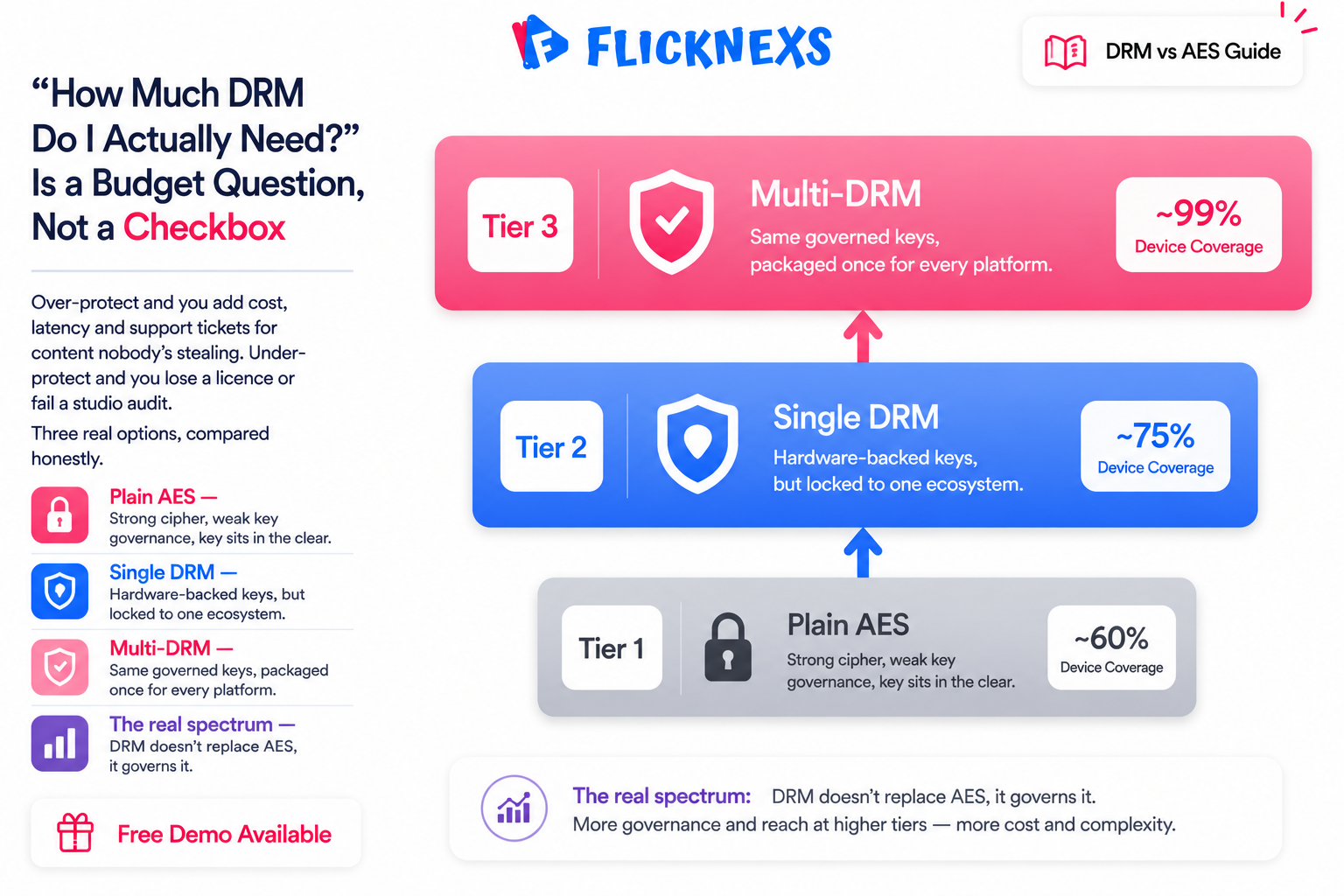
If you are about to launch or scale a streaming service, “how much DRM do I actually need?” is a real budget and risk decision, not a checkbox. Over-protect and you add cost, latency and support tickets for content nobody is trying to steal. Under-protect and you can lose a content licence, fail a studio security audit, or watch your premium catalogue end up on a piracy site. This page lays out the three realistic options (AES, single-DRM, and multi-DRM) on honest, verifiable dimensions and tells you plainly who should choose what. It pairs with our deeper guide on DRM compliance for studios and the MPA protection tiers.
First, clear up the vs these are layers, not rivals
The phrase “drm vs aes encryption” is slightly misleading, and getting this right saves you money. AES is the cipher that does the actual scrambling. DRM is the system that decides who gets the AES key, on what device, and under what rules. Modern DRM systems encrypt with AES under the hood. So DRM does not replace AES, it governs it.
That means the real spectrum looks like this:
- Plain AES. Strong encryption, weak key governance. The key is delivered to the player as a file.
- Single DRM. Strong encryption plus governed, hardware-backed keys, but for one ecosystem only.
- Multi-DRM. The same governed keys, packaged once and delivered to every major platform via the right DRM.
Plain AES: what it protects and where it stops
AES (Advanced Encryption Standard) is a symmetric cipher used everywhere from banking to messaging, and it is not broken. In streaming it encrypts each media segment (the small .ts or fragmented-MP4 chunks a player downloads), so a stolen segment is meaningless without the key. When people say “I encrypt my streams,” they usually mean HLS AES-128: the playlist carries an #EXT-X-KEY tag, the player fetches a 128-bit key over HTTPS, and decrypts on the fly.
The cryptography is excellent. The weakness is key delivery. With plain HLS AES-128 the key is just a file served over HTTPS, so anyone who can authenticate as a legitimate viewer (or capture a session) can request that key and save it. Stream-ripping tools routinely grab the key alongside the segments and rebuild a clean, decrypted MP4. You can raise the bar with token authentication, signed and expiring key URLs, and per-session keys, and that genuinely stops casual ripping. But the key still ultimately lands in software the user controls, in the clear. No hardware is enforcing the rules. Here is what actually happens in practice: someone opens the network tab in their browser, copies the key URL while they are logged in, and downloads it with curl. No special skills, just patience. You can read the deeper version of this in our companion piece, AES encryption vs DRM for video.
DRM: governed keys and real enforcement
DRM (Digital Rights Management) keeps the AES encryption but replaces the plain key file with a license exchange. The player asks a license server for a license; the server checks entitlements and issues a key that gets decrypted inside a protected environment the user cannot easily read. That unlocks rules AES alone cannot enforce:
- Hardware-backed key handling. On Widevine L1 and FairPlay, keys and decoded frames live in a Trusted Execution Environment, not ordinary app memory.
- Output protection (HDCP). Block or downgrade playback to an unprotected capture device.
- Offline, rental and expiry rules. Persistent-license windows, download limits, automatic expiry.
- Device binding and concurrency caps. Tie licenses to devices and limit simultaneous streams.
- Revocation. Refuse to re-issue licenses for compromised content or accounts.
The three DRM systems and why one is never enough
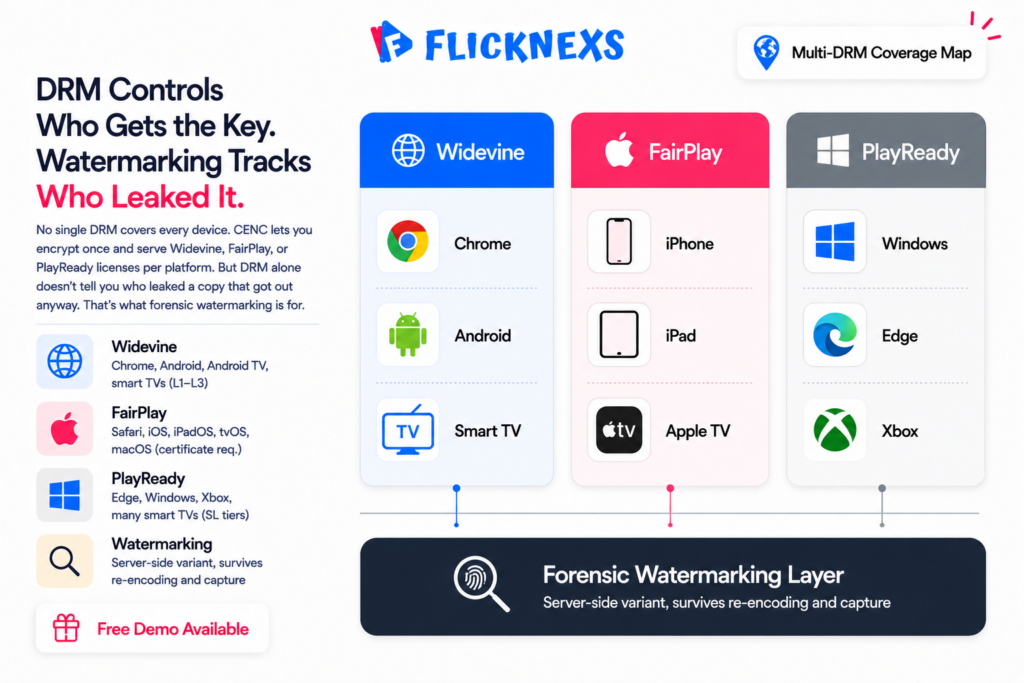
There are three DRM ecosystems, and each owns a slice of the device world:
- Google Widevine. Chrome, Firefox, Android, Android TV, and many smart TVs. Security levels run from L1 (hardware) to L3 (software).
- Apple FairPlay Streaming. Safari, iOS, iPadOS, tvOS, macOS.
- Microsoft PlayReady. Edge, Windows, Xbox, and many smart TVs and set-top boxes.
No single DRM covers all of these. FairPlay doesn’t run on Chrome or Android. Widevine doesn’t run in Safari on iOS. A single-DRM setup inevitably leaves a chunk of your audience unable to play protected content, and they don’t get a degraded experience, they get an error, not a stream.
Multi-DRM fixes this at the packaging stage rather than trying to patch it per platform. You package your content once with Common Encryption (CENC), the same encrypted file for everyone, and then serve the correct license to each platform through Encrypted Media Extensions (EME), the standardised layer browsers use to talk to whichever DRM is sitting underneath. One file, three key systems, no guessing which device gets locked out. If you want the technical detail on how EME works under the hood, Wikipedia’s overview is worth a read.
AES vs single-DRM vs multi-DRM: the honest comparison
This table compares on real, qualitative dimensions only. We do not quote competitor pricing or invented stats, because actual DRM license costs depend on your packager, volume and vendor contracts.
| Dimension | Plain AES (e.g. HLS AES-128) | Single DRM (one of Widevine / FairPlay / PlayReady) | Multi-DRM (all three) |
|---|---|---|---|
| Encryption strength | Strong (AES not broken) | Strong (AES under the hood) | Strong (AES under the hood) |
| Key governance | Key file delivered in the clear | Governed license, hardware-backed | Governed license, hardware-backed |
| Device coverage | Broad (plays widely) but weakly protected | Partial, fails outside its ecosystem | Full across major browsers, mobile, TV, console |
| Stops casual download tools | Partial (better with token/expiring keys) | Yes | Yes |
| Stops a determined ripper | No, key is extractable | Much harder on hardware level | Much harder on hardware level |
| Output protection (HDCP) | No | Yes | Yes |
| Offline / rental / expiry rules | No native policy | Yes | Yes |
| Studio / licensor acceptance | Usually not accepted for premium | Often insufficient (coverage gaps) | Typically required for premium content |
| Operational complexity | Low | Medium | Medium–high (handled for you on a managed platform) |
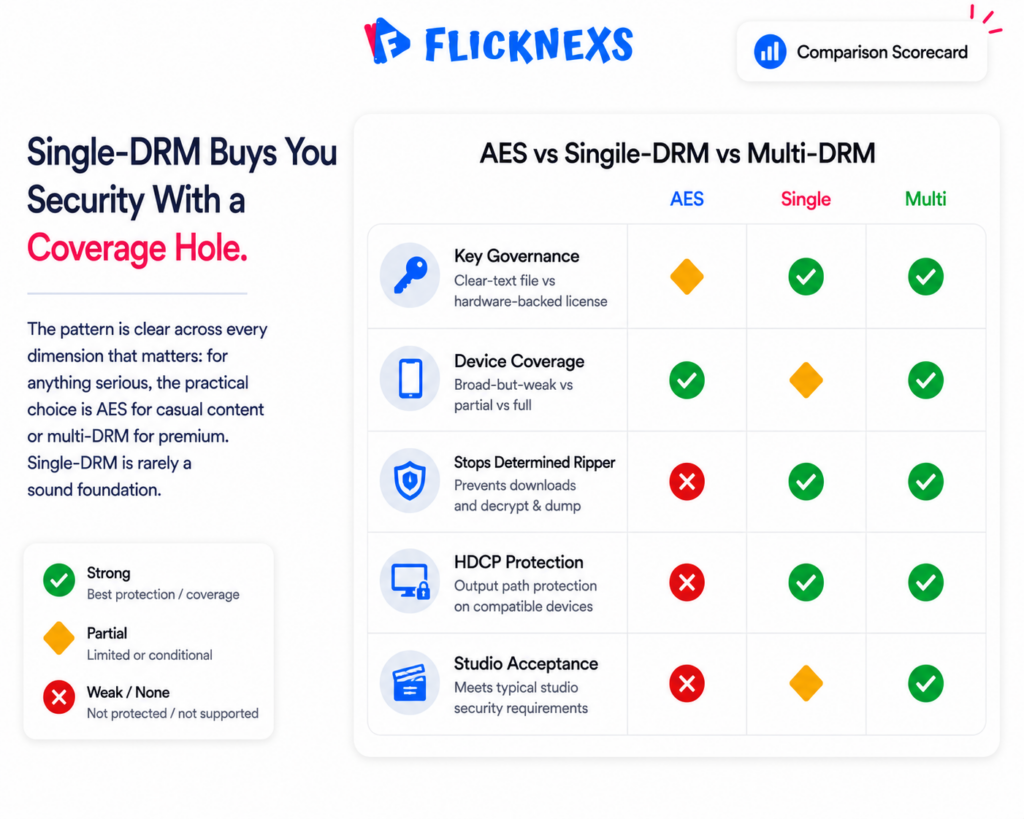
The pattern is clear. Single-DRM buys you the security of DRM but keeps a coverage hole. For anything serious, the practical choice is AES (cheap, casual) or multi-DRM (studio-grade). Single-DRM mainly makes sense as a short-lived, platform-specific edge case, rarely as your foundation.
Who should choose what
Choose plain AES (with token-protected keys)
- Your content is free, ad-supported low-value, internal training, community, or your own original material where casual deterrence is enough.
- You have no studio or licensor security obligations.
- You want the lowest cost and simplest pipeline, and you accept that a determined user could rip it.
Choose single-DRM
- Your audience is genuinely captive to one ecosystem (say, an internal iOS-only enterprise app on FairPlay) and you will never need other platforms.
- You understand that adding a second platform later means migrating to multi-DRM anyway.
For most public-facing OTT services this is a trap. The day you add a web player or an Android app, single-DRM content stops playing for those users.
Choose multi-DRM
- You carry licensed, premium, first-run, sports, or any content where a licensor or the MPA-style security tiers apply.
- Piracy or revenue leakage is a real business risk.
- You serve a broad audience across web, iOS, Android, smart TV and consoles, which is to say almost every commercial OTT business.
- You need offline downloads, rental windows, HDCP, or concurrency control.
The hidden cost of doing multi-DRM yourself
Multi-DRM is the right call for premium content. Nobody argues with that part. Where teams get burned is assuming they can just bolt it together over a sprint or two.
Here’s what “assembling it from scratch” actually involves. A CENC packaging pipeline. Three separate license server integrations, because Widevine, FairPlay and PlayReady each have their own provisioning, certificates and request formats, none of which talk to each other. Correct EME wiring in every player you support. Real device testing across platforms, not just a simulator. And then maintenance, forever, as OS and browser DRM behavior shifts under you. FairPlay is the awkward one in particular. It needs Apple certificates and a key-delivery flow that has nothing to do with the CENC path Widevine and PlayReady use, so you’re not building one system three times, you’re building two different systems.
The part nobody warns you about going in is the maintenance tail. A Chrome update or a new Android device tier can quietly break playback for a slice of your users, and you won’t know until the support tickets start piling up. Somebody on your team now owns that problem forever, whether they signed up for it or not.
This is exactly the kind of work a managed platform should take off your plate. Flicknexs white-label OTT builds in multi-DRM, Widevine, FairPlay and PlayReady, alongside AES encryption and token-secured delivery. You get studio-grade protection without standing up three license servers yourself, and you launch in weeks instead of burning a quarter on DRM plumbing. You set the policy. The platform handles packaging, per-platform licensing and player integration.
A practical rollout sequence
If you are unsure where to start, this staged approach keeps cost proportional to risk:
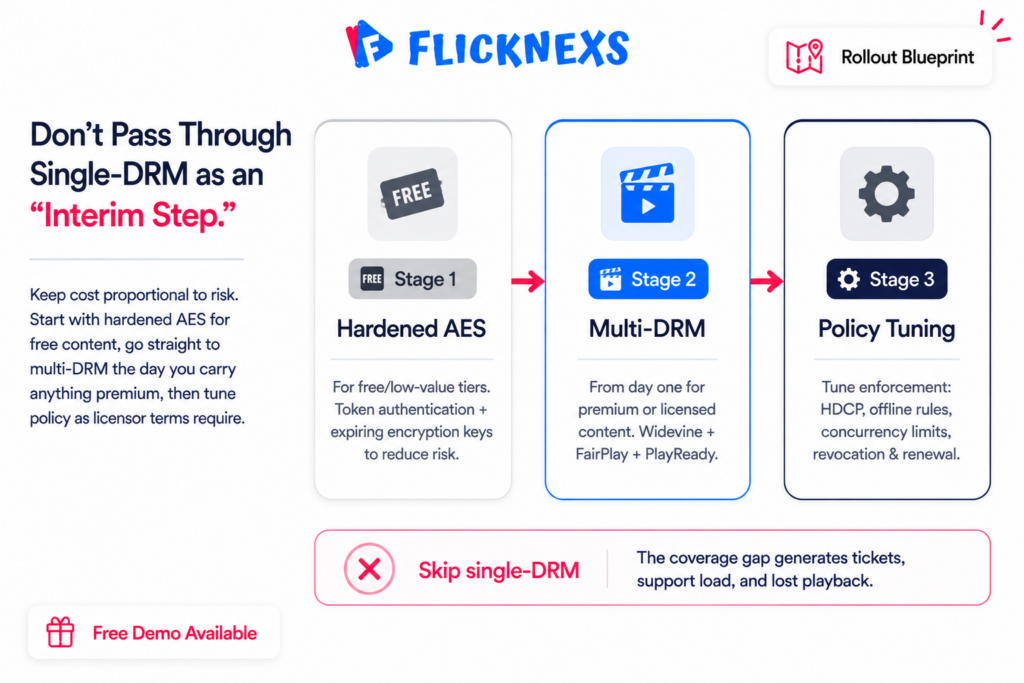
- Stage 1: AES with hardened keys for your free and low-value tiers (token auth, expiring keys, per-session keys).
- Stage 2: Multi-DRM for premium, licensed, or paywalled content from day one of carrying it. Do not pass through single-DRM as an interim step. The coverage gap will generate support tickets and lost playback.
- Stage 3: Policy tuning. Enable HDCP output protection, offline rules, concurrency caps and revocation as your licensor terms require, referencing the studio compliance tiers.
Want to see how this looks configured rather than theorised? Book a Flicknexs demo and we will walk through AES and multi-DRM on a live white-label build for your content type.
Frequently asked questions
Related guides
- DRM Compliance for Studios: Meeting MPA & Hollywood Protection Tiers
- AES Encryption vs DRM for Video: What’s the Difference?
- Flicknexs, white-label OTT, VOD & IPTV platform
Ready to build?
If you’re planning your next DRM / Security project, Flicknexs handles the video infrastructure end-to-end — so you can ship in weeks, not months.
- secure your OTT with DRM
- see Flicknexs pricing
More on video DRM and security
Continue exploring more on this topic across the Flicknexs blog.
- Deep dive: How to Start OTT Platform in 2026
- What is DRM? How Does It Works: Best Guide for DRM in 2025
- The Ultimate Guide to Geo Blocking: How It Works, Its Implications, and How to Bypass
- AES Encryption vs DRM for Video: What Actually Protects Your Content
Ready to build?
If you’re planning your next DRM / Security project, Flicknexs handles the video infrastructure end-to-end — so you can ship in weeks, not months.
- secure your OTT with DRM
- see Flicknexs pricing
More on video DRM and security
Continue exploring more on this topic across the Flicknexs blog.
- Deep dive: How to Start OTT Platform in 2026
- What is DRM? How Does It Works: Best Guide for DRM in 2025
- The Ultimate Guide to Geo Blocking: How It Works, Its Implications, and How to Bypass
- AES Encryption vs DRM for Video: What Actually Protects Your Content
Ready to build?
If you’re planning your next DRM / Security project, Flicknexs handles the video infrastructure end-to-end — so you can ship in weeks, not months.
- secure your OTT with DRM
- see Flicknexs pricing
More on video DRM and security
Continue exploring more on this topic across the Flicknexs blog.
- Deep dive: How to Start OTT Platform in 2026
- What is DRM? How Does It Works: Best Guide for DRM in 2025
- The Ultimate Guide to Geo Blocking: How It Works, Its Implications, and How to Bypass
- AES Encryption vs DRM for Video: What Actually Protects Your Content
Ready to build?
If you’re planning your next DRM / Security project, Flicknexs handles the video infrastructure end-to-end — so you can ship in weeks, not months.
- secure your OTT with DRM
- see Flicknexs pricing
More on video DRM and security
Continue exploring more on this topic across the Flicknexs blog.
- Deep dive: How to Start OTT Platform in 2026
- What is DRM? How Does It Works: Best Guide for DRM in 2025
- The Ultimate Guide to Geo Blocking: How It Works, Its Implications, and How to Bypass
- AES Encryption vs DRM for Video: What Actually Protects Your Content
Ready to build?
If you’re planning your next DRM / Security project, Flicknexs handles the video infrastructure end-to-end — so you can ship in weeks, not months.
- secure your OTT with DRM
- see Flicknexs pricing
More on video DRM and security
Continue exploring more on this topic across the Flicknexs blog.
- Deep dive: How to Start OTT Platform in 2026
- What is DRM? How Does It Works: Best Guide for DRM in 2025
- The Ultimate Guide to Geo Blocking: How It Works, Its Implications, and How to Bypass
- AES Encryption vs DRM for Video: What Actually Protects Your Content
Ready to build?
If you’re planning your next DRM / Security project, Flicknexs handles the video infrastructure end-to-end — so you can ship in weeks, not months.
- secure your OTT with DRM
- see Flicknexs pricing
More on video DRM and security
Continue exploring more on this topic across the Flicknexs blog.
- Deep dive: How to Start OTT Platform in 2026
- What is DRM? How Does It Works: Best Guide for DRM in 2025
- The Ultimate Guide to Geo Blocking: How It Works, Its Implications, and How to Bypass
- AES Encryption vs DRM for Video: What Actually Protects Your Content
Ready to build?
If you’re planning your next DRM / Security project, Flicknexs handles the video infrastructure end-to-end — so you can ship in weeks, not months.
- secure your OTT with DRM
- see Flicknexs pricing
More on video DRM and security
Continue exploring more on this topic across the Flicknexs blog.
- Deep dive: How to Start OTT Platform in 2026
- What is DRM? How Does It Works: Best Guide for DRM in 2025
- The Ultimate Guide to Geo Blocking: How It Works, Its Implications, and How to Bypass
- AES Encryption vs DRM for Video: What Actually Protects Your Content
Ready to build?
If you’re planning your next DRM / Security project, Flicknexs handles the video infrastructure end-to-end — so you can ship in weeks, not months.
- secure your OTT with DRM
- see Flicknexs pricing
More on video DRM and security
Continue exploring more on this topic across the Flicknexs blog.
- Deep dive: How to Start OTT Platform in 2026
- What is DRM? How Does It Works: Best Guide for DRM in 2025
- The Ultimate Guide to Geo Blocking: How It Works, Its Implications, and How to Bypass
- AES Encryption vs DRM for Video: What Actually Protects Your Content
Ready to build?
If you’re planning your next DRM / Security project, Flicknexs handles the video infrastructure end-to-end — so you can ship in weeks, not months.
- secure your OTT with DRM
- see Flicknexs pricing
More on video DRM and security
Continue exploring more on this topic across the Flicknexs blog.
- Deep dive: How to Start OTT Platform in 2026
- What is DRM? How Does It Works: Best Guide for DRM in 2025
- The Ultimate Guide to Geo Blocking: How It Works, Its Implications, and How to Bypass
- AES Encryption vs DRM for Video: What Actually Protects Your Content
Ready to build?
If you’re planning your next DRM / Security project, Flicknexs handles the video infrastructure end-to-end — so you can ship in weeks, not months.
- secure your OTT with DRM
- see Flicknexs pricing
More on video DRM and security
Continue exploring more on this topic across the Flicknexs blog.

