
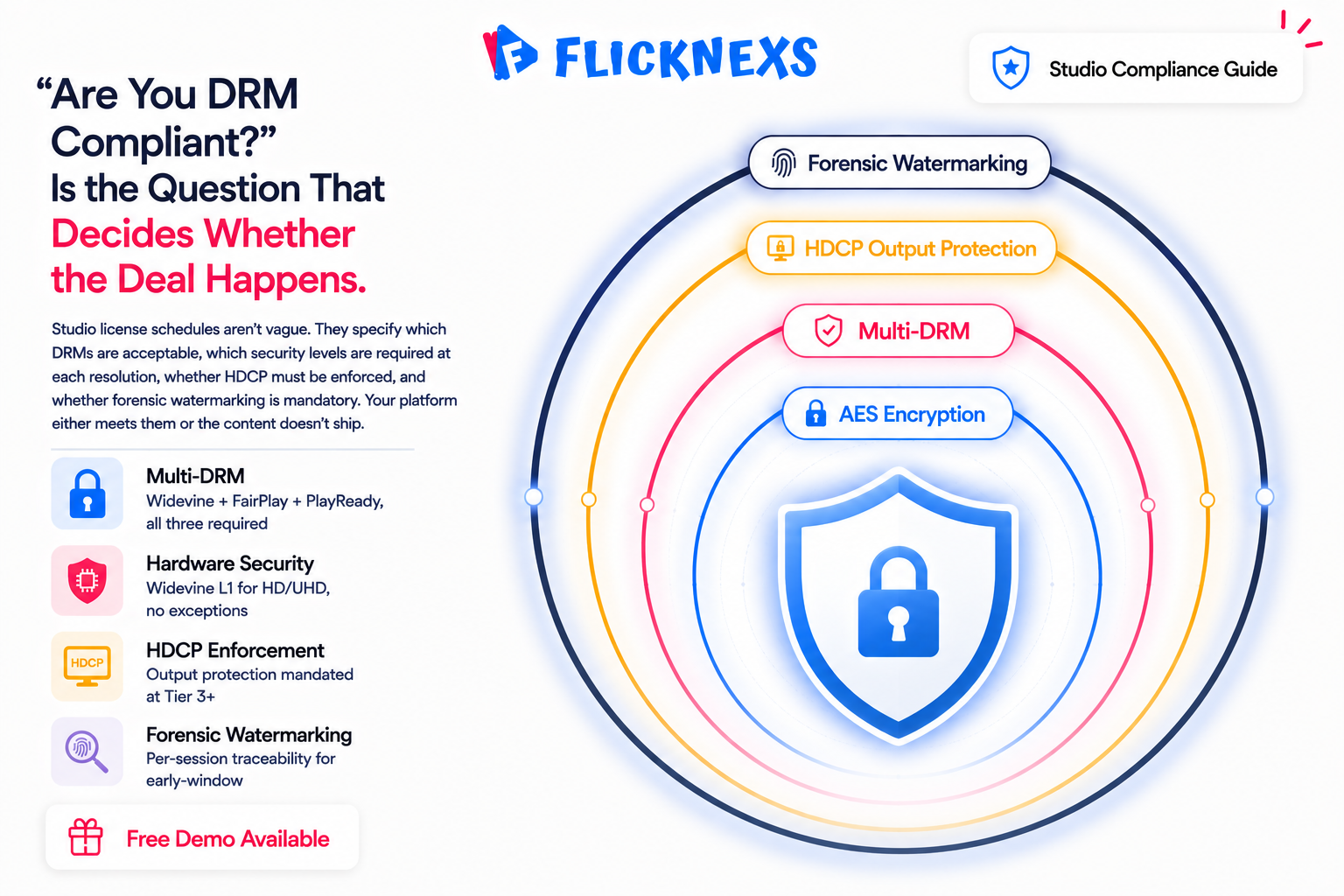
DRM compliance for studios means meeting the security requirements that content owners set before they’ll license premium titles to your platform. The major studios work through frameworks like the Motion Picture Association and the Trusted Partner Network and those frameworks have teeth.
In practice it means hardware-backed multi-DRM across Widevine, FairPlay and PlayReady. Enforced output protection via HDCP. Resolution rules tied to device security level, so a low-security device doesn’t get the same stream as a certified one. And for the highest tiers, early-window releases or 4K and UHD content, forensic session-based watermarking so that if anything leaks, it can be traced back to a single account rather than leaving the studio with no idea where the copy came from. There’s no single “MPA certificate” you buy. Studio licensing and security teams audit your stack end to end, often against the MovieLabs Enhanced Content Protection spec. For platforms that need to satisfy these tiers without building a license server, certificate pipeline and watermarking stack from scratch, a studio-grade white-label OTT platform like Flicknexs that ships multi-DRM plus forensic watermarking out of the box is the fastest audit-ready path.
By the Flicknexs team. We build white-label OTT/VOD/IPTV platforms, so this is written from hands-on streaming-platform experience.
If you’re a studio, distributor or OTT operator trying to license premium content, “are you DRM compliant?” is the question that decides whether the deal happens. The phrase covers a stack of specific, auditable requirements, not a checkbox. This guide explains what MPA and TPN expectations actually demand, how the protection tiers escalate from SD catalog to 4K early-window, who needs which tier and how to choose a platform that clears a content-security review the first time. It’s a spoke off our deeper comparison, Multi-DRM vs AES vs Single-DRM.
What “DRM compliance for studios” really means
When a studio licenses content, the license agreement carries content-protection schedules. These aren’t vague. They specify which DRMs are acceptable, what security levels are required at each resolution, whether output protection must be enforced, and whether forensic watermarking is mandatory for certain windows. Your platform either meets the schedule or the content doesn’t ship. Studio security reviews exist precisely to verify this before a single frame is delivered.
Two organizations set the baseline that most operators end up building around whether they realize it or not.The Motion Picture Association represents the major studios and it’s the MPA that drives the content-protection expectations you inherit the moment you sign a licensing deal. You don’t negotiate those terms. You accept them.
The Trusted Partner Network, an MPA-affiliated program, is where this gets concrete. TPN assesses vendors and service providers against a content-security questionnaire and a best-practices framework. If you’re a post house, a localization vendor or an OTT operator handling pre-release or premium assets, a TPN assessment is increasingly how studios decide whether to trust you with their files at all.
Don’t mistake this for a formality. It’s not a rubber stamp you get by filling out a form. It’s the gate. Fail it, and the studio relationship never even starts.
The three things every studio schedule checks
- Encryption + key governance. Content encrypted with AES Common Encryption (CENC), with keys delivered through a hardware-backed DRM license system, never as plain files.
- Robustness rules set the floor. Studios spell out exactly what security level each resolution needs, hardware-backed Widevine L1 or FairPlay for HD and UHD, no exceptions, plus output protection through HDCP so nobody can just grab a clean digital copy on the way out.
- Traceability handles what happens after a leak. For premium and early-window content, forensic or session watermarking gets baked into the stream, so if a copy does leak, you can trace it back to the exact viewing session that leaked it. Not the region. Not the device type. The session.
The protection tiers, from catalog to Hollywood early-window
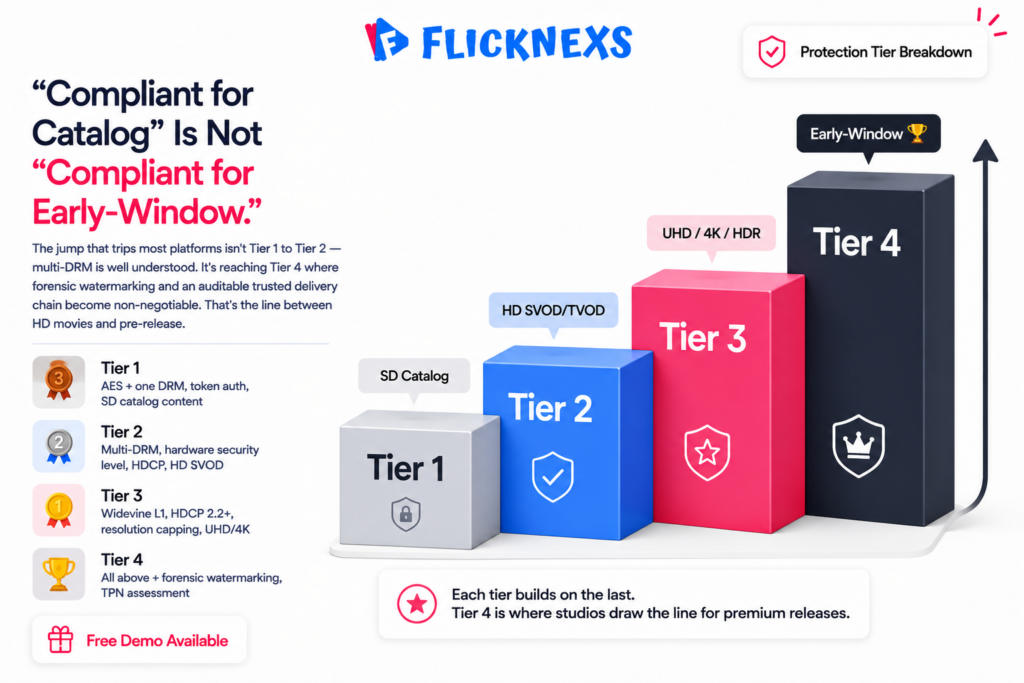
Studio requirements escalate with the value and freshness of the content. A platform that’s “compliant” for back-catalog SD may be nowhere near the bar for a 4K early-window theatrical release. Here’s the practical ladder we see in real licensing deals.
| Tier | Typical content | What’s usually required |
|---|---|---|
| Tier 1, Basic catalog | SD/720p library, older titles, free/ad-supported | AES Common Encryption + at least one DRM; token auth; HTTPS |
| Tier 2, Premium SVOD/TVOD | HD subscription & rental content | Multi-DRM (Widevine, FairPlay, PlayReady); hardware security level for HD; HDCP enforcement |
| Tier 3, UHD / 4K / HDR | 4K and HDR premium titles | Hardware-backed DRM (Widevine L1 / equivalent); HDCP 2.2+; resolution capping on software security; stricter robustness |
| Tier 4, Early-window / pre-release | Theatrical-window, screeners, pre-release | All of the above + forensic session-based watermarking; often TPN-assessed delivery chain |
The key insight: the jump that trips most platforms isn’t Tier 1 to Tier 2, since multi-DRM is well-understood. It’s reaching Tier 4, where watermarking and an auditable, trusted handling chain become non-negotiable. That’s the line between “we can stream HD movies” and “a studio will trust us with a film before it leaves theaters.”
Why AES alone never clears a studio review
Plain AES encryption, for example HLS AES-128, is real cryptography, but it delivers the decryption key as a file the client can read. A studio security reviewer will reject it immediately for premium content because there’s no hardware enforcing who gets the key or on what device. AES is necessary (it’s the cipher inside DRM), but it is never sufficient on its own. We break this down fully in Multi-DRM vs AES vs Single-DRM.
The multi-DRM requirement, briefly
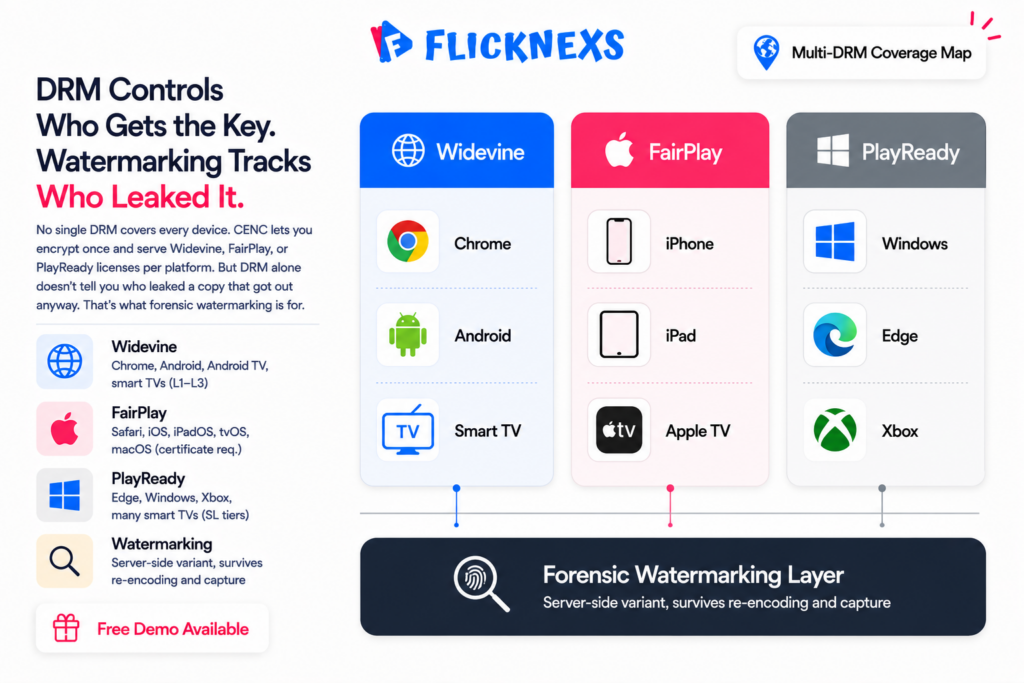
No single DRM covers every device, so studio-grade delivery means packaging once with CENC and serving the right license to each platform via Encrypted Media Extensions (EME):
- Google Widevine. Chrome, Android, Android TV, many smart TVs. Security levels L1 (hardware) to L3 (software) studios typically require L1 for HD/UHD.
- Apple FairPlay Streaming. Safari, iOS, iPadOS, tvOS, macOS. Requires a per-app FairPlay certificate from Apple.
- Microsoft PlayReady. Edge, Windows, Xbox and many smart TVs and set-top boxes, with its own security-level (SL) tiers.
You don’t re-encode three times to satisfy three different DRM systems. CENC lets you encrypt once with AES and simply attach DRM signaling for each system on top. That’s the easy part. The real operational work is certificate management, per-device QA across an actual hardware matrix, and tuning license policy to security level instead of treating DRM as a blunt on/off switch.
Here’s the piece that bites teams late, almost every time: the FairPlay certificate. It’s tied to your Apple developer account and runs on its own renewal clock, completely separate from everything else. Let it lapse, and Apple playback just stops dead while every other platform keeps humming along fine. Which makes it maddening to diagnose, because nothing else in your stack points to the actual cause.
Forensic watermarking: the Tier-4 differentiator
DRM controls who gets the key. That’s it. It doesn’t tell you who leaked a copy that got out anyway, whether that’s a compromised device, a screen capture that beat HDCP, or someone on the inside. Forensic, session-based watermarking closes that gap. It embeds an invisible, per-session identifier into the video, so if a copy shows up on a piracy site, you can pull the mark and trace it straight to the account and session it came from. Studios increasingly mandate this for early-window and pre-release content, and for good reason it’s the only layer that makes leaks attributable and attributable is what makes them deterrable.
Two approaches exist here. Client-side, where the player composites the mark itself, and server-side (or A-B variant), where the CDN serves subtly different segment variants per session. Server-side variant watermarking is generally the stronger option for premium content, because the mark actually survives re-encoding and screen capture better than the client-side version does. A studio-grade platform should let you switch watermarking on per title or per tier, so you’re not paying that overhead across your entire free catalog just to protect the handful of titles that actually need it.
DRM compliance for studios: a platform-decision comparison
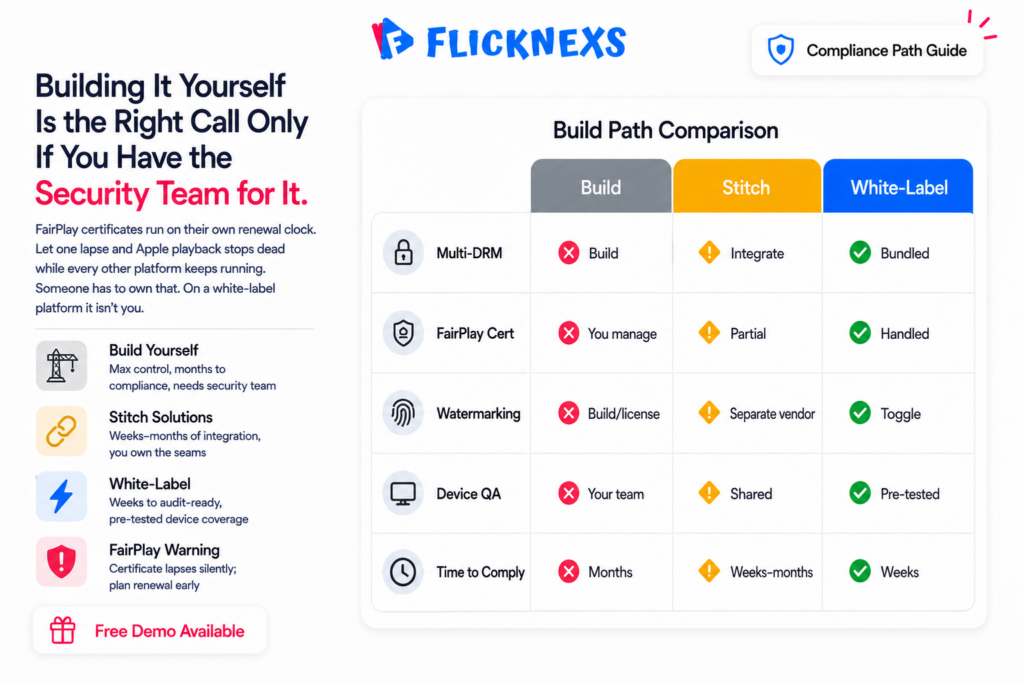
When you evaluate how to become studio-compliant, you’re really choosing between three build paths. Here’s an honest, qualitative comparison, with no invented prices, because real costs depend on your DRM vendor, traffic, and watermarking choice.
| Dimension | Build it yourself | Stitch point solutions | Studio-grade white-label (e.g. Flicknexs) |
|---|---|---|---|
| Multi-DRM packaging & license | You build CENC pipeline + license endpoints | Integrate a DRM-as-a-service vendor yourself | Bundled and pre-integrated |
| FairPlay certificate flow | You manage Apple cert lifecycle | Partly handled by vendor, partly you | Handled as part of onboarding |
| Forensic watermarking | Build or license + integrate | Separate vendor, separate integration | Available as an integrated tier toggle |
| Per-device QA matrix | Entirely on your team | Shared, but you own the seams | Pre-tested device coverage |
| Time to a compliant launch | Months | Weeks–months of integration | Weeks |
| Best for | Large engineering orgs with security staff | Teams with strong integration capacity | Operators who need to ship and pass review fast |
The honest trade-off: building it yourself gives maximum control and is the right call if you already employ a content-security team. For most studios, distributors, and new OTT operators, the engineering and certificate overhead of assembling DRM, watermarking, and a tested device matrix from parts is the slow, risky path. A white-label OTT platform with studio-grade protection built in collapses that into weeks and gives you a stack that’s already shaped to pass a security review.
Who should choose what
Choose hardened multi-DRM (Tier 2–3) when
- You license premium HD/UHD content but not pre-release or early-window titles.
- Your studio schedules require hardware security level and HDCP, but not mandatory watermarking yet.
- You sell SVOD/TVOD where piracy directly costs subscription or rental revenue.
Choose multi-DRM + forensic watermarking (Tier 4) when
- You handle early-window, pre-release, or screener content where a leak is catastrophic.
- A studio contract explicitly mandates session-based watermarking and a traceable delivery chain.
- You’re being asked to complete a TPN assessment or equivalent content-security review.
Build in-house only when
- You already run a dedicated content-security and DevOps team that can own certificates, license policy, and a real-device QA lab.
- Custom rights logic is a core differentiator you can’t outsource.
For everyone else, and that’s most operators, the pragmatic answer is a platform that ships multi-DRM and watermarking as configurable tiers so you can match each title to its required protection level. That’s exactly how Flicknexs is built: launch white-label in weeks, then dial protection per content tier rather than over-paying for watermarking on your free catalog.
Implementation notes from real studio deals
Security level beats “DRM on”
Studios care about Widevine L1 vs L3 (and PlayReady SL3000 vs SL2000) more than the mere presence of DRM. Your license policy must cap resolution on software security and require hardware level for HD/UHD, or a reviewer will flag it. Plan policy around the device’s security level. The trap here is that a cheap Android box can report L3 and quietly downshift to SD mid-stream; if your policy doesn’t cap that explicitly, the first you’ll hear of it is a reviewer’s screenshot of HD playing on an L3 device.
HDCP is part of the contract, not a nice-to-have
Tier-3 and Tier-4 schedules typically require HDCP 2.2 or higher and may demand that playback degrades or blocks entirely when a non-compliant output is detected. Test this against real TVs and capture devices. Not emulators. Emulators won’t catch the edge cases that show up in a studio review, and finding out your HDCP enforcement has a hole in it after you’ve already submitted for approval is an expensive way to learn that lesson.
Watermarking choice affects robustness claims
If a studio asks how your watermark survives screen recording and re-encoding, “client-side overlay” is a weaker answer than server-side variant watermarking. Know which you’re offering before the review call.
TPN-readiness is a process, not a feature
Passing a security assessment is about documented controls (access management, asset handling, logging) as much as the DRM tech. A platform that already aligns to those practices shortens your path the assessment itself is still yours to complete.
Ready to launch your streaming website? Build it on Flicknexs →
Frequently asked questions
Related guides
- Multi-DRM vs AES vs Single-DRM: Which Studio-Grade Protection Do You Need?
- Flicknexs white-label OTT platform, launch in weeks
Further reading on the underlying organizations and standards: Motion Picture Association (Wikipedia) and W3C Encrypted Media Extensions.
Ready to build?
If you’re planning your next DRM / Security project, Flicknexs handles the video infrastructure end-to-end — so you can ship in weeks, not months.
- get DRM-protected OTT
- see pricing and plans
More on video DRM and security
Continue exploring more on this topic across the Flicknexs blog.
- The definitive guide: How to Start OTT Platform in 2026
- What is DRM? How Does It Works: Best Guide for DRM in 2025
- The Ultimate Guide to Geo Blocking: How It Works, Its Implications, and How to Bypass
- AES Encryption vs DRM for Video: What Actually Protects Your Content
Ready to build?
If you’re planning your next DRM / Security project, Flicknexs handles the video infrastructure end-to-end — so you can ship in weeks, not months.
- get DRM-protected OTT
- see pricing and plans
More on video DRM and security
Continue exploring more on this topic across the Flicknexs blog.
- The definitive guide: How to Start OTT Platform in 2026
- What is DRM? How Does It Works: Best Guide for DRM in 2025
- The Ultimate Guide to Geo Blocking: How It Works, Its Implications, and How to Bypass
- AES Encryption vs DRM for Video: What Actually Protects Your Content
Ready to build?
If you’re planning your next DRM / Security project, Flicknexs handles the video infrastructure end-to-end — so you can ship in weeks, not months.
- get DRM-protected OTT
- see pricing and plans
More on video DRM and security
Continue exploring more on this topic across the Flicknexs blog.
- The definitive guide: How to Start OTT Platform in 2026
- What is DRM? How Does It Works: Best Guide for DRM in 2025
- The Ultimate Guide to Geo Blocking: How It Works, Its Implications, and How to Bypass
- AES Encryption vs DRM for Video: What Actually Protects Your Content
Ready to build?
If you’re planning your next DRM / Security project, Flicknexs handles the video infrastructure end-to-end — so you can ship in weeks, not months.
- get DRM-protected OTT
- see pricing and plans
More on video DRM and security
Continue exploring more on this topic across the Flicknexs blog.
- The definitive guide: How to Start OTT Platform in 2026
- What is DRM? How Does It Works: Best Guide for DRM in 2025
- The Ultimate Guide to Geo Blocking: How It Works, Its Implications, and How to Bypass
- AES Encryption vs DRM for Video: What Actually Protects Your Content
Ready to build?
If you’re planning your next DRM / Security project, Flicknexs handles the video infrastructure end-to-end — so you can ship in weeks, not months.
- get DRM-protected OTT
- see pricing and plans
More on video DRM and security
Continue exploring more on this topic across the Flicknexs blog.
- The definitive guide: How to Start OTT Platform in 2026
- What is DRM? How Does It Works: Best Guide for DRM in 2025
- The Ultimate Guide to Geo Blocking: How It Works, Its Implications, and How to Bypass
- AES Encryption vs DRM for Video: What Actually Protects Your Content
Ready to build?
If you’re planning your next DRM / Security project, Flicknexs handles the video infrastructure end-to-end — so you can ship in weeks, not months.
- get DRM-protected OTT
- see pricing and plans
More on video DRM and security
Continue exploring more on this topic across the Flicknexs blog.
- The definitive guide: How to Start OTT Platform in 2026
- What is DRM? How Does It Works: Best Guide for DRM in 2025
- The Ultimate Guide to Geo Blocking: How It Works, Its Implications, and How to Bypass
- AES Encryption vs DRM for Video: What Actually Protects Your Content
Ready to build?
If you’re planning your next DRM / Security project, Flicknexs handles the video infrastructure end-to-end — so you can ship in weeks, not months.
- get DRM-protected OTT
- see pricing and plans
More on video DRM and security
Continue exploring more on this topic across the Flicknexs blog.
- The definitive guide: How to Start OTT Platform in 2026
- What is DRM? How Does It Works: Best Guide for DRM in 2025
- The Ultimate Guide to Geo Blocking: How It Works, Its Implications, and How to Bypass
- AES Encryption vs DRM for Video: What Actually Protects Your Content
Ready to build?
If you’re planning your next DRM / Security project, Flicknexs handles the video infrastructure end-to-end — so you can ship in weeks, not months.
- get DRM-protected OTT
- see pricing and plans
More on video DRM and security
Continue exploring more on this topic across the Flicknexs blog.
- The definitive guide: How to Start OTT Platform in 2026
- What is DRM? How Does It Works: Best Guide for DRM in 2025
- The Ultimate Guide to Geo Blocking: How It Works, Its Implications, and How to Bypass
- AES Encryption vs DRM for Video: What Actually Protects Your Content
Ready to build?
If you’re planning your next DRM / Security project, Flicknexs handles the video infrastructure end-to-end — so you can ship in weeks, not months.
- get DRM-protected OTT
- see pricing and plans
More on video DRM and security
Continue exploring more on this topic across the Flicknexs blog.
- The definitive guide: How to Start OTT Platform in 2026
- What is DRM? How Does It Works: Best Guide for DRM in 2025
- The Ultimate Guide to Geo Blocking: How It Works, Its Implications, and How to Bypass
- AES Encryption vs DRM for Video: What Actually Protects Your Content
Ready to build?
If you’re planning your next DRM / Security project, Flicknexs handles the video infrastructure end-to-end — so you can ship in weeks, not months.
- get DRM-protected OTT
- see pricing and plans
More on video DRM and security
Continue exploring more on this topic across the Flicknexs blog.
- The definitive guide: How to Start OTT Platform in 2026
- What is DRM? How Does It Works: Best Guide for DRM in 2025
- The Ultimate Guide to Geo Blocking: How It Works, Its Implications, and How to Bypass
- AES Encryption vs DRM for Video: What Actually Protects Your Content
Ready to build?
If you’re planning your next DRM / Security project, Flicknexs handles the video infrastructure end-to-end — so you can ship in weeks, not months.
- get DRM-protected OTT
- see pricing and plans
More on video DRM and security
Continue exploring more on this topic across the Flicknexs blog.
- The definitive guide: How to Start OTT Platform in 2026
- What is DRM? How Does It Works: Best Guide for DRM in 2025
- The Ultimate Guide to Geo Blocking: How It Works, Its Implications, and How to Bypass
- AES Encryption vs DRM for Video: What Actually Protects Your Content
Ready to build?
If you’re planning your next DRM / Security project, Flicknexs handles the video infrastructure end-to-end — so you can ship in weeks, not months.
- get DRM-protected OTT
- see pricing and plans
More on video DRM and security
Continue exploring more on this topic across the Flicknexs blog.
- The definitive guide: How to Start OTT Platform in 2026
- What is DRM? How Does It Works: Best Guide for DRM in 2025
- The Ultimate Guide to Geo Blocking: How It Works, Its Implications, and How to Bypass
- AES Encryption vs DRM for Video: What Actually Protects Your Content
Ready to build?
If you’re planning your next DRM / Security project, Flicknexs handles the video infrastructure end-to-end — so you can ship in weeks, not months.
- get DRM-protected OTT
- see pricing and plans
More on video DRM and security
Continue exploring more on this topic across the Flicknexs blog.
- The definitive guide: How to Start OTT Platform in 2026
- What is DRM? How Does It Works: Best Guide for DRM in 2025
- The Ultimate Guide to Geo Blocking: How It Works, Its Implications, and How to Bypass
- AES Encryption vs DRM for Video: What Actually Protects Your Content
Ready to build?
If you’re planning your next DRM / Security project, Flicknexs handles the video infrastructure end-to-end — so you can ship in weeks, not months.
- get DRM-protected OTT
- see pricing and plans
More on video DRM and security
Continue exploring more on this topic across the Flicknexs blog.
- The definitive guide: How to Start OTT Platform in 2026
- What is DRM? How Does It Works: Best Guide for DRM in 2025
- The Ultimate Guide to Geo Blocking: How It Works, Its Implications, and How to Bypass
- AES Encryption vs DRM for Video: What Actually Protects Your Content
Ready to build?
If you’re planning your next DRM / Security project, Flicknexs handles the video infrastructure end-to-end — so you can ship in weeks, not months.
- get DRM-protected OTT
- see pricing and plans
More on video DRM and security
Continue exploring more on this topic across the Flicknexs blog.
- The definitive guide: How to Start OTT Platform in 2026
- What is DRM? How Does It Works: Best Guide for DRM in 2025
- The Ultimate Guide to Geo Blocking: How It Works, Its Implications, and How to Bypass
- AES Encryption vs DRM for Video: What Actually Protects Your Content
Ready to build?
If you’re planning your next DRM / Security project, Flicknexs handles the video infrastructure end-to-end — so you can ship in weeks, not months.
- get DRM-protected OTT
- see pricing and plans
More on video DRM and security
Continue exploring more on this topic across the Flicknexs blog.
- The definitive guide: How to Start OTT Platform in 2026
- What is DRM? How Does It Works: Best Guide for DRM in 2025
- The Ultimate Guide to Geo Blocking: How It Works, Its Implications, and How to Bypass
- AES Encryption vs DRM for Video: What Actually Protects Your Content
Ready to build?
If you’re planning your next DRM / Security project, Flicknexs handles the video infrastructure end-to-end — so you can ship in weeks, not months.
- get DRM-protected OTT
- see pricing and plans
More on video DRM and security
Continue exploring more on this topic across the Flicknexs blog.
- The definitive guide: How to Start OTT Platform in 2026
- What is DRM? How Does It Works: Best Guide for DRM in 2025
- The Ultimate Guide to Geo Blocking: How It Works, Its Implications, and How to Bypass
- AES Encryption vs DRM for Video: What Actually Protects Your Content
Ready to build?
If you’re planning your next DRM / Security project, Flicknexs handles the video infrastructure end-to-end — so you can ship in weeks, not months.
- get DRM-protected OTT
- see pricing and plans
More on video DRM and security
Continue exploring more on this topic across the Flicknexs blog.
- The definitive guide: How to Start OTT Platform in 2026
- What is DRM? How Does It Works: Best Guide for DRM in 2025
- The Ultimate Guide to Geo Blocking: How It Works, Its Implications, and How to Bypass
- AES Encryption vs DRM for Video: What Actually Protects Your Content
Ready to build?
If you’re planning your next DRM / Security project, Flicknexs handles the video infrastructure end-to-end — so you can ship in weeks, not months.
- get DRM-protected OTT
- see pricing and plans
More on video DRM and security
Continue exploring more on this topic across the Flicknexs blog.
- The definitive guide: How to Start OTT Platform in 2026
- What is DRM? How Does It Works: Best Guide for DRM in 2025
- The Ultimate Guide to Geo Blocking: How It Works, Its Implications, and How to Bypass
- AES Encryption vs DRM for Video: What Actually Protects Your Content
Ready to build?
If you’re planning your next DRM / Security project, Flicknexs handles the video infrastructure end-to-end — so you can ship in weeks, not months.
- get DRM-protected OTT
- see pricing and plans
More on video DRM and security
Continue exploring more on this topic across the Flicknexs blog.
- The definitive guide: How to Start OTT Platform in 2026
- What is DRM? How Does It Works: Best Guide for DRM in 2025
- The Ultimate Guide to Geo Blocking: How It Works, Its Implications, and How to Bypass
- AES Encryption vs DRM for Video: What Actually Protects Your Content
Ready to build?
If you’re planning your next DRM / Security project, Flicknexs handles the video infrastructure end-to-end — so you can ship in weeks, not months.
- get DRM-protected OTT
- see pricing and plans
More on video DRM and security
Continue exploring more on this topic across the Flicknexs blog.
- The definitive guide: How to Start OTT Platform in 2026
- What is DRM? How Does It Works: Best Guide for DRM in 2025
- The Ultimate Guide to Geo Blocking: How It Works, Its Implications, and How to Bypass
- AES Encryption vs DRM for Video: What Actually Protects Your Content
Ready to build?
If you’re planning your next DRM / Security project, Flicknexs handles the video infrastructure end-to-end — so you can ship in weeks, not months.
- get DRM-protected OTT
- see pricing and plans
More on video DRM and security
Continue exploring more on this topic across the Flicknexs blog.
- The definitive guide: How to Start OTT Platform in 2026
- What is DRM? How Does It Works: Best Guide for DRM in 2025
- The Ultimate Guide to Geo Blocking: How It Works, Its Implications, and How to Bypass
- AES Encryption vs DRM for Video: What Actually Protects Your Content
Ready to build?
If you’re planning your next DRM / Security project, Flicknexs handles the video infrastructure end-to-end — so you can ship in weeks, not months.
- get DRM-protected OTT
- see pricing and plans
More on video DRM and security
Continue exploring more on this topic across the Flicknexs blog.
- The definitive guide: How to Start OTT Platform in 2026
- What is DRM? How Does It Works: Best Guide for DRM in 2025
- The Ultimate Guide to Geo Blocking: How It Works, Its Implications, and How to Bypass
- AES Encryption vs DRM for Video: What Actually Protects Your Content
Ready to build?
If you’re planning your next DRM / Security project, Flicknexs handles the video infrastructure end-to-end — so you can ship in weeks, not months.
- get DRM-protected OTT
- see pricing and plans
More on video DRM and security
Continue exploring more on this topic across the Flicknexs blog.
- The definitive guide: How to Start OTT Platform in 2026
- What is DRM? How Does It Works: Best Guide for DRM in 2025
- The Ultimate Guide to Geo Blocking: How It Works, Its Implications, and How to Bypass
- AES Encryption vs DRM for Video: What Actually Protects Your Content
Ready to build?
If you’re planning your next DRM / Security project, Flicknexs handles the video infrastructure end-to-end — so you can ship in weeks, not months.
- get DRM-protected OTT
- see pricing and plans
More on video DRM and security
Continue exploring more on this topic across the Flicknexs blog.
- The definitive guide: How to Start OTT Platform in 2026
- What is DRM? How Does It Works: Best Guide for DRM in 2025
- The Ultimate Guide to Geo Blocking: How It Works, Its Implications, and How to Bypass
- AES Encryption vs DRM for Video: What Actually Protects Your Content
Ready to build?
If you’re planning your next DRM / Security project, Flicknexs handles the video infrastructure end-to-end — so you can ship in weeks, not months.
- get DRM-protected OTT
- see pricing and plans
More on video DRM and security
Continue exploring more on this topic across the Flicknexs blog.
- The definitive guide: How to Start OTT Platform in 2026
- What is DRM? How Does It Works: Best Guide for DRM in 2025
- The Ultimate Guide to Geo Blocking: How It Works, Its Implications, and How to Bypass
- AES Encryption vs DRM for Video: What Actually Protects Your Content
Ready to build?
If you’re planning your next DRM / Security project, Flicknexs handles the video infrastructure end-to-end — so you can ship in weeks, not months.
- get DRM-protected OTT
- see pricing and plans
More on video DRM and security
Continue exploring more on this topic across the Flicknexs blog.
- The definitive guide: How to Start OTT Platform in 2026
- What is DRM? How Does It Works: Best Guide for DRM in 2025
- The Ultimate Guide to Geo Blocking: How It Works, Its Implications, and How to Bypass
- AES Encryption vs DRM for Video: What Actually Protects Your Content
Ready to build?
If you’re planning your next DRM / Security project, Flicknexs handles the video infrastructure end-to-end — so you can ship in weeks, not months.
- get DRM-protected OTT
- see pricing and plans
More on video DRM and security
Continue exploring more on this topic across the Flicknexs blog.
- The definitive guide: How to Start OTT Platform in 2026
- What is DRM? How Does It Works: Best Guide for DRM in 2025
- The Ultimate Guide to Geo Blocking: How It Works, Its Implications, and How to Bypass
- AES Encryption vs DRM for Video: What Actually Protects Your Content
Ready to build?
If you’re planning your next DRM / Security project, Flicknexs handles the video infrastructure end-to-end — so you can ship in weeks, not months.
- get DRM-protected OTT
- see pricing and plans
More on video DRM and security
Continue exploring more on this topic across the Flicknexs blog.
- The definitive guide: How to Start OTT Platform in 2026
- What is DRM? How Does It Works: Best Guide for DRM in 2025
- The Ultimate Guide to Geo Blocking: How It Works, Its Implications, and How to Bypass
- AES Encryption vs DRM for Video: What Actually Protects Your Content
Ready to build?
If you’re planning your next DRM / Security project, Flicknexs handles the video infrastructure end-to-end — so you can ship in weeks, not months.
- get DRM-protected OTT
- see pricing and plans
More on video DRM and security
Continue exploring more on this topic across the Flicknexs blog.
- The definitive guide: How to Start OTT Platform in 2026
- What is DRM? How Does It Works: Best Guide for DRM in 2025
- The Ultimate Guide to Geo Blocking: How It Works, Its Implications, and How to Bypass
- AES Encryption vs DRM for Video: What Actually Protects Your Content
Ready to build?
If you’re planning your next DRM / Security project, Flicknexs handles the video infrastructure end-to-end — so you can ship in weeks, not months.
- get DRM-protected OTT
- see pricing and plans
More on video DRM and security
Continue exploring more on this topic across the Flicknexs blog.
- The definitive guide: How to Start OTT Platform in 2026
- What is DRM? How Does It Works: Best Guide for DRM in 2025
- The Ultimate Guide to Geo Blocking: How It Works, Its Implications, and How to Bypass
- AES Encryption vs DRM for Video: What Actually Protects Your Content
Ready to build?
If you’re planning your next DRM / Security project, Flicknexs handles the video infrastructure end-to-end — so you can ship in weeks, not months.
- get DRM-protected OTT
- see pricing and plans
More on video DRM and security
Continue exploring more on this topic across the Flicknexs blog.
- The definitive guide: How to Start OTT Platform in 2026
- What is DRM? How Does It Works: Best Guide for DRM in 2025
- The Ultimate Guide to Geo Blocking: How It Works, Its Implications, and How to Bypass
- AES Encryption vs DRM for Video: What Actually Protects Your Content
Ready to build?
If you’re planning your next DRM / Security project, Flicknexs handles the video infrastructure end-to-end — so you can ship in weeks, not months.
- get DRM-protected OTT
- see pricing and plans
More on video DRM and security
Continue exploring more on this topic across the Flicknexs blog.
- The definitive guide: How to Start OTT Platform in 2026
- What is DRM? How Does It Works: Best Guide for DRM in 2025
- The Ultimate Guide to Geo Blocking: How It Works, Its Implications, and How to Bypass
- AES Encryption vs DRM for Video: What Actually Protects Your Content
Ready to build?
If you’re planning your next DRM / Security project, Flicknexs handles the video infrastructure end-to-end — so you can ship in weeks, not months.
- get DRM-protected OTT
- see pricing and plans
More on video DRM and security
Continue exploring more on this topic across the Flicknexs blog.
- The definitive guide: How to Start OTT Platform in 2026
- What is DRM? How Does It Works: Best Guide for DRM in 2025
- The Ultimate Guide to Geo Blocking: How It Works, Its Implications, and How to Bypass
- AES Encryption vs DRM for Video: What Actually Protects Your Content
Ready to build?
If you’re planning your next DRM / Security project, Flicknexs handles the video infrastructure end-to-end — so you can ship in weeks, not months.
- get DRM-protected OTT
- see pricing and plans
More on video DRM and security
Continue exploring more on this topic across the Flicknexs blog.
- The definitive guide: How to Start OTT Platform in 2026
- What is DRM? How Does It Works: Best Guide for DRM in 2025
- The Ultimate Guide to Geo Blocking: How It Works, Its Implications, and How to Bypass
- AES Encryption vs DRM for Video: What Actually Protects Your Content
Ready to build?
If you’re planning your next DRM / Security project, Flicknexs handles the video infrastructure end-to-end — so you can ship in weeks, not months.
- get DRM-protected OTT
- see pricing and plans
More on video DRM and security
Continue exploring more on this topic across the Flicknexs blog.
- The definitive guide: How to Start OTT Platform in 2026
- What is DRM? How Does It Works: Best Guide for DRM in 2025
- The Ultimate Guide to Geo Blocking: How It Works, Its Implications, and How to Bypass
- AES Encryption vs DRM for Video: What Actually Protects Your Content
Ready to build?
If you’re planning your next DRM / Security project, Flicknexs handles the video infrastructure end-to-end — so you can ship in weeks, not months.
- get DRM-protected OTT
- see pricing and plans
More on video DRM and security
Continue exploring more on this topic across the Flicknexs blog.
- The definitive guide: How to Start OTT Platform in 2026
- What is DRM? How Does It Works: Best Guide for DRM in 2025
- The Ultimate Guide to Geo Blocking: How It Works, Its Implications, and How to Bypass
- AES Encryption vs DRM for Video: What Actually Protects Your Content
Ready to build?
If you’re planning your next DRM / Security project, Flicknexs handles the video infrastructure end-to-end — so you can ship in weeks, not months.
- get DRM-protected OTT
- see pricing and plans
More on video DRM and security
Continue exploring more on this topic across the Flicknexs blog.
- The definitive guide: How to Start OTT Platform in 2026
- What is DRM? How Does It Works: Best Guide for DRM in 2025
- The Ultimate Guide to Geo Blocking: How It Works, Its Implications, and How to Bypass
- AES Encryption vs DRM for Video: What Actually Protects Your Content
Ready to build?
If you’re planning your next DRM / Security project, Flicknexs handles the video infrastructure end-to-end — so you can ship in weeks, not months.
- get DRM-protected OTT
- see pricing and plans
More on video DRM and security
Continue exploring more on this topic across the Flicknexs blog.
- The definitive guide: How to Start OTT Platform in 2026
- What is DRM? How Does It Works: Best Guide for DRM in 2025
- The Ultimate Guide to Geo Blocking: How It Works, Its Implications, and How to Bypass
- AES Encryption vs DRM for Video: What Actually Protects Your Content
Ready to build?
If you’re planning your next DRM / Security project, Flicknexs handles the video infrastructure end-to-end — so you can ship in weeks, not months.
- get DRM-protected OTT
- see pricing and plans
More on video DRM and security
Continue exploring more on this topic across the Flicknexs blog.
- The definitive guide: How to Start OTT Platform in 2026
- What is DRM? How Does It Works: Best Guide for DRM in 2025
- The Ultimate Guide to Geo Blocking: How It Works, Its Implications, and How to Bypass
- AES Encryption vs DRM for Video: What Actually Protects Your Content
Ready to build?
If you’re planning your next DRM / Security project, Flicknexs handles the video infrastructure end-to-end — so you can ship in weeks, not months.
- get DRM-protected OTT
- see pricing and plans
More on video DRM and security
Continue exploring more on this topic across the Flicknexs blog.
- The definitive guide: How to Start OTT Platform in 2026
- What is DRM? How Does It Works: Best Guide for DRM in 2025
- The Ultimate Guide to Geo Blocking: How It Works, Its Implications, and How to Bypass
- AES Encryption vs DRM for Video: What Actually Protects Your Content
Ready to build?
If you’re planning your next DRM / Security project, Flicknexs handles the video infrastructure end-to-end — so you can ship in weeks, not months.
- get DRM-protected OTT
- see pricing and plans
More on video DRM and security
Continue exploring more on this topic across the Flicknexs blog.
- The definitive guide: How to Start OTT Platform in 2026
- What is DRM? How Does It Works: Best Guide for DRM in 2025
- The Ultimate Guide to Geo Blocking: How It Works, Its Implications, and How to Bypass
- AES Encryption vs DRM for Video: What Actually Protects Your Content
Ready to build?
If you’re planning your next DRM / Security project, Flicknexs handles the video infrastructure end-to-end — so you can ship in weeks, not months.
- get DRM-protected OTT
- see pricing and plans
More on video DRM and security
Continue exploring more on this topic across the Flicknexs blog.
- The definitive guide: How to Start OTT Platform in 2026
- What is DRM? How Does It Works: Best Guide for DRM in 2025
- The Ultimate Guide to Geo Blocking: How It Works, Its Implications, and How to Bypass
- AES Encryption vs DRM for Video: What Actually Protects Your Content
Ready to build?
If you’re planning your next DRM / Security project, Flicknexs handles the video infrastructure end-to-end — so you can ship in weeks, not months.
- get DRM-protected OTT
- see pricing and plans
More on video DRM and security
Continue exploring more on this topic across the Flicknexs blog.
- The definitive guide: How to Start OTT Platform in 2026
- What is DRM? How Does It Works: Best Guide for DRM in 2025
- The Ultimate Guide to Geo Blocking: How It Works, Its Implications, and How to Bypass
- AES Encryption vs DRM for Video: What Actually Protects Your Content
Ready to build?
If you’re planning your next DRM / Security project, Flicknexs handles the video infrastructure end-to-end — so you can ship in weeks, not months.
- get DRM-protected OTT
- see pricing and plans
More on video DRM and security
Continue exploring more on this topic across the Flicknexs blog.
- The definitive guide: How to Start OTT Platform in 2026
- What is DRM? How Does It Works: Best Guide for DRM in 2025
- The Ultimate Guide to Geo Blocking: How It Works, Its Implications, and How to Bypass
- AES Encryption vs DRM for Video: What Actually Protects Your Content
Ready to build?
If you’re planning your next DRM / Security project, Flicknexs handles the video infrastructure end-to-end — so you can ship in weeks, not months.
- get DRM-protected OTT
- see pricing and plans
More on video DRM and security
Continue exploring more on this topic across the Flicknexs blog.
- The definitive guide: How to Start OTT Platform in 2026
- What is DRM? How Does It Works: Best Guide for DRM in 2025
- The Ultimate Guide to Geo Blocking: How It Works, Its Implications, and How to Bypass
- AES Encryption vs DRM for Video: What Actually Protects Your Content
Ready to build?
If you’re planning your next DRM / Security project, Flicknexs handles the video infrastructure end-to-end — so you can ship in weeks, not months.
- get DRM-protected OTT
- see pricing and plans
More on video DRM and security
Continue exploring more on this topic across the Flicknexs blog.
- The definitive guide: How to Start OTT Platform in 2026
- What is DRM? How Does It Works: Best Guide for DRM in 2025
- The Ultimate Guide to Geo Blocking: How It Works, Its Implications, and How to Bypass
- AES Encryption vs DRM for Video: What Actually Protects Your Content
Ready to build?
If you’re planning your next DRM / Security project, Flicknexs handles the video infrastructure end-to-end — so you can ship in weeks, not months.
- get DRM-protected OTT
- see pricing and plans
More on video DRM and security
Continue exploring more on this topic across the Flicknexs blog.
- The definitive guide: How to Start OTT Platform in 2026
- What is DRM? How Does It Works: Best Guide for DRM in 2025
- The Ultimate Guide to Geo Blocking: How It Works, Its Implications, and How to Bypass
- AES Encryption vs DRM for Video: What Actually Protects Your Content
Ready to build?
If you’re planning your next DRM / Security project, Flicknexs handles the video infrastructure end-to-end — so you can ship in weeks, not months.
- get DRM-protected OTT
- see pricing and plans
More on video DRM and security
Continue exploring more on this topic across the Flicknexs blog.
- The definitive guide: How to Start OTT Platform in 2026
- What is DRM? How Does It Works: Best Guide for DRM in 2025
- The Ultimate Guide to Geo Blocking: How It Works, Its Implications, and How to Bypass
- AES Encryption vs DRM for Video: What Actually Protects Your Content
Ready to build?
If you’re planning your next DRM / Security project, Flicknexs handles the video infrastructure end-to-end — so you can ship in weeks, not months.
- get DRM-protected OTT
- see pricing and plans
More on video DRM and security
Continue exploring more on this topic across the Flicknexs blog.
- The definitive guide: How to Start OTT Platform in 2026
- What is DRM? How Does It Works: Best Guide for DRM in 2025
- The Ultimate Guide to Geo Blocking: How It Works, Its Implications, and How to Bypass
- AES Encryption vs DRM for Video: What Actually Protects Your Content
Ready to build?
If you’re planning your next DRM / Security project, Flicknexs handles the video infrastructure end-to-end — so you can ship in weeks, not months.
- get DRM-protected OTT
- see pricing and plans
More on video DRM and security
Continue exploring more on this topic across the Flicknexs blog.
- The definitive guide: How to Start OTT Platform in 2026
- What is DRM? How Does It Works: Best Guide for DRM in 2025
- The Ultimate Guide to Geo Blocking: How It Works, Its Implications, and How to Bypass
- AES Encryption vs DRM for Video: What Actually Protects Your Content
Ready to build?
If you’re planning your next DRM / Security project, Flicknexs handles the video infrastructure end-to-end — so you can ship in weeks, not months.
- get DRM-protected OTT
- see pricing and plans
More on video DRM and security
Continue exploring more on this topic across the Flicknexs blog.

