
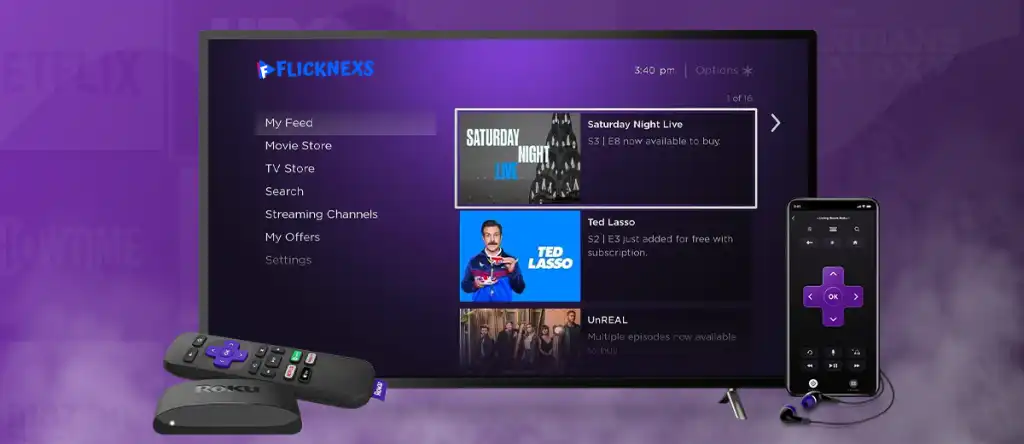
Creating a Roku channel is one of the most effective ways to distribute video content to a global streaming audience. With millions of active users, Roku provides a powerful opportunity for creators, businesses, and media brands to publish and monetize content directly on smart TVs.
If you are wondering how to start a Roku channel, this guide will walk you through the complete process from setup to publishing and approval.
What is Roku?
Roku is a digital streaming platform that allows users to access online content on their televisions through internet-connected devices. It supports popular streaming services like Netflix, Hulu, and Amazon Prime Video, along with thousands of independent channels.
Roku devices are simple to use and give viewers access to:
- Free streaming channels
- Paid subscription services
- Live TV and sports content
- On-demand movies and shows
For content creators, Roku offers an opportunity to build a dedicated audience through a custom Roku channel.
Benefits of Starting a Roku Channel
If you plan to create a Roku channel, here are some key benefits:
1. Large Audience Reach
Roku has millions of active users worldwide, allowing you to reach a massive streaming audience.
2. Monetization Opportunities
You can earn through:
- Advertising revenue
- Subscription models
- Pay-per-view content
3. Brand Visibility
Having your own Roku channel helps increase brand awareness and positions your business in the streaming ecosystem.
4. Easy Content Access
Roku channels are user-friendly and make it easy for viewers to discover and consume content.
5. Viewer Analytics
Roku provides insights into viewer behavior, helping you optimize your content strategy.
Discover Flicknexs’ Capabilities
Types of Roku Channels
Before you build your own Roku channel, it is important to understand the different types available:
Streaming Services Channels
Platforms like Netflix, Hulu, and Disney+ offering subscription-based content.
Free Channels
Ad-supported channels like Tubi, Crackle, and The Roku Channel.
Live TV Channels
Offer live broadcasts including news, sports, and entertainment.
News Channels
Channels like CNN, BBC, and MSNBC that provide real-time updates.
Sports Channels
Provide live matches, highlights, and sports analysis.
Music Channels
Platforms like Spotify, Pandora, and iHeartRadio.
Educational Channels
Courses, tutorials, and documentaries for learning purposes.
Kids & Family Channels
Child-friendly content including cartoons and educational videos.
Tech & Science Channels
Content focused on innovation, gadgets, and scientific topics.
How to Start a Roku Channel
If you want to know how to make a Roku channel, follow these steps:
Step 1: Create a Roku Developer Account
Go to the Roku Developer website and sign up for a free developer account. This is required to access Roku’s publishing tools.
Step 2: Prepare Your Content
Before you create a Roku channel, organize your video content. Ensure your videos are:
- High quality
- Properly formatted (MP4 recommended)
- Optimized for streaming
Step 3: Choose a Channel Type
You can choose between:
- Public channels
- Private channels (for testing or limited audience)
Step 4: Build Your Channel
Use Roku’s tools or SDK to:
- Design your channel interface
- Add branding elements (logo, images)
- Upload and organize content
You can also use a roku channel builder or third-party platforms to simplify development.
Step 5: Test Your Channel
Roku provides a Developer Dashboard where you can test your channel before publishing. You can:
- Preview on a Roku device
- Fix errors or layout issues
- Validate content playback
Step 6: Submit for Approval
Once testing is complete, submit your channel for Roku review. Roku will check:
- Technical compliance
- Content guidelines
- Performance standards
Step 7: Publish Your Channel
After approval, your channel will be published on the Roku Channel Store and become available to users worldwide.
How Much Does It Cost to Start a Roku Channel?
The cost of starting a Roku channel depends on your approach:
- DIY development: Low cost (mainly hosting + content production)
- Using a channel builder: Subscription-based pricing
- Enterprise development: Higher cost depending on features
In most cases, basic Roku channel creation can be done at a relatively low cost.
Choose Your Preferred Pricing Plan
Features of a Roku Channel
Roku Direct Publisher
Allows you to create a channel without coding using a web-based interface.
Live Streaming
Broadcast live content directly to your audience.
Monetization Tools
Run ads or offer paid subscriptions through your channel.
Analytics Dashboard
Track viewer engagement and performance metrics.
Explore Flicknexs OTT Platform Features
How Flicknexs Helps to Create Roku Channel
Flicknexs simplifies Roku channel creation by providing a user-friendly platform to design, publish, and monetize your content. With Flicknexs, you can effortlessly build and manage your Roku channel, ensuring a seamless streaming experience for your audience, all within a streamlined and efficient process.
Flicknexs offers the ultimate customized Roku TV channel experience. With a curated selection of content tailored to your preferences, it delivers personalized entertainment at your fingertips. Enjoy seamless streaming and discover your favourite shows and movies effortlessly with Flicknexs on Roku.
Conclusion
Learning how to start a Roku channel opens the door to building a powerful streaming presence. Whether you are a creator, brand, or media business, Roku provides the tools to distribute and monetize content at scale.
By following the steps above from account creation to publishing, you can successfully create a Roku channel and reach millions of viewers worldwide.
With the right strategy and platform support, building your own Roku channel becomes not only achievable but highly scalable in today’s streaming-first world.




Leave a Reply to Amar Cancel reply