
Quick answer: OTT stands for Over-the-Top, video and content delivered straight to a viewer’s device over the open internet, skipping cable boxes and satellite carriage deals entirely. It covers streaming platforms like Netflix and Disney+, live sports and news and any app that plays on a phone, smart TV or streaming stick. What ties it together is the delivery path: no operator in the middle, just a broadband connection and an app.
What does OTT stand for? (OTT full form)
OTT is an abbreviation for Over-the-Top. The phrase started in telecom to describe any service that runs on top of an existing network without needing the network owner’s cooperation. In video, it means the provider sends files or live streams straight to the viewer’s broadband connection, skipping the set-top box and the carriage agreements that define cable or satellite TV. Because the delivery path is the open internet, the same stream plays on a Roku, a Fire TV stick, a game console, a phone or a laptop. The model is documented in detail under Over-the-top media service.
What is OTT? A clear definition
An OTT solution is a software platform that stores, manages and delivers video content to viewers over HTTP-based streaming protocols such as HLS or MPEG-DASH. The category is scaling fast Statista projects worldwide OTT video revenue will hit $352.96 billion in 2026, growing to $482.76 billion by 2030.
How does OTT work?
When a viewer presses play, the request travels from the device to a content delivery network (CDN) edge server that holds a cached copy of the video segments. The CDN serves the segment at a bitrate matched to the device’s bandwidth and screen and the player keeps measuring throughput and switching quality up or down in real time. No proprietary set-top box is involved; the only requirements are an internet connection and a compatible app or browser.
OTT vs IPTV vs traditional cable
The three delivery models differ in who owns the network, how flexible the device support is and how the business earns. The table below sums up the key distinctions.
| Feature | OTT | IPTV | Traditional cable |
|---|---|---|---|
| Network | Public internet | Managed private IP network | Coaxial / fibre broadcast |
| Set-top box | Not required (any device) | Operator-provided box | Cable box |
| Content control | Content owner | Operator (bundled) | Operator (linear schedule) |
| Monetization | SVOD, AVOD, TVOD, hybrid | Subscription + pay-per-view | Subscription + advertising |
| Reach | Global, instant | Operator footprint | Cable plant footprint |
For a closer look, see IPTV vs OTT.
Types of OTT content
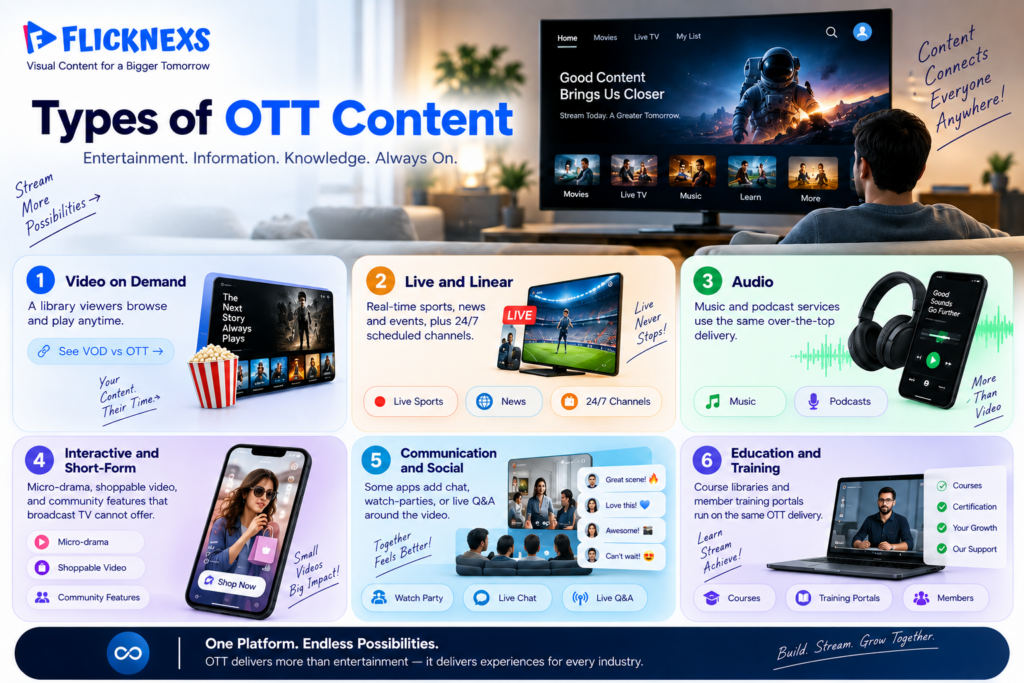
- Video on demand: a library viewers browse and play anytime. See VOD vs OTT for how the two terms relate.
- Live and linear: real-time sports, news and events, plus 24/7 scheduled channels delivered over the same internet pipe.
- Audio: music and podcast services use the same over-the-top delivery.
- Interactive and short-form: micro-drama, shoppable video and community features that broadcast TV cannot offer.
- Communication and social: some apps add chat, watch-parties or live Q&A around the video.
- Education and training: course libraries and member training portals run on the same OTT delivery.
OTT monetization models
- SVOD (Subscription Video on Demand): a recurring fee for unlimited access. Examples: Netflix, Disney+, Amazon Prime Video.
- AVOD (Advertising Video on Demand): free to watch, revenue from ads. Examples: Tubi, Pluto TV, the free tier of YouTube.
- TVOD (Transactional Video on Demand): pay per title or rental. Examples: TV store, Google Play Movies. For live events specifically, setting up ott pay per view requires its own ticketing and access-control approach.”
- Hybrid: mixes models, such as an ad-supported tier alongside an ad-free subscription or rentals on top of a base plan.
Choosing between them is its own decision; AVOD vs SVOD vs TVOD walks through it.
OTT devices and real examples
Popular OTT platforms by category
It helps to see how real services group by purpose rather than as one undifferentiated list. For a current comparison of leading white-label streaming platform providers, explore the top streaming platforms 2026
- Global subscription giants: Netflix, Disney+, Amazon Prime Video, HBO Max, Apple TV+.
- Live and sports-led: Hotstar, Hulu + Live TV, Sling TV, DAZN.
- Free, ad-supported (AVOD / FAST): Tubi, Pluto TV, Samsung TV Plus.
- Regional and language-first: SonyLIV, ZEE5, Viu, iQIYI.
The pattern worth noting: the fastest-growing slice is rarely another global giant. It is focused, niche and regional services that own one specific audience well. That is exactly the gap a new platform can win and the reason so many content owners now launch their own branded service instead of renting space on someone else’s.
Benefits of OTT
For viewers
- Choice of content, time and screen.
- No long-term contract; cancel anytime.
- Recommendations tuned to what you actually watch.
- Access to niche libraries that never reach linear TV.
For content owners and businesses
- A direct relationship with the audience, including first-party data, email and push.
- Full control over pricing, packaging and release windows.
- Global reach without negotiating carriage in every market.
- Freedom to test SVOD, AVOD, TVOD or hybrid on the same catalogue.
- Lower upfront cost than building a broadcast network.
Common misconceptions about OTT
- “OTT and IPTV are the same.” They are not. OTT uses the open internet on any device; IPTV runs on a managed network with an operator’s box.
- “OTT means free.” Some OTT is ad-supported and free but plenty is subscription or pay-per-view.
- “You need your own data centre.” A white-label platform plus a CDN removes the need to own infrastructure.
- “OTT is only Netflix-style giants.” Thousands of niche, regional and faith-based services run profitably at a fraction of that scale.
What to look for in an OTT platform
If you are evaluating a provider, weigh the parts that are painful to add later: multi-device apps (web, mobile and the main TV platforms), flexible monetization, reliable DRM, a CDN that performs in your target regions, clean analytics and a content management system your team can run without engineers. The right base lets you launch fast and extend as the audience grows.
A short history of OTT
OTT became practical only once a few things lined up. Affordable broadband made streaming watchable, smartphones put a screen in every pocket and smart TVs and streaming sticks brought internet video back to the living room. Early services proved that audiences would pay to watch on their own terms and studios that once relied on broadcasters started going direct to viewers. What began as a way to rent the occasional movie online has grown into the primary way many households watch television.
OTT and connected TV (CTV)
Connected TV or CTV, is the living-room side of OTT: any television connected to the internet through a smart TV operating system, a streaming stick or a game console. CTV matters because it pairs the lean-back comfort of the big screen with the targeting and measurement of digital. For advertisers, that combination is the reason ad budgets keep moving from linear channels to streaming inventory.
For content owners, CTV apps are usually the highest-engagement, longest-session surface they run.eMarketer’s forecast shows the number of streaming services generating over $1 billion in annual US CTV ad revenue will grow from two in 2020 to nine by 2026, with viewers shifting to CTV faster than ad dollars are following.
Challenges OTT platforms face
Running an OTT service is not only a technology project. Three problems decide who survives. Discovery: with huge libraries, helping viewers find the next thing to watch is harder than hosting it. Modern short-form streaming platforms address this challenge by reducing social cognition overload through AI-powered recommendations and personalized content feeds.
Churn: subscribers cancel quickly when fresh content slows, so retention work never stops. Content and delivery cost: licensing or producing titles and paying for CDN bandwidth are the two largest line items and they scale with success. Piracy and multi-device support add further pressure. The owners who win treat content, product and economics as one connected problem rather than three separate teams.
From broadcast to OTT: what actually changed
Traditional TV put the operator in the middle. They owned the pipe, set the schedule, sold the ads and kept the viewer relationship. OTT removes that middle layer. A content owner can now reach a global audience directly, decide its own pricing, release on its own calendar and keep the first-party data. That shift is why studios, broadcasters, sports leagues and even individual creators have launched direct-to-consumer apps.
The flip side is that everything the operator used to handle, billing, support, discovery and retention, now belongs to the owner. The platforms that win treat that ownership as the advantage, not the burden.
Is OTT the future of television?
Viewing keeps shifting toward on-demand, multi-screen habits, advertisers follow the audience and major sports rights increasingly go to streaming-first platforms. Linear broadcast will stay relevant for live events and local news but the centre of gravity is moving to internet-delivered services. Even cable and telecom operators now launch their own OTT apps to keep subscribers.
The likely outcome is a hybrid world where traditional channels and direct-to-consumer streaming coexist, with OTT as the growth engine.Nielsen’s own 2026 Upfront Planning Guide: Nielsen’s 2026 Upfront Planning Guide takes an in-depth look at ad-supported TV viewership trends across key demographics and in sports, treating linear, streaming and FAST as one integrated ecosystem.
How to launch your own OTT platform
There are two main paths. A white-label streaming platform gives you a ready-made CMS, player, DRM, billing and CDN integration; you brand it, upload content and go live in weeks. Building from scratch offers total customization but needs a team for encoding, player work, device certification and ongoing operations, usually a year-long effort. Most mid-size owners start white-label and add custom features as the business scales.
Understanding ott platform development cost upfront helps clarify which path fits your budget and timeline. Most mid-size owners start white-label and add custom features as the business scales.” If you want to create your own OTT platform and also run a 24/7 linear channel, Flicknexs Playout handles scheduling, ad insertion and live-to-VOD in one dashboard.
See our guides to low code ott solution, benefits of ott advertising, ott examples and brightcove vs vimeo. For revenue growth specifically, see our guide to ai application in ott. For a different content format, explore micro drama, how it compares in micro dramas vs TikTok Reels, our guide to short drama monetization and for creators our micro-drama scriptwriting guide.


Leave a Reply