
Quick answer: Use YouTube when a video’s job is to be discovered by people who don’t know you yet. Use professional video hosting when the video is part of what customers pay for, must sit behind a login, or plays inside your own website or app. Most growing businesses use both: YouTube for reach, their own platform for revenue and control.
Most video hosting vs YouTube comparisons line up the same feature checklist and end with “it depends.” That is true, but it does not help you decide. A better question is what job each video is doing for your business. A product teaser and a paid course module are both videos, but one needs to be found by strangers and the other needs to be protected from them. This guide is for marketing, product and content teams deciding where business video should live. You will get a simple decision model, the trade-offs most companies only notice after their library grows, a six-question scorecard, five real business scenarios and a migration checklist you can use this week. It is written by the team behind Flicknexs, which builds white-label video hosting and OTT platforms for businesses.
Key Takeaways
- YouTube is the strongest free tool for reach and discovery. Professional hosting is the stronger tool for control, access and revenue.
- Unlisted is not private. Anyone with an unlisted link can watch and share it, so it is not a safe home for paid or confidential video.
- YouTube embeds always show related videos at the end. Since 2018 you can only limit them to your own channel, not switch them off.
- Decide per video, not per company. The Video Job Test below sorts each video into Attract, Educate, Convert, Retain, Sell or Protect.
- Never delete YouTube videos that already bring search traffic. Move only the videos whose job YouTube can’t do well.
The Rent vs Own Model
Think of YouTube as renting shelf space in the world’s busiest video mall. Foot traffic is enormous and the space is free. But the mall decides the layout, which shops sit next to yours, which ads play while customers browse and the rules you must follow to stay open.
Professional video hosting is owning your own store. If the term is new to you, start with our explainer on what a video hosting platform is. You choose the design, decide who gets through the door and keep a record of every customer. The catch is that nobody walks past by accident. You have to bring people in through SEO, ads, email and social channels.
Neither model is wrong. Problems start when a business uses rented space for something that should be owned, or pays to own a store for videos whose only job is getting noticed.
| YouTube (rented) | Professional hosting (owned) | |
|---|---|---|
| Cost to start | Free | Subscription or usage-based pricing |
| Who brings viewers | YouTube search and recommendations | Your own marketing |
| Who controls the page | YouTube | You |
| Who owns viewer data | YouTube (you see aggregated analytics) | You, inside your own accounts and CRM |
| Who sets the rules | YouTube policies | Your provider contract and your own policies |
| Best at | Reach and awareness | Control, access and revenue |
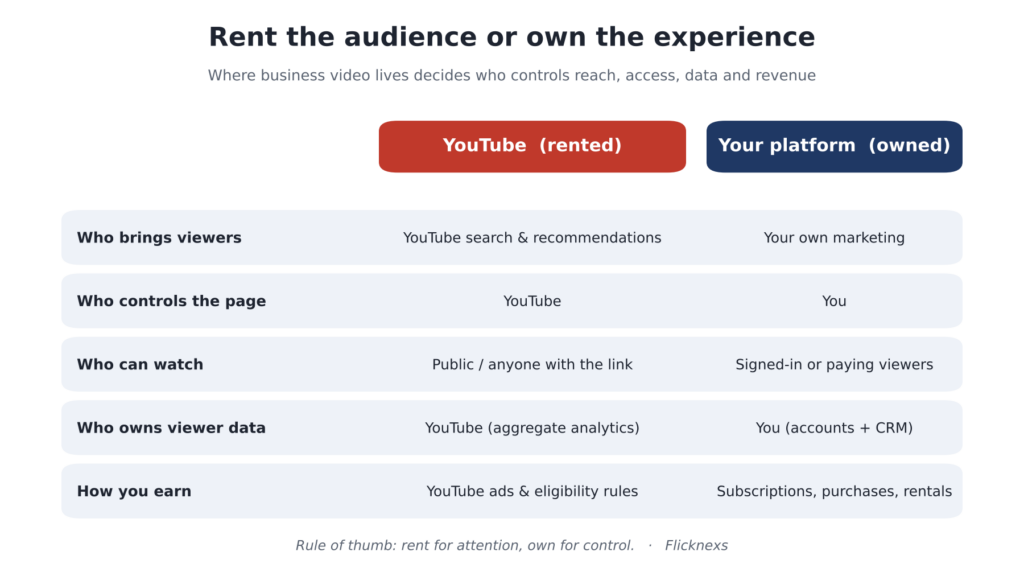
Rent vs Own: how YouTube and your own platform differ on control.
In short: rent when you need attention, own when you need control.
How YouTube Privacy Settings Actually Work
Many businesses assume YouTube’s privacy settings are enough for customer or internal video. Here is what each setting really does, based on YouTube’s own help documentation.
| Setting | Who can watch | Shows in search or on channel | Business fit |
|---|---|---|---|
| Public | Anyone | Yes | Marketing, tutorials, announcements |
| Unlisted | Anyone with the link, no Google account needed | No, unless added to a public playlist | Low-risk sharing only; links can be forwarded freely |
| Private | Only people you invite by email | No | Small groups; not connected to your own customer logins |
The gap is clear. Public and unlisted videos can spread beyond the people you intended. Private videos are locked down, but access is managed one email address at a time inside YouTube Studio, not through your own customer accounts, subscriptions or course enrollments.
In short: YouTube privacy settings control visibility, not paid or account-based access.
6 Trade-offs Businesses Notice Too Late on YouTube
YouTube’s strengths are well known. These are the less obvious costs that show up once video becomes important to revenue, onboarding or customer experience.
1. Your video page also promotes other people’s videos
YouTube is built to keep viewers watching YouTube. Around and after your video, viewers are offered more content to watch next. According to YouTube’s embedded player documentation, the rel parameter changed in September 2018: it now limits end-of-video suggestions to the same channel, and related videos can no longer be disabled. For a sales demo or a course lesson, every suggestion is a possible exit.
2. Ads can appear that you didn’t choose
YouTube’s terms include a “right to monetize” clause, which lets it show ads on videos even when the channel is not in its Partner Program. The change took effect in the US in November 2020, as 9 to5 Google reported. That means a customer watching your onboarding tutorial could see an ad first, possibly from a business in your own category, and you have no say in what is advertised.
3. Unlisted is not the same as private
Putting paid or internal content on YouTube as unlisted videos is one of the most common shortcuts. Unlisted only hides the video from search and your channel. Anyone with the link can watch it and share it further. Private videos are restricted to invited email addresses, which works for a handful of people but does not scale to a customer base or connect to your own login system.
4. Embed control is on/off, not “only on my site”
On YouTube you can allow or disable embedding. What you generally cannot do is say “this video may only play on my domain.” Professional hosting providers often support domain restrictions and time-limited signed playback URLs, so a copied link or embed code stops working outside the places you approved. Our guide to building a membership website for video content shows how these controls fit together in practice.
5. You learn about views, not about viewers
YouTube Analytics is good at answering “how is this video performing?” It cannot tell you that a specific customer watched most of your pricing walkthrough yesterday. When plays happen inside your own platform, viewing activity can be tied to user accounts and passed into your CRM, sales follow-up and retention workflows.
6. Policy changes and claims affect your business directly
Monetization rules, age restrictions, content policies and copyright claims are decided at platform level. For marketing clips, this is usually a minor risk. For a business whose revenue depends on a video catalog, especially licensed content, platform decisions outside your control become a business risk.
In short: YouTube’s design serves YouTube’s goals first. That is fine for marketing and risky for revenue.
What You Give Up When You Leave YouTube
A fair comparison has to include the other side. Moving video off YouTube has real costs:
- Discovery: YouTube is one of the most-used search destinations online, and YouTube videos often appear in Google results. Self-hosted videos have to earn visibility through your own SEO.
- Free delivery: YouTube absorbs storage, transcoding and bandwidth. With professional hosting, these become line items in your budget.
- Familiarity: Viewers already know how YouTube works. Your own platform needs a clean player and simple sign-in to avoid friction.
- Community features: Comments, subscriptions and notifications come built in on YouTube.
- Zero setup: A YouTube channel takes minutes. A branded platform takes planning, content organization and a launch.
This is why the goal is rarely to “leave YouTube.” It is to stop using YouTube for jobs it was not designed to do.
Access Controls Explained: What Professional Hosting Adds
“Control” is vague until you see the actual tools. These are the controls that separate a business video platform from a public channel, and what each one protects against.
| Control | What it does | Protects against |
|---|---|---|
| Authenticated playback | Video plays only for signed-in users | Strangers watching paid or internal content |
| Entitlements | Ties playback to a subscription, purchase or rental | Non-paying users accessing premium video |
| Signed playback URLs | Links expire after a set time | Shared or leaked links working forever |
| Domain restrictions | Player works only on approved websites | Your embed being copied onto other sites |
| Geo-fencing | Allows or blocks playback by country | Breaking territory terms in licensing deals |
| DRM | Encrypts content for licensed playback | Downloading and redistribution of studio content |
Not every business needs all six. Training and course content is usually well protected with authentication, entitlements and signed URLs. Studio or licensed content often requires DRM under the license agreement; our DRM explainer covers how it works. No method fully prevents screen recording, so match the controls to the real risk.
In short: professional hosting turns “who can watch” from a link setting into a business rule.
The Video Job Test: Where Each Video Should Live
Before choosing a platform, list your videos and tag each one with the job it does. The right home usually becomes obvious.
| Video job | Typical examples | Best home | Why |
|---|---|---|---|
| Attract | Teasers, explainers, thought leadership, short clips | YouTube | Needs reach from people who don’t know you yet |
| Educate (public) | How-to guides, free tutorials, FAQs | YouTube + embed on your site | Search visibility on both platforms |
| Convert | Product demos, pricing walkthroughs, case studies | Professional hosting | No competitor suggestions or third-party ads near buying decisions |
| Retain | Customer onboarding, help-center videos, member content | Professional hosting | Tied to customer accounts; viewing data feeds success teams |
| Sell | Courses, premium series, films, live events | Professional hosting / OTT platform | Needs paywalls, entitlements and access control |
| Protect | Internal training, partner briefings, licensed content | Private professional hosting | Needs authentication, domain and territory controls |
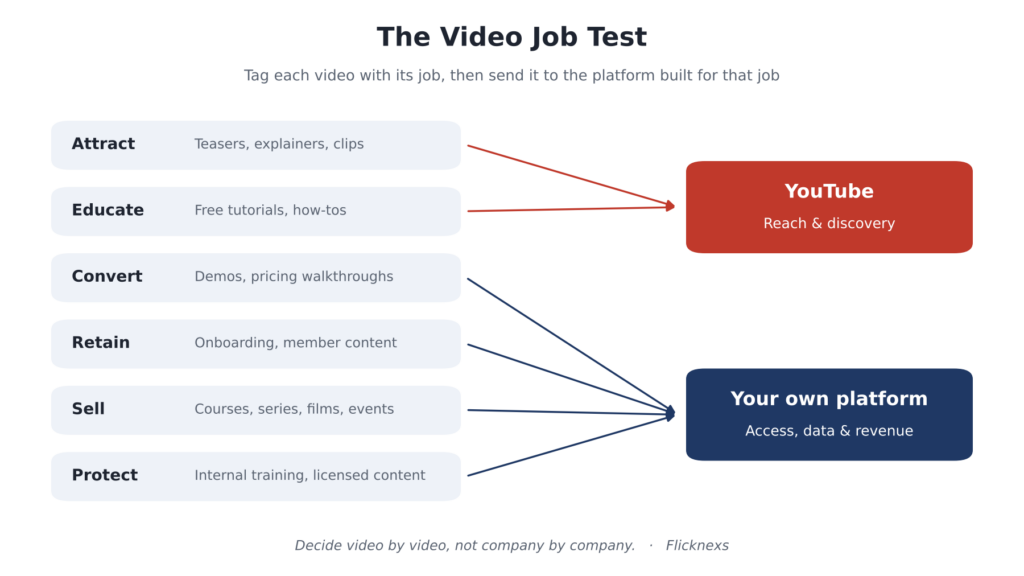
Figure 2. The Video Job Test: route each video by the job it does.
How to run the test: export a list of your existing videos (YouTube Studio lets you see your full library), add a “job” column and tag each one. Most teams find that the bulk of their library is Attract or Educate content that should stay on YouTube, plus a smaller set of high-value videos that belong on their own platform. The point is that the decision is made video by video.
The 6-Question Scorecard
For a quick decision on a single video or a content program, mark each statement Yes or No and count your Yes answers.
- The video itself is part of what customers pay for.
- Only logged-in, paying or approved people should be able to watch it.
- You need to know which individual customer watched what.
- The video sits close to a buying decision (demo, pricing, case study).
- The content carries licensing, territory or rights restrictions.
- The video needs to play inside your own website, app or TV app with your branding.
| Yes answers | What it means |
|---|---|
| 0–1 | YouTube is a strong fit. Focus on titles, thumbnails and embedding videos on relevant pages of your site. |
| 2–3 | Hybrid approach. Keep discovery content on YouTube and move conversion and customer content to professional hosting. |
| 4–6 | Video is part of your product. You need professional hosting, and likely a branded OTT or video platform with monetization. |
5 Business Scenarios: Which Approach Fits?
B2B SaaS company
Situation: Public feature explainers, plus onboarding tutorials and in-app help videos for customers.
Fit: Hybrid. Explainers stay on YouTube for discovery. Onboarding and help videos are hosted professionally and embedded inside the product dashboard, where there are no distractions and viewing can be linked to customer accounts. Customer success teams can then spot accounts that never watched onboarding and reach out before they churn.
Fitness coach or wellness studio
Situation: Free workout tips build an audience; paid programs generate revenue.
Fit: Free tips on YouTube as the top of the funnel. Paid programs on a branded platform with subscriptions, so members get a dedicated app experience and the business owns the subscriber relationship instead of depending on platform payouts. Short clips from paid programs can still go on YouTube as trailers.
Online education provider
Situation: Course modules sold individually or as a subscription.
Fit: Professional hosting. Unlisted YouTube links in a paid course can be forwarded to anyone, which quietly erodes course revenue. Signed URLs, account-based access and purchase or subscription entitlements keep lessons available only to enrolled learners.
Regional film or content distributor
Situation: A catalog of licensed films with rights limited to certain countries.
Fit: A full OTT platform. Licensing agreements typically require territory controls, and monetization through subscriptions, rentals or purchases needs a platform built for that. YouTube remains useful for trailers and behind-the-scenes clips that drive sign-ups.
Enterprise learning and development
Situation: Compliance training, leadership sessions and internal announcements.
Fit: Private professional hosting. Internal videos should require sign-in, and the business needs to control and audit who can access them. YouTube private videos can work for a tiny team, but they are not designed for company-wide access managed through your own systems.
In short: the more a video is tied to revenue, customers or rights, the more it belongs on a platform you control.
The Metrics That Matter for Each Video Job
Platform choice also changes what you can measure. Judge each video by the metric that matches its job, not by views alone.
| Video job | Metric that matters | Where you can measure it |
|---|---|---|
| Attract | Impressions, click-through rate, new subscribers | YouTube Analytics |
| Educate | Watch time, search traffic, clicks to your site | YouTube Analytics + your web analytics |
| Convert | Demo requests or sign-ups after viewing | Your own platform + CRM |
| Retain | Onboarding completion per account, support tickets avoided | Your own platform + CRM |
| Sell | Subscribers, purchases, rentals, churn | Your own platform and payment system |
| Protect | Who accessed what, and when | Your own platform’s access logs |
Notice the pattern. YouTube measures attention well. The metrics tied to revenue and retention need viewing data connected to known customers, which only your own platform can provide.
Live Streaming: YouTube Live vs Your Own Platform
Everything above applies to live video too, often more sharply. YouTube Live is a fast way to broadcast in public: there is no infrastructure to set up, chat is built in and the stream becomes a video on your channel afterward. That makes it a good fit for product launches, open webinars and community Q&A sessions.
The trade-offs appear when a live event has value of its own. Ticketed concerts, paid workshops, internal town halls and customer-only training need the stream behind a login or paywall. A public or unlisted YouTube Live link can be passed around as easily as an unlisted video, and the same ads and suggestions can appear around it.
Many teams run both. They stream the free keynote on YouTube Live to reach new people, then run the paid workshop or members-only session on their own platform. Afterward, each recording goes to the home that matches its job: highlights to YouTube, the full session to the members area. When you evaluate a platform for live video, check three things: whether it supports ticketed or pay-per-view access, how a live recording becomes on-demand content, and what moderation tools you get for chat.
In short: go live on YouTube for reach, and on your own platform when the event itself is the product.
How to Run YouTube and Your Own Platform Together
The strongest setup for most businesses is a deliberate funnel where each platform does what it does best:
- Publish short, discoverable content on YouTube. Trailers, tips, highlights and free lessons that answer real search questions.
- Point viewers to your own site. Use descriptions, pinned comments and end screens (where eligible) to send interested viewers to a landing page.
- Convert on your own platform. Host demos, previews and sign-up offers where there are no third-party distractions.
- Deliver the premium experience on your own platform. Paid, private and customer content lives behind login, under your brand.
- Feed viewing data back into marketing. Use what customers watch on your platform to personalize follow-ups and spot upsell or churn signals.
Rule of thumb: Give away the trailer on YouTube. Keep the full episode on your own platform. Never upload paid content as unlisted YouTube videos.
What Professional Video Hosting Costs
YouTube is free in money but costs you control. Professional hosting is the reverse. When comparing providers, budget for these line items:
- Storage: how much video your library holds today and in a year.
- Delivery: how streaming bandwidth or viewing hours are measured and billed.
- Transcoding: whether converting uploads into streaming formats is included.
- Apps: whether branded web, mobile and TV apps are included or extra.
- Payments: transaction fees or revenue share on subscriptions, rentals and purchases.
- Exit costs: whether you can export your content and data if you switch providers.
Be wary of “unlimited” claims. Ask how usage is measured and what happens to your bill when a video takes off. If you are shortlisting providers, our Vimeo alternatives comparison is a useful starting point.
How to Move Videos Off YouTube Without Losing Traffic
- Don’t delete public videos that rank. If a YouTube video brings search traffic, keep it and add a link to your platform instead.
- Move by job, not by date. Start with Convert, Retain and Sell videos from the Video Job Test.
- Keep your original files. Upload source files to your new host rather than downloaded YouTube copies, which are lower quality.
- Update embeds on your site. Replace YouTube embeds on product, pricing and help pages with your hosted player.
- Close the old links. Once paid content is moved, switch the old YouTube versions to private or remove them so forwarded links stop working.
- Tell your customers. Announce the new home for member or course content by email so nobody hits a dead link.
Common Mistakes to Avoid
- Treating unlisted as secure. It hides a video from search; it does not stop sharing.
- Moving everything at once. Pulling public videos off YouTube throws away discovery you already earned.
- Choosing on features alone. A long feature list means little if pricing breaks when viewing grows. Model your real usage.
- Ignoring the viewer experience. A clunky sign-in or slow player on your own platform loses viewers YouTube would have kept.
- Over-protecting low-risk content. DRM on a free tutorial adds cost and friction with no benefit.
- Forgetting measurement. If you move videos to your own platform but never connect viewing data to your CRM, you lose half the reason to move.
Final Verdict: Best Choice by Business Type
| If you are… | Best choice |
|---|---|
| A small business focused on awareness | YouTube, with videos embedded on key pages of your site |
| A SaaS or B2B company | Hybrid: YouTube for explainers, own platform for demos and onboarding |
| A creator or coach with paid programs | Hybrid: YouTube as a funnel, branded platform for members |
| An education or training provider | Professional hosting with account-based access |
| A media company or content distributor | A full OTT platform with territory controls and monetization |
| An enterprise with internal video | Private professional hosting with sign-in and access logs |
Own Your Video Experience With Flicknexs
Flicknexs builds white-label video hosting and OTT platforms. Businesses use it to host, protect and sell video under their own brand. The Flicknexs Video Hosting Platform is built for the Convert, Retain, Sell and Protect jobs in the Video Job Test, whether you need a private library or a full branded streaming service.
- Adaptive HLS streaming with transcoding up to 1440p, so playback adjusts to each viewer’s connection.
- Branded video player that looks like your business, not someone else’s platform.
- Signed playback URLs and geo-fencing to control where and how your content plays.
- Free, subscription, purchase and rental models so you can sell video directly.
- Multi-device delivery across web, Android, iOS, Android TV and Fire TV, with other TV options subject to configuration and availability.
Ready to launch? If your scorecard came out at 4 or more, your video is part of your product. Launch your own branded OTT platform with Flicknexs and keep your audience, data and revenue under your brand.
Conclusion: Match the Platform to the Job
YouTube is the best place to be discovered. Professional video hosting is the best place to do business. The mistake is not choosing one over the other; it is using one for the other’s job.
Run your library through the Video Job Test this week. Keep Attract and Educate content on YouTube, and give your demos, customer videos and paid content a home you control. To see how that home can look under your own brand, explore how Flicknexs hosts and protects business video.
FAQs About Video Hosting vs YouTube
Q: Is it safe to sell courses using unlisted YouTube videos?
A: No. Unlisted videos can be watched by anyone who has the link, and links are easy to share. For paid content, use a platform with account-based access and protected playback links.
Q: Can I stop YouTube from showing other videos when I embed on my site?
A: Only partly. Since 2018, embed settings can limit end-of-video suggestions to your own channel, but related videos can no longer be switched off. A professional player gives you full control over what appears before, during and after playback.
Q: Will moving videos off YouTube hurt my SEO?
A: It can if you remove videos that already rank. Keep discovery videos on YouTube and move only content meant for customers, buyers or members. Self-hosted videos can also rank in Google when the pages are well optimized.
Q: Is professional video hosting worth it for a small business?
A: If you only publish marketing videos, YouTube is usually enough. Professional hosting becomes worth it once video drives sales, customer onboarding or direct revenue.
Q: Can I make money from video without meeting YouTube’s eligibility thresholds?
A: Yes. With your own platform you can charge subscriptions, sell individual videos or offer rentals from day one, without depending on platform eligibility rules or ad revenue sharing.
Q: Do I need DRM for my business videos?
A: It depends on the content. Studio or licensed content often requires DRM under the license agreement. Training and course content is usually well protected with authentication, signed URLs and domain restrictions. No method fully prevents screen recording.
Q: How many people can watch a private YouTube video?
A: Only the people you invite by email in YouTube Studio. That works for a small group, but access is managed inside YouTube rather than through your own customer accounts or subscriptions.
Q: Should I use YouTube and professional hosting at the same time?
A: For most growing businesses, yes. Use YouTube to attract new viewers and your own platform to convert, serve and retain customers.