
Quick answer: Private video hosting checks every viewer’s permission before a video plays, instead of letting anyone with a link watch. It combines login and entitlements, expiring signed URLs, domain and geo rules, and DRM (digital rights management) for high-value content. Flicknexs provides private video hosting with per-title access rules, signed playback URLs, country-level geo-fencing and DRM on request.
Introduction
Most business videos don’t leak through a hack. They leak through a forwarded link, a shared password or a player embedded on someone else’s site.
That’s the gap private video hosting is meant to close. It decides who can press play, where the player is allowed to load and how long a playback link stays valid.
A course creator loses revenue when one login serves ten households. An HR team has a problem when an onboarding video with salary bands reaches a competitor. A regional broadcaster breaks its license when a title plays outside its permitted territory.
Each of these is a different leak, and each needs a different fix. This guide walks through the six most common leak paths, the control that closes each one, and how to choose a platform that matches the value of what you’re protecting.
What “private” actually means: the four-step ladder
Private video hosting means the platform checks permission at the moment of playback, not just that the video is hard to find.
It helps to think of video privacy as a ladder. Each step up adds a control the step below doesn’t have.
- Public. Anyone can find and watch it. Right for ads, launch videos and brand stories.
- Unlisted. Hidden from search and listings, but anyone holding the link can watch. Convenient, not secure.
- Private (access-controlled). The viewer must be signed in and entitled through a role, subscription, purchase or rental before a stream is issued.
- Protected (DRM-encrypted). The stream itself is encrypted and only decrypts in an authorized player holding a valid license.
The mistake most teams make is stopping at step 2 and calling it private. If a link alone is enough to watch, the video is only as safe as the most careless person who receives it.
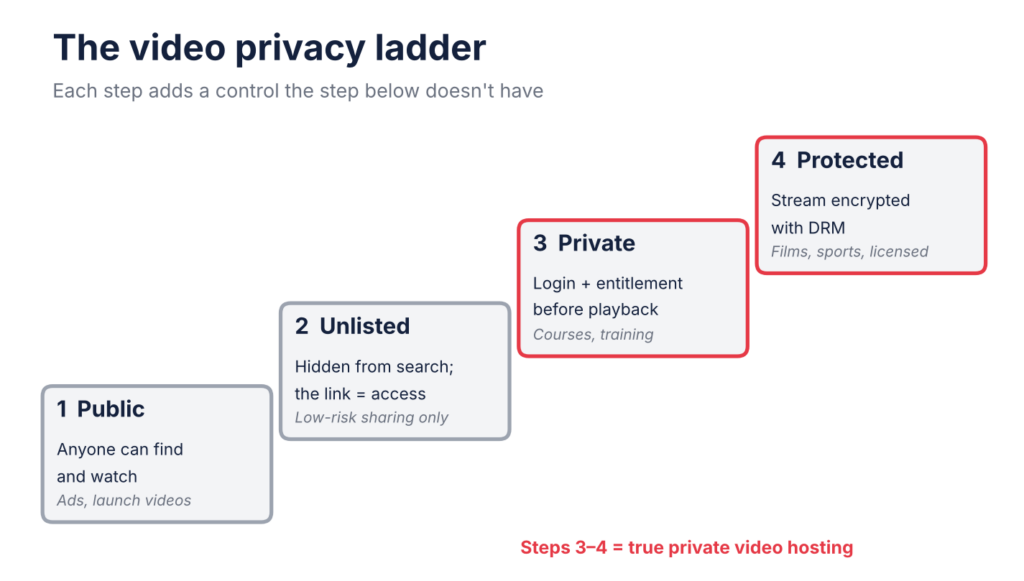
Four-step video privacy ladder: public, unlisted, private access-controlled, DRM-protected.
Six ways business video leaks, and the control that closes each
Every leak path has a matching control; no single feature covers all six.
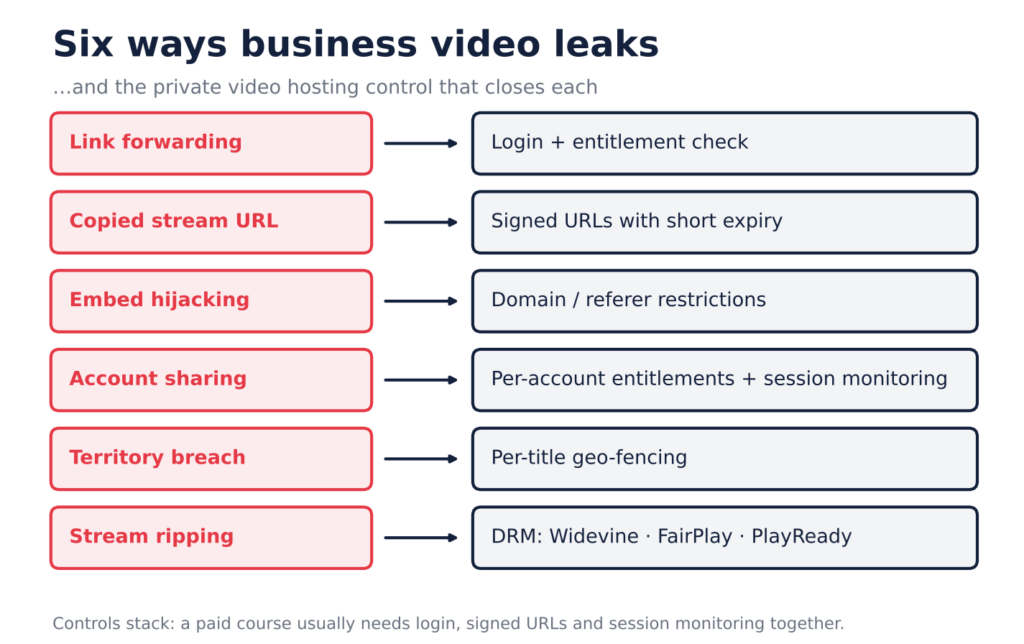
Six video leak paths mapped to the private video hosting control that closes each.
| Leak path | What it looks like | Control that closes it | What it won’t stop |
|---|---|---|---|
| Link forwarding | An employee pastes a video link into a WhatsApp group | Login authentication + entitlement check before playback | A signed-in user watching alongside someone else |
| Copied stream URL | Someone grabs the .m3u8 address (the stream’s playlist file) from browser dev tools and reuses it | Signed playback URLs with a short expiry | Reuse inside the expiry window |
| Embed hijacking | Your player appears on an unrelated site, using your bandwidth | Domain / referer restrictions on the player | A determined user spoofing headers (pair with auth) |
| Account sharing | One subscription login used across several homes | Per-account entitlements, session and device monitoring | Sharing that stays within your concurrency limits |
| Territory breach | A licensed title plays in a country outside the deal | Country-level geo-fencing per title | Viewers on VPNs; IP location is an estimate |
| Stream ripping | A tool downloads and decrypts the stream into a file | DRM (Widevine, FairPlay, PlayReady) | Screen recording with a second device |
Two things follow from this table. First, controls stack: a paid course usually needs rows 1, 2 and 4 together. Second, the last column matters as much as the third: a platform that oversells any one feature as “complete protection” is a red flag.
DRM coverage is set by the DRM vendors, not your host. Check the device lists published for Google Widevine, Apple FairPlay Streaming and Microsoft PlayReady against the devices your audience actually uses.
In browsers, DRM runs through the W3C Encrypted Media Extensions standard, which is why the same encrypted stream can play in Chrome, Safari and Edge.
Match protection to content value
Over-protecting costs money and frustrates viewers; under-protecting costs revenue or compliance. Sort your library into tiers first, then pick controls per tier.
| Tier | Typical content | Minimum controls | Add when needed |
|---|---|---|---|
| 1: Open | Product demos, ads, public webinars | Public hosting, branded player | Analytics |
| 2: Members | Customer tutorials, support libraries, community replays | Login, per-video permissions, domain restrictions | Signed URLs |
| 3: Paid | Online courses, subscription libraries, pay-per-view events | Login, entitlements tied to payment, signed URLs, session monitoring | Watermark, geo-fencing |
| 4: Licensed / confidential | Films, sports rights, board recordings, regulated training | Everything in tier 3 + DRM + geo-fencing | Forensic watermarking, contractual audits |
A useful rule: if losing control of a video would cost you a sale, it’s at least tier 3. If it would breach a contract or a regulation, it’s tier 4.
Three real-world setups
The same platform can be configured very differently depending on who’s watching and why.
The fitness coach selling a 12-week program
The risk is a buyer sharing their login with friends. The setup: each lesson is locked to an active purchase, playback links expire within minutes, and the coach watches for one account streaming from several cities at once. Public teaser clips stay open on social media to drive sign-ups.
The manufacturer training 2,000 field technicians
The risk is internal procedures reaching distributors or competitors. The setup: technicians sign in through the company account, permissions follow department and region, and the player loads only inside the training portal’s domain. DRM is usually unnecessary; access control does the heavy lifting.
The regional OTT (over-the-top streaming) service streaming licensed films
The risk is breaching distribution contracts. The setup: every title carries its own country allow-list, the stream is DRM-encrypted across web, mobile and TV apps, and a branded watermark identifies the source. The studio’s security requirements decide the final configuration, so ask for them in writing before launch.
Seven questions that expose a weak platform
Feature lists all look alike. These questions get past the brochure.
- “If I copy a playback URL and open it in another browser an hour later, what happens?” The right answer: it fails, because the link has expired.
- “Is access checked before the stream is issued, or only on the page that hosts the player?” Page-only checks can be bypassed with a direct URL.
- “Do domain and geo rules apply in your mobile and TV apps, or only in the web player?” Controls that stop at the browser leave the apps open.
- “Which DRM systems do you support, on which devices, and is licensing included in the price?” Widevine, FairPlay and PlayReady together cover most devices; costs vary.
- “Is your watermark a logo overlay or user-specific?” A logo shows ownership; it doesn’t identify who leaked a file.
- “Can I set different access rules per title, not just per library?” Mixed libraries, with free trailers next to paid episodes, need per-title control.
- “Who helps configure and test this before launch?” Security that’s misconfigured is no security at all.
Run a 30-minute leak test before launch
Try to break your own setup before a customer does. Use one authorized account, one unauthorized account and two devices.
- ☐ Open a protected video while signed out; it should refuse to play
- ☐ Sign in with an account that lacks the entitlement; it should refuse to play
- ☐ Copy the playback URL, wait past the expiry, and reload; it should fail
- ☐ Embed the player on a test page outside your domain; it should not load
- ☐ Check a geo-blocked title from a blocked country (or ask a colleague there)
- ☐ Let a test subscription lapse; access should stop on the next play
- ☐ Repeat the key checks in each native app, not just the browser
- ☐ Confirm failed attempts show up in your analytics
If any box fails, fix the configuration before you announce the library.
How Flicknexs maps to the six leak paths
The Flicknexs Video Hosting Platform is built for businesses running their own branded video service, so its controls line up with the leak paths above.
| Leak path | Flicknexs control |
|---|---|
| Link forwarding / account sharing | Per-title access rules: free, subscription, purchase or rental |
| Copied stream URL | Time-limited signed playback URLs |
| Territory breach | Country-level allow/block rules for the whole platform or individual titles |
| Source identification | Branded player watermark with adjustable placement and opacity |
| Stream ripping | Widevine, FairPlay and PlayReady DRM, arranged through the delivery layer on request |
Videos are transcoded into adaptive HLS (HTTP Live Streaming) renditions up to 1440p, and delivered to web, Android, iOS, Android TV and Fire TV apps, with more TV platforms available separately. DRM is scoped per project, based on your content and licensing terms.
Selling rentals or pay-per-view? See how TVOD platforms handle transactional access. Delivering to TVs as well as phones? Our guide to OTT apps for every device covers each ecosystem.
Frequently Asked Questions
Q: What is private video hosting?
A: It’s video hosting where the platform verifies a viewer’s permission before every playback, instead of letting anyone with a link watch.
Q: Is an unlisted video safe for confidential content?
A: No. Unlisted only hides a video from search. Anyone who receives the link can usually still play it.
Q: Do signed URLs replace DRM?
A: No. Signed URLs limit how long a link works. DRM encrypts the video so only licensed players can decrypt it. High-value content often needs both.
Q: Can private hosting stop screen recording?
A: Not fully. DRM blocks many capture tools on supported devices, but a phone pointed at a screen can’t be stopped. Watermarks help trace the source.
Q: How short should a signed URL’s expiry be?
A: Long enough to start playback reliably, short enough that a copied link is useless soon after: often minutes rather than days. Test it on slow networks.
Q: Does geo-blocking work against VPNs?
A: Partly. It’s based on the viewer’s IP location, which VPNs can mask. Treat it as a license-compliance tool, not airtight enforcement.
Q: Which content actually needs DRM?
A: Licensed films, live sports and anything a rights holder requires it for. Most training and tutorial libraries are well served by login, entitlements and signed URLs.
Q: Can I run free and paid videos on the same platform?
A: Yes, if the platform supports per-title access rules. Trailers can stay free while full episodes or lessons require a subscription or purchase.
Key takeaways
- Unlisted is not private: if a link alone plays the video, anyone who receives it can watch.
- Each leak path needs its own control; login, signed URLs, domain rules, geo-fencing and DRM stack together.
- Tier your library by value before choosing controls, so you don’t over- or under-protect.
- Run a leak test across every app before launch, not just the web player.
The bottom line
In short, private video hosting isn’t one feature. It’s a set of controls matched to how your content could leak. Start by tiering your library, pick the controls each tier needs, then run the leak test before launch.
If you’re planning a branded course library, training portal or streaming service, explore the Flicknexs Video Hosting Platform and see how its access rules, signed URLs, geo-fencing and DRM options fit your content.
Ready to run video under your own brand and your own rules? Book a free Flicknexs demo.