
Quick answer: Enterprise video hosting is a platform that stores, manages, protects and streams video at organizational scale to employees, customers or paying viewers. To choose one, name the job your video must do, then run 10 stress tests in a trial, from access control and traffic spikes to devices and total cost. Pick the vendor that passes the tests your job needs.
Key takeaways
- Name the video job first; it decides which stress tests matter most.
- Test access control on the raw stream URL, not just the player page.
- Get peak-traffic and uptime commitments in writing before you sign.
- Weight your scorecard by job; unweighted feature counts mislead.
- Estimate bandwidth yourself: viewing hours × average Mbps × 0.45 = GB.
Why feature lists fail enterprise buyers
Every enterprise video hosting vendor claims security, scale and analytics. On a pricing page, the checkboxes look identical. The real differences appear months later: on the morning thousands of employees open the same town-hall recording, or when a licensing partner asks exactly how your content is protected.
Feature lists describe what a platform has. They don’t tell you what happens when your network, your users and your traffic meet that platform. That gap is where most enterprise video projects stall.
This guide replaces the feature list with 10 stress tests. For each one, you get what typically breaks, how to test it during a free trial, what to ask the vendor, which answers should worry you, and a one-line takeaway. You’ll also get a weighted scorecard and a bandwidth formula, so you can compare vendors on numbers instead of claims.
What is enterprise video hosting?
Enterprise video hosting is a platform for uploading, organizing, protecting and streaming video at business scale, through your own website, apps, intranet or customer portal. If you’re new to the basics, start with our explainer on what a video hosting platform.
The word “enterprise” isn’t about file size or picture quality. It’s about control: who can watch, on which devices, through which systems, at what cost, and with what proof that viewing happened.
A public YouTube channel works well for marketing clips. It falls short once video becomes part of a business workflow, such as training that must be tracked, product tutorials only customers should see, or programs you sell.
Flicknexs provides a white-label video hosting and OTT platform that lets businesses manage, protect, stream and monetize video under their own brand across web, mobile and TV apps.
Step zero: name the job your video has to do
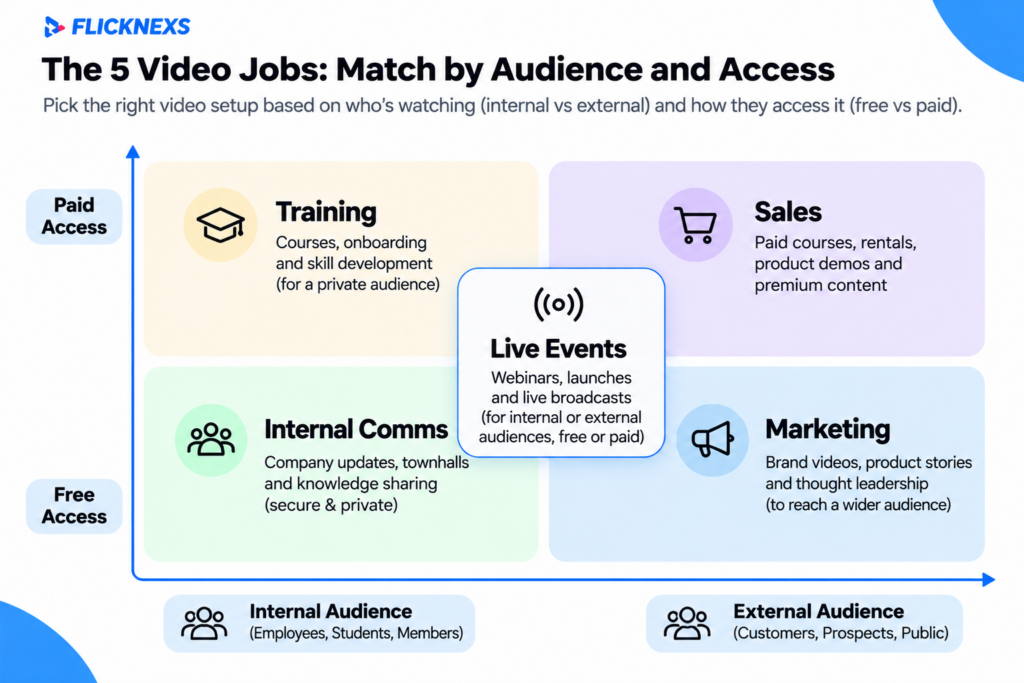
Before you compare a single vendor, write down the job your video must do. Most enterprise buying mistakes start here: a team evaluates a training platform for a revenue job, or a streaming platform for an internal-communications job, and then wonders why half the features go unused while the critical ones are missing.
| Video job | Who watches | What matters most | What matters less |
|---|---|---|---|
| Internal communication | Employees | SSO, permissions, handling same-day viewing spikes | Monetization, TV apps |
| Training and compliance | Employees, partners | Per-user completion data, LMS integration, role-based access | Branded TV apps, DRM |
| Customer education | Registered customers | Branded player, portal embedding, search, per-video analytics | Geo-restrictions |
| Paid or licensed content | Subscribers, buyers | Paywalls, entitlements, DRM, multi-device apps, territory rights | Internal SSO |
| Media library distribution | Public or partner audiences | Delivery scale, TV apps, metadata, rights controls | LMS hooks |
How to use this table
Pick one primary job and, at most, one secondary job. Write them at the top of your evaluation document. Every stress test below carries a different weight depending on that choice, and the scorecard later in this guide turns those weights into numbers.
Three questions help you decide quickly:
- Who is the viewer? Employees behave differently from customers. Employees can be required to watch; customers have to want to.
- Who pays? If viewers pay, entitlement, protection and device coverage become non-negotiable.
- What proves success? Completion rates for training, ticket deflection for customer education, revenue for paid content. The answer decides which analytics you need.
The takeaway: a platform is only “enterprise-ready” relative to a specific job. Name the job first, and half of your vendor shortlist will eliminate itself.
The 10 stress tests
Each test follows the same pattern: what breaks in real deployments, how to test it in a trial, what to ask the vendor, the red flag to watch for, and the takeaway.
1. The library test: can someone find a video in 10 seconds?
What breaks: At 50 videos, folders work. At 800, nobody can find the current version of the compliance module, so teams re-upload duplicates and viewers watch outdated content. Library problems rarely show up in a demo, because demo accounts hold a dozen tidy videos.
Run this in the trial: Upload 30 real videos with their real titles. Tag them by department, topic and audience. Then ask a colleague who has never seen the dashboard to find one specific video, replace its thumbnail and move it to a different collection. Time it.
Ask the vendor:
- Can each department manage its own collection without seeing or editing others?
- Can titles, tags and descriptions be edited in bulk?
- Is there version control, so a replaced video keeps its URL and analytics history?
Red flag: Search only matches exact titles, or every edit requires a super-admin.
The takeaway: if a new user can’t find and update a video within a minute in the trial, your library will become unusable at scale. For practical structuring tips, see our guide on how to organize a large video library.
2. The wrong-person test: can a viewer reach what they shouldn’t?
What breaks: A “private” video link gets pasted into a public forum or a group chat, and anyone who clicks it can play the file. Many platforms treat “private” as “unlisted”, which only hides the video from search.
Run this in the trial: Set a video to restricted access. Copy both the player page URL and the raw stream URL (your browser’s developer tools show the .m3u8 or .mpd request). Open both in a private browsing window, on a different network, after logging out.
Ask the vendor:
- How is each playback request validated: by session, token or signed URL?
- Do playback URLs expire, and can you set the expiry window?
- Can access be set per user, group, individual video and region?
Red flag: The stream URL keeps working forever once it has been copied.
The takeaway: real access control is enforced on every playback request, not just on the page that hosts the player.
3. The weak-network test: what happens on a 3G phone in a warehouse?
What breaks: Video plays perfectly on office Wi-Fi during the vendor demo, then buffers endlessly for field staff, retail teams and mobile customers.
Run this in the trial: Use your browser’s network throttling (set it to “Slow 3G” or “Fast 3G”) or test on a phone with a weak signal. Watch whether quality steps down smoothly or the player stalls. Then restore the connection and check whether quality climbs back up.
Ask the vendor:
- Is adaptive bitrate streaming included on every plan? The two common formats are Apple’s HTTP Live Streaming (HLS) and MPEG-DASH.
- How many quality renditions are created per upload, and up to what resolution?
- Are captions and audio tracks carried across every rendition?
Red flag: A single MP4 file delivered over a CDN and described as “adaptive”.
HLS is an open specification: the IETF published it as RFC 8216 in August 2017, and support for it is widespread across browsers, phones and media players.
The takeaway: adaptive streaming is what keeps video watchable on bad networks; test it with throttling, not on the vendor’s demo connection.
4. The Monday-morning test: what happens when everyone clicks at once?
What breaks: A CEO update goes out by email at 9:00 a.m., and thousands of employees hit the same video within 15 minutes. Or a product launch video gets shared by a partner and traffic jumps sharply within an hour. Platforms sized for average traffic struggle with peaks.
Run this in the trial: You can’t simulate 5,000 concurrent viewers on a free trial, so test the contract instead. Ask the vendor to state its concurrency assumptions, CDN coverage and overage terms in writing, then check them against your largest expected event.
Ask the vendor:
- What concurrent-viewer level is supported on the plan you’re quoting?
- Which CDN regions serve your audience’s countries?
- What uptime commitment is in the contract, and what happens if it’s missed?
- What is the incident response time, and is there a status page?
Red flag: “Unlimited viewers” with no service-level agreement (SLA), or overage charges that appear only in the fine print.
The takeaway: scale is a contract term, not a marketing claim; get peak-traffic commitments in writing before you sign.
5. The proof test: can you show who actually watched?
What breaks: The compliance team asks which employees completed a required safety video. The dashboard only shows total plays, so nobody can answer, and the training has to be redone with sign-in sheets.
Run this in the trial: Watch a video halfway from one test account and fully from another. Then open the reports and check whether they tell those two people apart, by name or user ID, with watch time and completion percentage.
Ask the vendor:
- Can reports be filtered by user, video, date, device and location?
- Is completion tracked per viewer, not just as an average?
- Can data be exported as CSV or pushed to your BI tool, CRM or LMS through an API?
- How long is analytics data retained?
Red flag: Views and impressions only, with no watch time, drop-off point or completion rate.
The takeaway: if you can’t prove viewing at the individual level, the platform can’t support training, compliance or customer-success use cases.
6. The login test: do viewers need yet another password?
What breaks: Employees ignore training because it sits behind a separate login they forgot. Customers abandon tutorials because the help center asks them to create a new account.
Run this in the trial: Ask for a sandbox connected to your identity provider. If that isn’t possible on a trial, ask for the setup documentation and read it with your IT team before shortlisting.
Ask the vendor:
- Which single sign-on standards are supported: SAML 2.0 or OpenID Connect?
- Are APIs and webhooks included on your plan, or only on a higher tier?
- Is there a ready-made connector for your LMS or CRM, or does integration need custom development?
Red flag: “SSO available on request” with no published documentation.
The takeaway: every extra login costs you viewers; make identity integration a shortlist requirement for any internal or customer-portal job.
7. The brand test: does the player look like you or like them?
What breaks: A premium customer portal shows a third-party logo, a “watch on” button and related videos from other brands. For a paid course or a branded streaming service, that undermines trust and leaks viewers to someone else’s site.
Run this in the trial: Embed the player on a staging page that matches your production site. Change the colors, logo, play button and control bar. Turn captions on and check the result on a phone, a tablet and a desktop. Captions matter for accessibility too; the W3C’s guidance on media accessibility is a useful checklist.
Ask the vendor:
- Can all vendor branding be removed from the player and the share screens?
- Do your customizations carry over to the mobile and TV apps?
- Can you host the player and video pages on your own domain?
Red flag: White-label branding is a paid add-on you only discover after signing.
The takeaway: if video is part of your product or a revenue stream, the player has to look and behave like your brand on every screen.
8. The leak test: which protection do you actually need?
What breaks: Two opposite mistakes. Some businesses pay for full DRM they don’t need for internal training. Others assume a watermark or password protects licensed films that their distribution contract says must be DRM-encrypted.
Match the protection to the risk:
| Risk | Protection that fits |
|---|---|
| The wrong person watches an internal video | Authentication and role-based permissions |
| Stream links get shared or scraped | Signed, expiring playback URLs |
| The player gets embedded on unapproved sites | Domain or referrer restrictions |
| Viewers watch outside licensed territories | Geo-restrictions |
| Paid content gets screen-recorded and reposted | Visible or forensic watermarking |
| A studio or sports license requires encryption | DRM: Google Widevine, Apple FairPlay, Microsoft PlayReady |
Run this in the trial: Take your most sensitive video. Write down the realistic way it could leak (a shared link, an embed on a pirate site, a screen recording) and check which control on the vendor’s platform stops that specific route.
Ask the vendor: Which of these protections are native, which require a third-party integration, and which cost extra? For DRM, which browsers and devices are covered by each DRM system?
Red flag: Password protection or signed URLs described as “DRM”.
The takeaway: buy the protection your risk and your contracts require, no less and no more. For a deeper explanation, read what DRM is and how it works.
9. The device test: does it work on the screens your audience uses?
What breaks: The web player works fine, but the sales team promised a client an Android TV app for a lobby screen. Or employees start a training video on a laptop and can’t resume it on their phone, so completion data splits across devices.
Run this in the trial: List the five devices your audience uses most (check your website analytics if you’re unsure). On each one, test login, playback, quality switching, captions and resume-from-last-position.
Ask the vendor:
- Which apps are included: Android, iOS, Android TV, Fire TV, Apple TV, Roku, smart-TV platforms?
- Are those apps branded with your name and published in your developer accounts, or the vendor’s?
- Who publishes updates to the app stores, and who fixes the apps after operating-system updates?
- Do access rules and entitlements carry across every device?
Red flag: “Supports all devices” with no named apps and no example store listings.
The takeaway: device coverage is a list of named apps and an update commitment, not a slogan. For a broader look at app publishing, see our hub on OTT apps for every device.
10. The year-two test: what will this really cost?
What breaks: Year one fits the budget. Year two adds bandwidth overages, transcoding fees, extra seats, a paid support tier and an app-maintenance charge. Total cost of ownership can end up far above the original quote.
Run this in the trial: Build the usage model in the bandwidth section below, then send the same model to every shortlisted vendor. Ask each one to price that model, not a plan name.
Ask the vendor:
- What is included in the base price: storage, bandwidth, encoding minutes, seats, apps?
- What triggers extra charges, and at what rate?
- What support response time is committed, and on which channels?
- What does migration cost if you leave, and can you export your videos and metadata?
Red flag: A quote that doesn’t state its bandwidth, storage or encoding assumptions.
The takeaway: compare vendors on the cost of your real usage over 24 months, including exit costs, not on the entry-level monthly price.
A weighted scorecard you can copy
Score each vendor from 1 (fails) to 5 (excellent) on every stress test. Multiply each score by the weight for your primary video job, then add up the results. The weights below are starting points; adjust them to your situation.
| Stress test | Internal comms and training | Customer education | Paid or licensed content |
|---|---|---|---|
| 1. Library | 3 | 3 | 2 |
| 2. Access control | 3 | 2 | 3 |
| 3. Weak network | 2 | 2 | 3 |
| 4. Traffic spikes | 3 | 1 | 3 |
| 5. Proof of viewing | 3 | 2 | 2 |
| 6. Login and integrations | 3 | 2 | 1 |
| 7. Branding | 1 | 3 | 3 |
| 8. Content protection | 2 | 1 | 3 |
| 9. Devices | 1 | 2 | 3 |
| 10. Total cost | 3 | 3 | 3 |
| Maximum possible score | 120 | 105 | 130 |
Worked example: a SaaS company choosing a platform for customer education
Imagine a software company that wants to put 300 product tutorials inside its customer portal. Its primary job is customer education. It shortlists two vendors and scores them after a two-week trial.
| Stress test | Weight | Vendor A score | Vendor A weighted | Vendor B score | Vendor B weighted |
|---|---|---|---|---|---|
| 1. Library | 3 | 4 | 12 | 5 | 15 |
| 2. Access control | 2 | 3 | 6 | 4 | 8 |
| 3. Weak network | 2 | 5 | 10 | 3 | 6 |
| 4. Traffic spikes | 1 | 3 | 3 | 5 | 5 |
| 5. Proof of viewing | 2 | 2 | 4 | 5 | 10 |
| 6. Login and integrations | 2 | 4 | 8 | 3 | 6 |
| 7. Branding | 3 | 5 | 15 | 1 | 3 |
| 8. Content protection | 1 | 3 | 3 | 4 | 4 |
| 9. Devices | 2 | 4 | 8 | 3 | 6 |
| 10. Total cost | 3 | 3 | 9 | 4 | 12 |
| Total | 36 | 78 (74%) | 37 | 75 (71%) |
On a plain feature count, Vendor B wins, 37 to 36. Once the scores are weighted for customer education, Vendor A wins, because it is far stronger on branding, the thing customers actually see, while Vendor B’s strengths in viewing proof, library and traffic spikes carry less weight for this job.
The takeaway: unweighted comparisons reward the vendor with the longest feature list; weighted comparisons reward the vendor that fits your job.
Bandwidth and storage: estimate the bill yourself
Bandwidth is the cost line that most often surprises enterprise buyers, because it grows with every viewer and every minute watched. You can estimate it in a minute before you ask for a single quote.
The bandwidth formula
Data delivered (GB) = viewing hours × average bitrate (Mbps) × 0.45
The 0.45 comes from 3,600 seconds per hour, divided by 8 bits per byte, divided by 1,000 megabytes per gigabyte.
Here is what 50,000 viewing hours a month looks like at three typical viewing mixes:
| Average bitrate | Typical viewing mix | Data delivered per month |
|---|---|---|
| 1.5 Mbps | Mostly mobile, 480p–720p | About 34 TB |
| 3 Mbps | Mixed desktop and mobile, 720p–1080p | About 68 TB |
| 5 Mbps | Mostly desktop or TV, 1080p and above | About 113 TB |
The same audience, watching the same hours, can cost more than three times as much depending on the screens it uses. That is why a vendor quote without a stated bitrate or viewing mix is impossible to compare.
The storage estimate
Adaptive streaming stores several copies of every video (one per quality level), and many platforms also keep your original upload. A rough worked example for a 500-video library with an average length of 10 minutes:
- Original files at around 8 Mbps (a typical 1080p export): about 600 MB per video, or roughly 300 GB in total.
- Streaming renditions for a four-step ladder (1080p, 720p, 480p and 360p, adding up to around 10 Mbps): about 770 MB per video, or roughly 390 GB in total.
- Total: close to 700 GB, more than double the size of the original files alone.
Your numbers will differ with video length, resolution and the vendor’s encoding ladder, so treat these as planning estimates and ask each vendor to confirm its own.
What to send every vendor
Put these five numbers in one short brief and ask each vendor to price against them:
- Number of videos today and expected growth over 24 months.
- Average video length.
- Expected monthly viewing hours.
- Viewing mix by device (mobile, desktop, TV).
- Largest expected single-event audience.
The takeaway: the cheapest platform is the one whose quote holds up against your real usage, so give every vendor the same usage model and compare like with like.
A 30-day evaluation plan
You can run every stress test in this guide within a month, with a small team and a free trial or sandbox from each shortlisted vendor.
| Week | Focus | Stress tests | Output |
|---|---|---|---|
| Week 1 | Define the job and shortlist | Step zero | One-page brief: primary job, viewers, success metric, usage model |
| Week 2 | Hands-on trials | 1, 2, 3, 7, 9 | Scores for library, access, weak network, branding and devices |
| Week 3 | Vendor calls and documents | 4, 5, 6, 8 | Written answers on SLA, analytics, SSO and protection |
| Week 4 | Pricing and decision | 10 + scorecard | Priced usage model per vendor and a weighted scorecard |
Two tips make the month go faster. First, use the same 30 test videos in every trial, so results are comparable. Second, involve one person from IT and one person who represents viewers; vendors answer differently when the person asking runs the identity provider.
If you’re also comparing video management tools in general, our video management software buyer’s guide covers the wider software category.
How different industries apply these tests
The same 10 tests apply everywhere, but each industry leans on a different few.
- HR and learning and development teams lean on tests 5 and 6. They need per-employee completion data and single sign-on, so training is easy to start and easy to prove.
- SaaS and technology companies lean on tests 1 and 7. Tutorials live inside a customer portal, so search and a branded player matter more than DRM.
- Education providers lean on tests 2, 5 and 9. Learners must be enrolled to watch, progress has to be tracked, and students watch on phones.
- Media companies and broadcasters lean on tests 4, 8 and 9. Large audiences, territory rights and TV apps decide whether a launch succeeds. Those that sell access also need subscription, purchase or rental workflows; our overview of video monetization platforms covers the models.
- Healthcare and regulated services lean on tests 2 and 8, and add their own compliance review. No general video platform meets privacy or industry regulations automatically, so involve your compliance team before you shortlist.
The takeaway: run all 10 tests, but spend most of your evaluation time on the three that decide success in your industry.
How Flicknexs scores on these tests
Flicknexs provides a white-label video hosting platform for businesses that want to manage, protect, stream and monetize video under their own brand. It fits best when your primary job is customer-facing video, paid content or a branded media library. Here is how its published capabilities map to the stress tests:
| Stress test | Flicknexs capability |
|---|---|
| 1. Library | Central upload, organization and management of video content |
| 2. Access control | Signed playback URLs and configurable geo-fencing rules |
| 3. Weak network | Adaptive HLS streaming with transcoding up to 1440p |
| 7. Branding | A branded player configured to your identity |
| 8. Content protection | Signed URLs and geo-fencing; confirm any DRM requirement with the team |
| 9. Devices | Web, Android, iOS, Android TV and Fire TV apps; other TV platforms depending on configuration |
| Revenue workflows | Free, subscription, purchase and rental access models |
For tests 4, 5, 6 and 10 (peak-traffic commitments, reporting depth, single sign-on and pricing), run them directly with the Flicknexs team against your own usage model. Those answers depend on your plan and configuration, and they should be in writing like any other vendor’s.
If you’re planning a complete branded streaming service rather than a video library, the Flicknexs Online Video Platform covers the wider distribution and app setup.
Ready to run the stress tests on Flicknexs? Launch your branded video platform and test it against your own videos, devices and viewing numbers.
Frequently Asked Questions
What is enterprise video hosting?
Enterprise video hosting is a platform that lets an organization upload, manage, protect and stream video at scale to employees, customers or paying viewers, through its own websites, apps and portals. In short, it is video hosting built around access control, integrations and proof of viewing.
How is enterprise video hosting different from YouTube or Vimeo?
Public video platforms are built for reach and discovery. Enterprise video hosting is built for control: who can watch, under which brand, through which systems, and with what data about viewing. In short, public platforms grow audiences; enterprise platforms manage them.
Is enterprise video hosting the same as an OTT platform?
No. Enterprise video hosting manages and delivers business video. An OTT platform streams content directly to audiences, usually with subscriptions, purchases or ads and its own TV and mobile apps. Some platforms, including Flicknexs, support both workflows.
Do I need DRM for enterprise video?
You need DRM if your content licenses require it or if your paid content is valuable enough to be pirated at scale. For internal training and customer education, authentication, signed URLs and geo-restrictions usually cover the risk. In short, let your contracts and your risk decide.
What is the difference between signed URLs and DRM?
A signed URL limits who can request a video stream, using a cryptographic signature and an expiry time. DRM encrypts the video itself and only plays it on devices that hold a valid license. Signed URLs stop link sharing; DRM stops copying of the content.
How much bandwidth will my enterprise videos use?
Multiply your monthly viewing hours by the average bitrate in Mbps, then multiply by 0.45 to get gigabytes. For example, 50,000 viewing hours at 3 Mbps comes to about 68 TB a month.
Can an enterprise video platform integrate with my LMS?
Many enterprise video platforms offer LMS connectors or APIs. Before you buy, confirm which LMS is supported and which data (completion, watch time, user ID) flows back into it.
Does enterprise video hosting support single sign-on?
Many enterprise platforms support single sign-on through SAML 2.0 or OpenID Connect. Confirm the exact standards, your identity provider and whether SSO is included on your plan.
Does enterprise video hosting support live streaming?
Some platforms support live streaming, while others only handle on-demand video. Confirm live support, recording, latency and concurrent-viewer limits separately from on-demand features.
How long does it take to choose an enterprise video hosting platform?
A focused evaluation takes about 30 days: one week to define the job and shortlist, two weeks to run trials and vendor calls, and one week to price and score. Rushing it usually means skipping the cost and traffic tests that cause problems later.
The bottom line
A feature list tells you what an enterprise video hosting platform claims. A stress test tells you what it does under your conditions: your network, your users, your traffic and your budget.
To choose well, follow four steps:
- Name the primary job your video has to do.
- Run the 10 stress tests in a trial with your own videos.
- Score vendors with weights that match that job.
- Price every vendor against the same usage model, over 24 months.
In conclusion: the right enterprise video hosting platform is the one that passes the tests that matter for your job, at a cost that holds up against your real viewing hours. If branded, multi-device or monetized video is the job, start with the Flicknexs video hosting platform and put it through the same tests.