
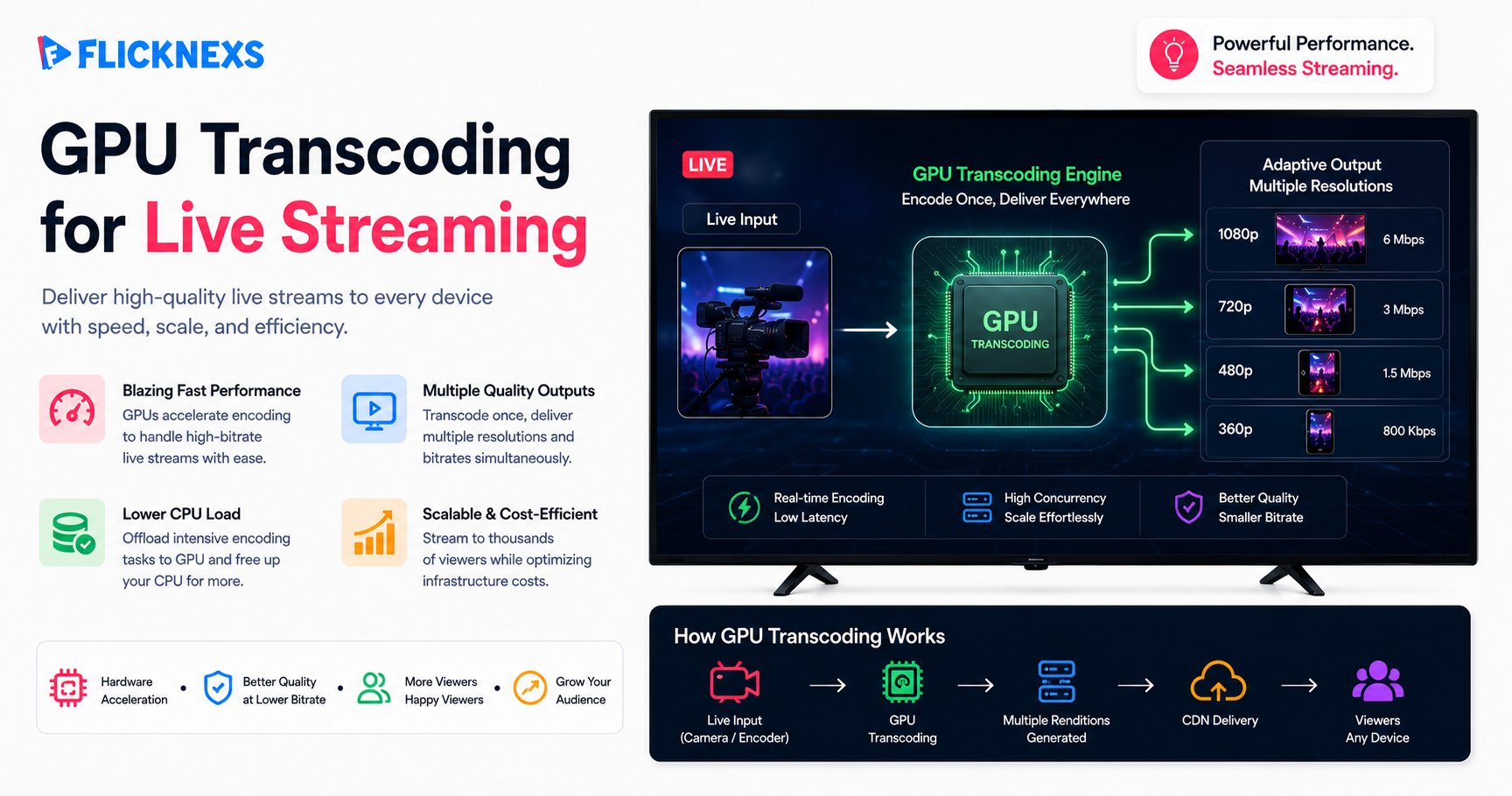
Through GPU transcoding, live streaming live events is made more efficient with multiple resolution and bitrate outputs for each incoming stream; this allows for improved playback for the user with significantly less buffering, quicker start up times and overall better performance across any device.
It is important to note that live events have strict timelines to adhere to; therefore, every single frame must be rendered before the next frame arrives. GPU Transcoding allows us to fulfill such timelines regardless of how many viewers simultaneously access your stream (adaptive bitrate ladder).
In this guide we will explain the purpose of transcoding, how utilizing GPU resources changes the math of transcoding; and the correlation between the quality of transcoding and its affect on the viewer experience.
GPU transcoding speeds up live streaming by converting one incoming feed into multiple resolutions and bitrates in real time, so viewers get smoother playback, faster start times, and far less buffering across every device. When you run a live event, the encoder has a hard deadline: every frame has to be processed before the next one arrives. GPU acceleration is what lets us hit that deadline at scale, even with a full adaptive bitrate ladder feeding thousands of concurrent viewers. In this guide, we’ll explain what transcoding actually does, why moving it onto the GPU changes the math, and how it ties directly to the experience your audience sees.
Key takeaways
- Transcoding is the process of taking one live video input stream and creating multiple simultaneous output streams having various bitrates and resolutions.
- GPU transcoding hits the real-time deadline that CPU-only setups struggle with once the ladder and viewer count grow.
- The ABR (adaptive bitrate) ladder is at the core of the solution with 4 different renderings; 1080p, 720p, 480p, and 360p; so that each viewer’s video player can automatically choose an appropriate quality for their device.
- By transcoding on the GPU, fewer dropped frames occur and latency is reduced. Stream stability can also be maintained during periods of high-traffic.
- CPU and GPU each have a place — GPU wins on throughput and density; CPU can edge ahead on per-title quality at low channel counts.
What transcoding actually does in a live stream
Transcoding is the process of taking one input stream and producing several output versions of it. Your camera or encoder sends a single high-quality feed to the platform — say 1080p at a high bitrate. But your audience is not uniform. Some watch on fibre, some on a patchy mobile connection, some on a smart TV and others on a five-year-old phone. Transcoding will take the originally recorded video feed and create multiple renditions of the same video feed that have different resolutions and bitrates, while also creating different container or codec types for the purpose of being able to decode each rendered video file using the decoder on a given device.
Generally Speaking, there are three items that change as a direct result of transcoding: first, the resolution of the rendered video (1080p, 720p, 48p and so on), second, the bitrate of each image being rendered (how many bytes per second for each rendered video) and third, the codec (if you choose to re-wrap to HLS segments or choose to use a new codec type for greater efficiency).Bitrate is the lever that most directly shapes how a stream looks and how reliably it plays — our breakdown of how video bitrate affects video quality walks through why that trade-off matters.
For live delivery, those renditions are usually packaged into a segmented format. If you want the mechanics of how segments and playlists work, our explainer on what HLS streaming is covers the format most players expect, and what RTMP is covers the protocol that typically carries your feed into the platform in the first place.
The ABR ladder: one stream, many renditions
Adaptive bitrate streaming (ABR) is the reason a stream “just works” on different connections. Instead of forcing everyone onto one quality, the platform publishes a ladder of renditions, and each viewer’s player measures its own bandwidth and switches up or down on the fly. A strong connection climbs to 1080p; a struggling one drops to 480p or 360p rather than freezing.
The “ladder” is just the set of rungs you publish. A typical live ladder looks like this:
| Rendition | Resolution | Typical video bitrate | Best suited for |
|---|---|---|---|
| 1080p | 1920×1080 | 4,500–6,000 kbps | Fibre / strong Wi-Fi, large screens & TVs |
| 720p | 1280×720 | 2,500–4,000 kbps | Good broadband, laptops & tablets |
| 480p | 854×480 | 1,000–1,800 kbps | Average mobile / variable Wi-Fi |
| 360p | 640×360 | 500–900 kbps | Weak or congested mobile networks |
Here’s the catch for live: every rung on that ladder is a separate encode happening at the same time. Four renditions means four simultaneous encodes of the same moving picture, and they all have to keep pace with real time. That is where the hardware choice stops being academic.
How GPU transcoding improves live streaming
GPU transcoding moves the heavy encode/decode work onto dedicated video hardware on the graphics card instead of the general-purpose CPU. Modern GPUs ship with fixed-function encoder blocks built specifically for this, and that specialisation is what delivers the wins below.
Faster transcoding and a real shot at the deadline
A GPU can process many frames in parallel and run several renditions at once on its dedicated encoder blocks. For live, “fast enough” is not a nice-to-have — if encoding falls behind the incoming frame rate, the stream stutters or drops. GPU acceleration gives you the headroom to keep the full ladder flowing in real time, which is exactly the margin a CPU-only box runs out of first.
Lower buffering and faster start with GPU transcoding
When renditions are produced quickly and consistently, segments are ready when the player asks for them. That means shorter startup time and fewer mid-stream stalls, because the player always has a rung it can reach for. Keeping that pipeline tight is closely tied to low latency for a better user experience, and it pairs naturally with the playback-side fixes in our guide to buffering solutions for a smoother streaming experience.
Lower CPU load and more stable streams at scale
Offloading encode work frees the CPU for everything else the platform needs to do — packaging, security, origin and delivery logic. On a single server that means you can run more channels before the box saturates. When you’re delivering many live events at once, that density is the difference between a stable broadcast and one that wobbles under load. If you’re distributing the same event widely, our note on sending one HLS feed to multiple platforms shows how a single well-built output can fan out cleanly.
CPU vs GPU: the trade-offs we weigh
GPU transcoding is not automatically “better” in every dimension — it’s better for the problems live streaming actually has. CPU (software) encoding can squeeze out slightly higher quality per bit at a given bitrate, because software encoders can spend more effort on each frame when there’s time to spare. That’s appealing for video-on-demand, where you encode once and there is no clock ticking.
Live flips the priorities. With a fixed real-time budget and typically a lot of renditions and channels simultaneously being processed, throughput and density will be much more important than the last small fraction of per title quality. By using GPU encoding you will get more stable and more predictable parallel performance which means that there will be little to no CPU contention and this keeps the entire pipeline stable when it is needed. The pragmatic answer most teams land on is a blend: GPU for the live, high-density paths and software encoding where quality-per-bit is the priority and time is not. Pairing GPU throughput with an efficient codec also stretches your bandwidth further — see our guide to the HEVC codec for why that combination matters.
Why this matters for the viewer
All of this engineering exists to serve one thing: the person hitting play. Faster transcoding means the stream starts sooner. A healthy ABR ladder means quality adapts instead of freezing. Lower CPU load means your broadcast stays stable when a thousand people arrive at once. Viewers don’t see the GPU — they just notice that the stream comes up quickly, looks right for their connection, and doesn’t stall during the moment that matters. Choosing the right hardware and getting your encoder settings dialled in is a big part of that, and our overview of choosing live streaming encoders is a good next step.
Ready to launch your streaming website? Build it on Flicknexs →
Frequently Asked Questions
Written by the Flicknexs team — we build OTT, live-streaming, and FAST-channel platforms and work with transcoding pipelines like this every day. Explore our guide to choosing live streaming encoders to plan your setup.
Ready to build?
If you’re planning your next Playout / Live project, Flicknexs handles the video infrastructure end-to-end — so you can ship in weeks, not months.
- power live events with Flicknexs
- check plan pricing
More on live streaming
Continue exploring more on this topic across the Flicknexs blog.
- Complete guide: OTT Playout Platform: The Complete Guide to Launching Your Own TV Channel IN 2026
- How to Build a Successful Live Streaming Platform: A Step-by-Step Guide
- Live Streaming: Best Guide in 2023
- RTMP Live Streaming: Everything You Need to Know
Ready to build?
If you’re planning your next Playout / Live project, Flicknexs handles the video infrastructure end-to-end — so you can ship in weeks, not months.
- power live events with Flicknexs
- check plan pricing
More on live streaming
Continue exploring more on this topic across the Flicknexs blog.
- Complete guide: OTT Playout Platform: The Complete Guide to Launching Your Own TV Channel IN 2026
- How to Build a Successful Live Streaming Platform: A Step-by-Step Guide
- Live Streaming: Best Guide in 2023
- RTMP Live Streaming: Everything You Need to Know
Ready to build?
If you’re planning your next Playout / Live project, Flicknexs handles the video infrastructure end-to-end — so you can ship in weeks, not months.
- power live events with Flicknexs
- check plan pricing
More on live streaming
Continue exploring more on this topic across the Flicknexs blog.
- Complete guide: OTT Playout Platform: The Complete Guide to Launching Your Own TV Channel IN 2026
- How to Build a Successful Live Streaming Platform: A Step-by-Step Guide
- Live Streaming: Best Guide in 2023
- RTMP Live Streaming: Everything You Need to Know
Ready to build?
If you’re planning your next Playout / Live project, Flicknexs handles the video infrastructure end-to-end — so you can ship in weeks, not months.
- power live events with Flicknexs
- check plan pricing
More on live streaming
Continue exploring more on this topic across the Flicknexs blog.
- Complete guide: OTT Playout Platform: The Complete Guide to Launching Your Own TV Channel IN 2026
- How to Build a Successful Live Streaming Platform: A Step-by-Step Guide
- Live Streaming: Best Guide in 2023
- RTMP Live Streaming: Everything You Need to Know
Ready to build?
If you’re planning your next Playout / Live project, Flicknexs handles the video infrastructure end-to-end — so you can ship in weeks, not months.
- power live events with Flicknexs
- check plan pricing
More on live streaming
Continue exploring more on this topic across the Flicknexs blog.
- Complete guide: OTT Playout Platform: The Complete Guide to Launching Your Own TV Channel IN 2026
- How to Build a Successful Live Streaming Platform: A Step-by-Step Guide
- Live Streaming: Best Guide in 2023
- RTMP Live Streaming: Everything You Need to Know
Ready to build?
If you’re planning your next Playout / Live project, Flicknexs handles the video infrastructure end-to-end — so you can ship in weeks, not months.
- power live events with Flicknexs
- check plan pricing
More on live streaming
Continue exploring more on this topic across the Flicknexs blog.
- Complete guide: OTT Playout Platform: The Complete Guide to Launching Your Own TV Channel IN 2026
- How to Build a Successful Live Streaming Platform: A Step-by-Step Guide
- Live Streaming: Best Guide in 2023
- RTMP Live Streaming: Everything You Need to Know
Ready to build?
If you’re planning your next Playout / Live project, Flicknexs handles the video infrastructure end-to-end — so you can ship in weeks, not months.
- power live events with Flicknexs
- check plan pricing
More on live streaming
Continue exploring more on this topic across the Flicknexs blog.
- Complete guide: OTT Playout Platform: The Complete Guide to Launching Your Own TV Channel IN 2026
- How to Build a Successful Live Streaming Platform: A Step-by-Step Guide
- Live Streaming: Best Guide in 2023
- RTMP Live Streaming: Everything You Need to Know
Ready to build?
If you’re planning your next Playout / Live project, Flicknexs handles the video infrastructure end-to-end — so you can ship in weeks, not months.
- power live events with Flicknexs
- check plan pricing
More on live streaming
Continue exploring more on this topic across the Flicknexs blog.
- Complete guide: OTT Playout Platform: The Complete Guide to Launching Your Own TV Channel IN 2026
- How to Build a Successful Live Streaming Platform: A Step-by-Step Guide
- Live Streaming: Best Guide in 2023
- RTMP Live Streaming: Everything You Need to Know
Ready to build?
If you’re planning your next Playout / Live project, Flicknexs handles the video infrastructure end-to-end — so you can ship in weeks, not months.
- power live events with Flicknexs
- check plan pricing
More on live streaming
Continue exploring more on this topic across the Flicknexs blog.
- Complete guide: OTT Playout Platform: The Complete Guide to Launching Your Own TV Channel IN 2026
- How to Build a Successful Live Streaming Platform: A Step-by-Step Guide
- Live Streaming: Best Guide in 2023
- RTMP Live Streaming: Everything You Need to Know
Ready to build?
If you’re planning your next Playout / Live project, Flicknexs handles the video infrastructure end-to-end — so you can ship in weeks, not months.
- power live events with Flicknexs
- check plan pricing
More on live streaming
Continue exploring more on this topic across the Flicknexs blog.
- Complete guide: OTT Playout Platform: The Complete Guide to Launching Your Own TV Channel IN 2026
- How to Build a Successful Live Streaming Platform: A Step-by-Step Guide
- Live Streaming: Best Guide in 2023
- RTMP Live Streaming: Everything You Need to Know
Ready to build?
If you’re planning your next Playout / Live project, Flicknexs handles the video infrastructure end-to-end — so you can ship in weeks, not months.
- power live events with Flicknexs
- check plan pricing
More on live streaming
Continue exploring more on this topic across the Flicknexs blog.
- Complete guide: OTT Playout Platform: The Complete Guide to Launching Your Own TV Channel IN 2026
- How to Build a Successful Live Streaming Platform: A Step-by-Step Guide
- Live Streaming: Best Guide in 2023
- RTMP Live Streaming: Everything You Need to Know
Ready to build?
If you’re planning your next Playout / Live project, Flicknexs handles the video infrastructure end-to-end — so you can ship in weeks, not months.
- power live events with Flicknexs
- check plan pricing
More on live streaming
Continue exploring more on this topic across the Flicknexs blog.
- Complete guide: OTT Playout Platform: The Complete Guide to Launching Your Own TV Channel IN 2026
- How to Build a Successful Live Streaming Platform: A Step-by-Step Guide
- Live Streaming: Best Guide in 2023
- RTMP Live Streaming: Everything You Need to Know
Ready to build?
If you’re planning your next Playout / Live project, Flicknexs handles the video infrastructure end-to-end — so you can ship in weeks, not months.
- power live events with Flicknexs
- check plan pricing
More on live streaming
Continue exploring more on this topic across the Flicknexs blog.
- Complete guide: OTT Playout Platform: The Complete Guide to Launching Your Own TV Channel IN 2026
- How to Build a Successful Live Streaming Platform: A Step-by-Step Guide
- Live Streaming: Best Guide in 2023
- RTMP Live Streaming: Everything You Need to Know
Ready to build?
If you’re planning your next Playout / Live project, Flicknexs handles the video infrastructure end-to-end — so you can ship in weeks, not months.
- power live events with Flicknexs
- check plan pricing
More on live streaming
Continue exploring more on this topic across the Flicknexs blog.
- Complete guide: OTT Playout Platform: The Complete Guide to Launching Your Own TV Channel IN 2026
- How to Build a Successful Live Streaming Platform: A Step-by-Step Guide
- Live Streaming: Best Guide in 2023
- RTMP Live Streaming: Everything You Need to Know
Ready to build?
If you’re planning your next Playout / Live project, Flicknexs handles the video infrastructure end-to-end — so you can ship in weeks, not months.
- power live events with Flicknexs
- check plan pricing
More on live streaming
Continue exploring more on this topic across the Flicknexs blog.
- Complete guide: OTT Playout Platform: The Complete Guide to Launching Your Own TV Channel IN 2026
- How to Build a Successful Live Streaming Platform: A Step-by-Step Guide
- Live Streaming: Best Guide in 2023
- RTMP Live Streaming: Everything You Need to Know
Ready to build?
If you’re planning your next Playout / Live project, Flicknexs handles the video infrastructure end-to-end — so you can ship in weeks, not months.
- power live events with Flicknexs
- check plan pricing
More on live streaming
Continue exploring more on this topic across the Flicknexs blog.
- Complete guide: OTT Playout Platform: The Complete Guide to Launching Your Own TV Channel IN 2026
- How to Build a Successful Live Streaming Platform: A Step-by-Step Guide
- Live Streaming: Best Guide in 2023
- RTMP Live Streaming: Everything You Need to Know
Ready to build?
If you’re planning your next Playout / Live project, Flicknexs handles the video infrastructure end-to-end — so you can ship in weeks, not months.
- power live events with Flicknexs
- check plan pricing
More on live streaming
Continue exploring more on this topic across the Flicknexs blog.
- Complete guide: OTT Playout Platform: The Complete Guide to Launching Your Own TV Channel IN 2026
- How to Build a Successful Live Streaming Platform: A Step-by-Step Guide
- Live Streaming: Best Guide in 2023
- RTMP Live Streaming: Everything You Need to Know
Ready to build?
If you’re planning your next Playout / Live project, Flicknexs handles the video infrastructure end-to-end — so you can ship in weeks, not months.
- power live events with Flicknexs
- check plan pricing
More on live streaming
Continue exploring more on this topic across the Flicknexs blog.
- Complete guide: OTT Playout Platform: The Complete Guide to Launching Your Own TV Channel IN 2026
- How to Build a Successful Live Streaming Platform: A Step-by-Step Guide
- Live Streaming: Best Guide in 2023
- RTMP Live Streaming: Everything You Need to Know
Ready to build?
If you’re planning your next Playout / Live project, Flicknexs handles the video infrastructure end-to-end — so you can ship in weeks, not months.
- power live events with Flicknexs
- check plan pricing
More on live streaming
Continue exploring more on this topic across the Flicknexs blog.
- Complete guide: OTT Playout Platform: The Complete Guide to Launching Your Own TV Channel IN 2026
- How to Build a Successful Live Streaming Platform: A Step-by-Step Guide
- Live Streaming: Best Guide in 2023
- RTMP Live Streaming: Everything You Need to Know
Ready to build?
If you’re planning your next Playout / Live project, Flicknexs handles the video infrastructure end-to-end — so you can ship in weeks, not months.
- power live events with Flicknexs
- check plan pricing
More on live streaming
Continue exploring more on this topic across the Flicknexs blog.
- Complete guide: OTT Playout Platform: The Complete Guide to Launching Your Own TV Channel IN 2026
- How to Build a Successful Live Streaming Platform: A Step-by-Step Guide
- Live Streaming: Best Guide in 2023
- RTMP Live Streaming: Everything You Need to Know
Ready to build?
If you’re planning your next Playout / Live project, Flicknexs handles the video infrastructure end-to-end — so you can ship in weeks, not months.
- power live events with Flicknexs
- check plan pricing
More on live streaming
Continue exploring more on this topic across the Flicknexs blog.
- Complete guide: OTT Playout Platform: The Complete Guide to Launching Your Own TV Channel IN 2026
- How to Build a Successful Live Streaming Platform: A Step-by-Step Guide
- Live Streaming: Best Guide in 2023
- RTMP Live Streaming: Everything You Need to Know
Ready to build?
If you’re planning your next Playout / Live project, Flicknexs handles the video infrastructure end-to-end — so you can ship in weeks, not months.
- power live events with Flicknexs
- check plan pricing
More on live streaming
Continue exploring more on this topic across the Flicknexs blog.
- Complete guide: OTT Playout Platform: The Complete Guide to Launching Your Own TV Channel IN 2026
- How to Build a Successful Live Streaming Platform: A Step-by-Step Guide
- Live Streaming: Best Guide in 2023
- RTMP Live Streaming: Everything You Need to Know
Ready to build?
If you’re planning your next Playout / Live project, Flicknexs handles the video infrastructure end-to-end — so you can ship in weeks, not months.
- power live events with Flicknexs
- check plan pricing
More on live streaming
Continue exploring more on this topic across the Flicknexs blog.
- Complete guide: OTT Playout Platform: The Complete Guide to Launching Your Own TV Channel IN 2026
- How to Build a Successful Live Streaming Platform: A Step-by-Step Guide
- Live Streaming: Best Guide in 2023
- RTMP Live Streaming: Everything You Need to Know
Ready to build?
If you’re planning your next Playout / Live project, Flicknexs handles the video infrastructure end-to-end — so you can ship in weeks, not months.
- power live events with Flicknexs
- check plan pricing
More on live streaming
Continue exploring more on this topic across the Flicknexs blog.
- Complete guide: OTT Playout Platform: The Complete Guide to Launching Your Own TV Channel IN 2026
- How to Build a Successful Live Streaming Platform: A Step-by-Step Guide
- Live Streaming: Best Guide in 2023
- RTMP Live Streaming: Everything You Need to Know
Ready to build?
If you’re planning your next Playout / Live project, Flicknexs handles the video infrastructure end-to-end — so you can ship in weeks, not months.
- power live events with Flicknexs
- check plan pricing
More on live streaming
Continue exploring more on this topic across the Flicknexs blog.
- Complete guide: OTT Playout Platform: The Complete Guide to Launching Your Own TV Channel IN 2026
- How to Build a Successful Live Streaming Platform: A Step-by-Step Guide
- Live Streaming: Best Guide in 2023
- RTMP Live Streaming: Everything You Need to Know
Ready to build?
If you’re planning your next Playout / Live project, Flicknexs handles the video infrastructure end-to-end — so you can ship in weeks, not months.
- power live events with Flicknexs
- check plan pricing
More on live streaming
Continue exploring more on this topic across the Flicknexs blog.
- Complete guide: OTT Playout Platform: The Complete Guide to Launching Your Own TV Channel IN 2026
- How to Build a Successful Live Streaming Platform: A Step-by-Step Guide
- Live Streaming: Best Guide in 2023
- RTMP Live Streaming: Everything You Need to Know
Ready to build?
If you’re planning your next Playout / Live project, Flicknexs handles the video infrastructure end-to-end — so you can ship in weeks, not months.
- power live events with Flicknexs
- check plan pricing
More on live streaming
Continue exploring more on this topic across the Flicknexs blog.
- Complete guide: OTT Playout Platform: The Complete Guide to Launching Your Own TV Channel IN 2026
- How to Build a Successful Live Streaming Platform: A Step-by-Step Guide
- Live Streaming: Best Guide in 2023
- RTMP Live Streaming: Everything You Need to Know
Ready to build?
If you’re planning your next Playout / Live project, Flicknexs handles the video infrastructure end-to-end — so you can ship in weeks, not months.
- power live events with Flicknexs
- check plan pricing
More on live streaming
Continue exploring more on this topic across the Flicknexs blog.
- Complete guide: OTT Playout Platform: The Complete Guide to Launching Your Own TV Channel IN 2026
- How to Build a Successful Live Streaming Platform: A Step-by-Step Guide
- Live Streaming: Best Guide in 2023
- RTMP Live Streaming: Everything You Need to Know
Ready to build?
If you’re planning your next Playout / Live project, Flicknexs handles the video infrastructure end-to-end — so you can ship in weeks, not months.
- power live events with Flicknexs
- check plan pricing
More on live streaming
Continue exploring more on this topic across the Flicknexs blog.
- Complete guide: OTT Playout Platform: The Complete Guide to Launching Your Own TV Channel IN 2026
- How to Build a Successful Live Streaming Platform: A Step-by-Step Guide
- Live Streaming: Best Guide in 2023
- RTMP Live Streaming: Everything You Need to Know
Ready to build?
If you’re planning your next Playout / Live project, Flicknexs handles the video infrastructure end-to-end — so you can ship in weeks, not months.
- power live events with Flicknexs
- check plan pricing
More on live streaming
Continue exploring more on this topic across the Flicknexs blog.
- Complete guide: OTT Playout Platform: The Complete Guide to Launching Your Own TV Channel IN 2026
- How to Build a Successful Live Streaming Platform: A Step-by-Step Guide
- Live Streaming: Best Guide in 2023
- RTMP Live Streaming: Everything You Need to Know
Ready to build?
If you’re planning your next Playout / Live project, Flicknexs handles the video infrastructure end-to-end — so you can ship in weeks, not months.
- power live events with Flicknexs
- check plan pricing
More on live streaming
Continue exploring more on this topic across the Flicknexs blog.
- Complete guide: OTT Playout Platform: The Complete Guide to Launching Your Own TV Channel IN 2026
- How to Build a Successful Live Streaming Platform: A Step-by-Step Guide
- Live Streaming: Best Guide in 2023
- RTMP Live Streaming: Everything You Need to Know
Ready to build?
If you’re planning your next Playout / Live project, Flicknexs handles the video infrastructure end-to-end — so you can ship in weeks, not months.
- power live events with Flicknexs
- check plan pricing
More on live streaming
Continue exploring more on this topic across the Flicknexs blog.
- Complete guide: OTT Playout Platform: The Complete Guide to Launching Your Own TV Channel IN 2026
- How to Build a Successful Live Streaming Platform: A Step-by-Step Guide
- Live Streaming: Best Guide in 2023
- RTMP Live Streaming: Everything You Need to Know
Ready to build?
If you’re planning your next Playout / Live project, Flicknexs handles the video infrastructure end-to-end — so you can ship in weeks, not months.
- power live events with Flicknexs
- check plan pricing
More on live streaming
Continue exploring more on this topic across the Flicknexs blog.
- Complete guide: OTT Playout Platform: The Complete Guide to Launching Your Own TV Channel IN 2026
- How to Build a Successful Live Streaming Platform: A Step-by-Step Guide
- Live Streaming: Best Guide in 2023
- RTMP Live Streaming: Everything You Need to Know
Ready to build?
If you’re planning your next Playout / Live project, Flicknexs handles the video infrastructure end-to-end — so you can ship in weeks, not months.
- power live events with Flicknexs
- check plan pricing
More on live streaming
Continue exploring more on this topic across the Flicknexs blog.
- Complete guide: OTT Playout Platform: The Complete Guide to Launching Your Own TV Channel IN 2026
- How to Build a Successful Live Streaming Platform: A Step-by-Step Guide
- Live Streaming: Best Guide in 2023
- RTMP Live Streaming: Everything You Need to Know
Ready to build?
If you’re planning your next Playout / Live project, Flicknexs handles the video infrastructure end-to-end — so you can ship in weeks, not months.
- power live events with Flicknexs
- check plan pricing
More on live streaming
Continue exploring more on this topic across the Flicknexs blog.
- Complete guide: OTT Playout Platform: The Complete Guide to Launching Your Own TV Channel IN 2026
- How to Build a Successful Live Streaming Platform: A Step-by-Step Guide
- Live Streaming: Best Guide in 2023
- RTMP Live Streaming: Everything You Need to Know
Ready to build?
If you’re planning your next Playout / Live project, Flicknexs handles the video infrastructure end-to-end — so you can ship in weeks, not months.
- power live events with Flicknexs
- check plan pricing
More on live streaming
Continue exploring more on this topic across the Flicknexs blog.
- Complete guide: OTT Playout Platform: The Complete Guide to Launching Your Own TV Channel IN 2026
- How to Build a Successful Live Streaming Platform: A Step-by-Step Guide
- Live Streaming: Best Guide in 2023
- RTMP Live Streaming: Everything You Need to Know
Ready to build?
If you’re planning your next Playout / Live project, Flicknexs handles the video infrastructure end-to-end — so you can ship in weeks, not months.
- power live events with Flicknexs
- check plan pricing
More on live streaming
Continue exploring more on this topic across the Flicknexs blog.
- Complete guide: OTT Playout Platform: The Complete Guide to Launching Your Own TV Channel IN 2026
- How to Build a Successful Live Streaming Platform: A Step-by-Step Guide
- Live Streaming: Best Guide in 2023
- RTMP Live Streaming: Everything You Need to Know
Ready to build?
If you’re planning your next Playout / Live project, Flicknexs handles the video infrastructure end-to-end — so you can ship in weeks, not months.
- power live events with Flicknexs
- check plan pricing
More on live streaming
Continue exploring more on this topic across the Flicknexs blog.
- Complete guide: OTT Playout Platform: The Complete Guide to Launching Your Own TV Channel IN 2026
- How to Build a Successful Live Streaming Platform: A Step-by-Step Guide
- Live Streaming: Best Guide in 2023
- RTMP Live Streaming: Everything You Need to Know
Ready to build?
If you’re planning your next Playout / Live project, Flicknexs handles the video infrastructure end-to-end — so you can ship in weeks, not months.
- power live events with Flicknexs
- check plan pricing
More on live streaming
Continue exploring more on this topic across the Flicknexs blog.