
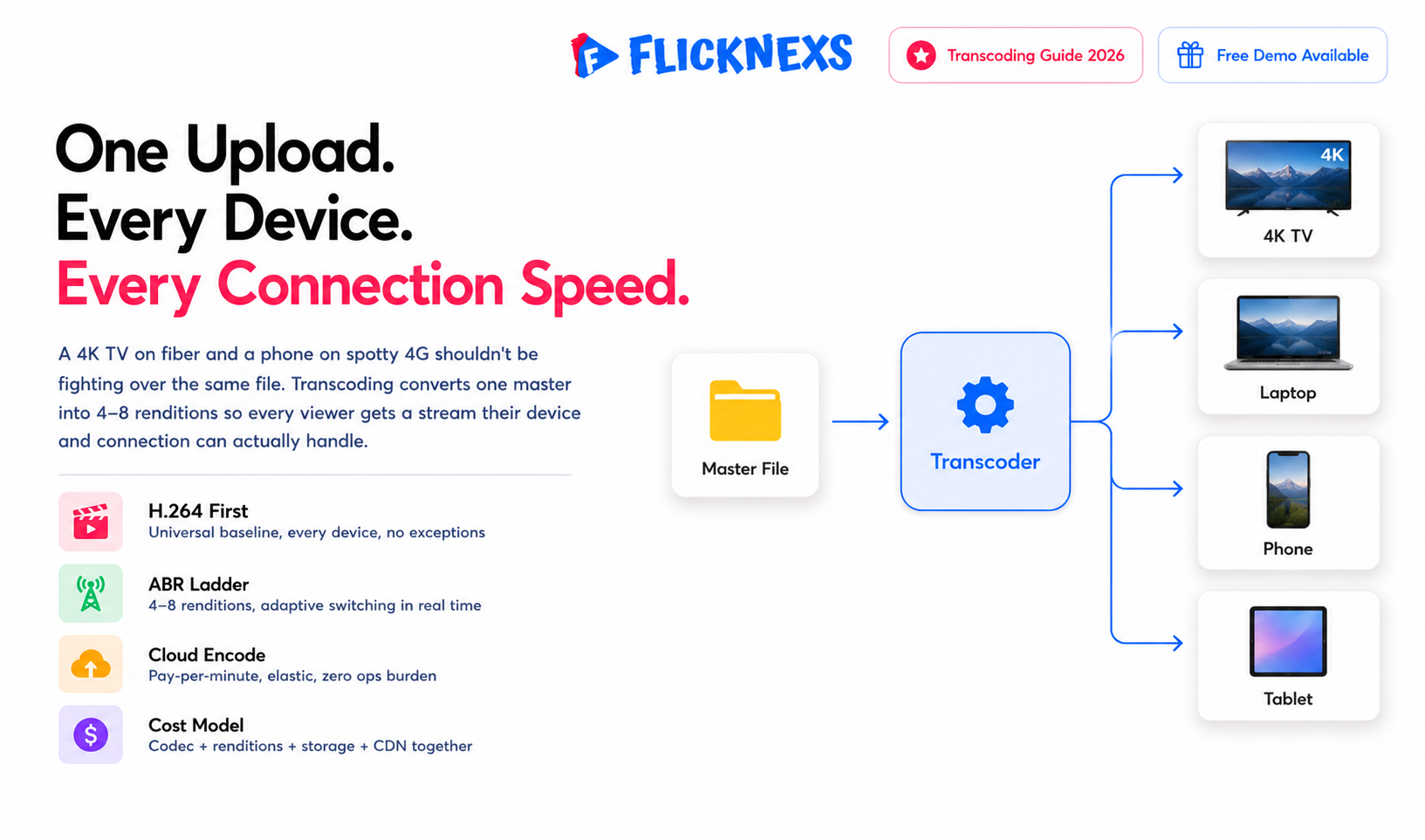
Video transcoding is what happens between “we have a master file” and “everyone can actually watch it.” You take one source video and convert it into multiple compressed versions, different resolutions, bitrates, codecs, so every viewer gets a stream their specific device and connection can actually handle. A 4K TV on fiber and a phone on spotty 4G shouldn’t be fighting over the same file.
For OTT, that usually means encoding an ABR ladder, adaptive bitrate, somewhere around 4 to 8 renditions. H.264 covers universal reach because basically every device supports it. H.265/HEVC or AV1 are where you go for 4K and real bandwidth savings, though device support is narrower. The two levers that actually move your costs are which codecs you support and whether transcoding runs in the cloud, pay-per-minute, elastic, scales with you, or on-prem, capital-heavy upfront but cheaper once you’re at real scale. For most operators, cloud wins outright. On-prem only makes sense once your volume is high and predictable enough to justify owning the hardware.
By the Flicknexs team. We build white-label OTT/VOD/IPTV streaming platforms, so this comes from hands-on streaming-platform experience.
If you’re launching or scaling a streaming service, transcoding is one of the few technical calls that touches everything at once: video quality, buffering, device compatibility, your bandwidth bill and your monthly infrastructure spend. Get the encoding ladder wrong in one direction and you’re burning money on bitrate nobody can even perceive. Get it wrong the other way and you’re shipping grainy video that quietly churns subscribers who never bother to tell you why they left. This guide breaks down codecs, renditions, and the cloud-vs-on-prem cost question in plain, operator-grade terms.
What video transcoding actually does in an OTT pipeline
A creator uploads a master file, often high-bitrate ProRes, a camera-original MP4 or a mezzanine H.264 and that single file simply can’t go straight to streaming. It’s too large for mobile connections, it might use a codec or container the player can’t even read and it has zero way to adapt when a viewer’s bandwidth drops mid-stream. Transcoding solves all three problems at once. It decodes the source and re-encodes it into a set of outputs actually built for streaming.
In a typical VOD pipeline, transcoding sits between ingest and packaging. The transcoder produces multiple renditions and the packager segments and wraps them into HLS and MPEG-DASH for delivery. For how those pieces fit together end to end, see our hub on streaming infrastructure.
Transcoding vs transrating vs transmuxing
People throw these terms around interchangeably, but they’re not the same thing and mixing them up leads to bad assumptions about both cost and speed.
- Transcoding changes the codec itself, ProRes to H.264, for example. This is the heaviest operation by far, because it has to fully decode and fully re-encode. Nothing gets skipped.
- Transrating keeps the codec but changes bitrate or resolution. This is how you generate the rungs of an ABR ladder from a single mezzanine file, without touching the underlying codec each time.
- Transmuxing sometimes called repackaging, only changes the container without touching the encoded video at all. It’s cheap. It’s fast. Same reason swapping a book into a different cover doesn’t require rewriting the book.
In practice, a real ladder build mixes all three: transcode once to establish the target codec, transrate to generate the rungs, transmux to package for delivery.
Codecs: which ones to support and why
Your codec choice is a trade-off between three things: how widely it plays back, how much bandwidth it saves and how expensive it is to encode and license. There is no single “best” codec and most serious OTT services ship more than one.
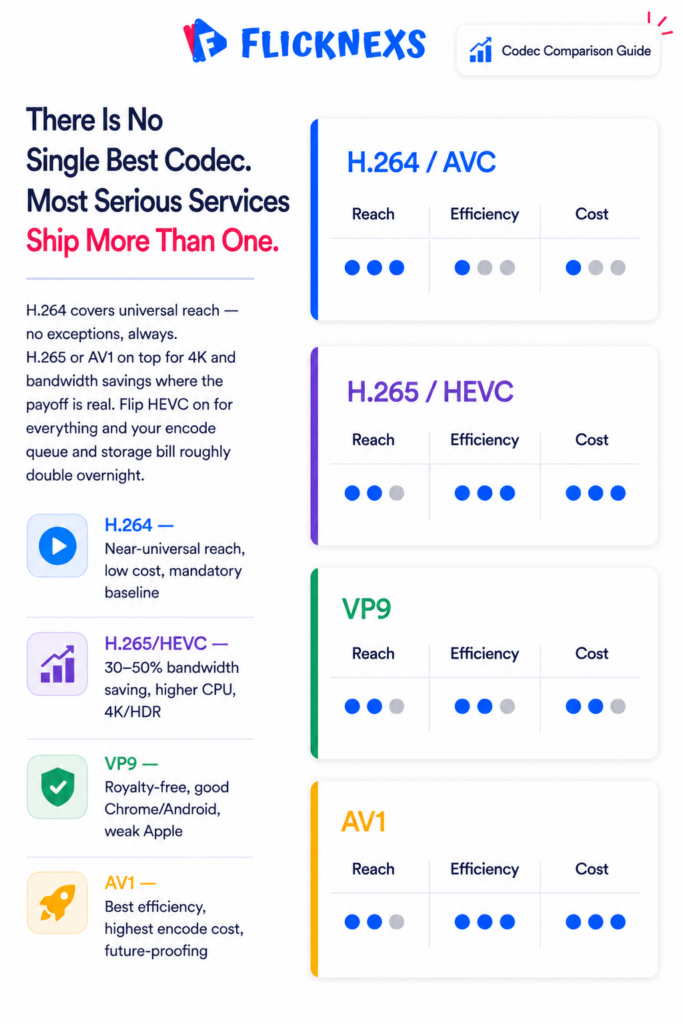
| Codec | Device reach | Bandwidth efficiency | Encoding cost | Best use |
| H.264 / AVC | Near-universal (every phone, TV, browser) | Baseline | Low / cheap | The mandatory fallback rendition for compatibility |
| H.265 / HEVC | Wide on modern TVs/iOS; patchier in browsers | ~30-50% better than H.264 at similar quality | Higher CPU; patent licensing complexity | 4K and HDR delivery, bandwidth-sensitive regions |
| VP9 | Good in Chrome/Android, weaker on Apple/TVs | Similar ballpark to HEVC | Moderate; royalty-free | Web-first services, YouTube-style delivery |
| AV1 | Growing (newer TVs, Chrome, Android); not everywhere | Often better than HEVC, esp. at low bitrate | Highest encode cost (improving fast) | Future-proofing, low-bitrate mobile, big libraries where storage/delivery savings compound |
The efficiency numbers above are widely cited industry ranges, but they depend heavily on content, encoder settings and which quality metric you’re using, so treat them as directional, not something to bank a spreadsheet on. For authoritative background, the HEVC and AV1 references are a good neutral starting point and web.dev is reliable on browser playback support.
A pragmatic codec strategy
For most operators, here’s what actually works: ship an H.264 ladder as your universal baseline, always, no exceptions. Then layer H.265 or AV1 on top specifically for 4K/HDR titles and high-volume content where the delivery savings genuinely pay back the extra encode cost. Adding a more efficient codec doesn’t just add a little overhead, it doubles, sometimes more, your encoding work and storage footprint. Only do it where the bandwidth or quality payoff is real, not because it sounds modern.
Here’s the part that catches teams off guard: flip on HEVC “for everything,” and your transcode queue depth and storage footprint roughly double overnight. The bill shows up immediately. The delivery savings show up later, if they show up at all for your particular audience. If most of your viewers are watching at 1080p or below on mid-range phones, a well-tuned H.264 ladder already covers the majority of your sessions, and you’re paying double for savings almost nobody on your platform will actually benefit from.
Renditions and the ABR ladder
An adaptive bitrate ladder is the set of renditions a player can switch between in real time as network conditions change. A good ladder gives smooth playback on a weak connection and crisp video on a strong one, without forcing a single compromise bitrate on everyone.
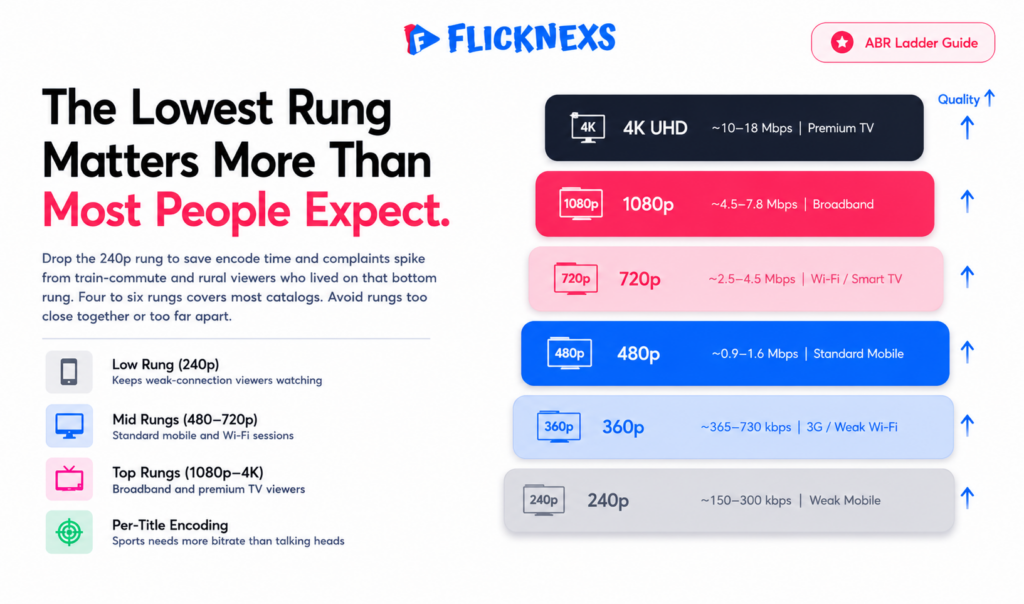
A sensible default H.264 ladder
| Rendition | Resolution | Typical video bitrate (H.264) | Targets |
| Low | 416×234 / 426×240 | ~145-300 kbps | Very poor mobile networks |
| SD | 640×360 | ~365-730 kbps | 3G/weak Wi-Fi |
| SD+ | 854×480 | ~0.9-1.6 Mbps | Standard mobile |
| HD | 1280×720 | ~2.5-4.5 Mbps | Wi-Fi, smart TVs |
| Full HD | 1920×1080 | ~4.5-7.8 Mbps | Broadband, large screens |
| 4K(HEVS/AV!) | 3840×2160 | ~10-18 Mbps | Premium, modern TVs |
These ranges are a starting point, not a rule carved in stone. The well-known “per-title” insight in the industry is simple the optimal ladder isn’t the same for every piece of content. A static talking-head interview compresses far more easily than fast-motion sports footage does. Feed both through the same one-size-fits-all ladder and you either waste bitrate on the easy content or starve the hard content of what it actually needs. Per-title or content-aware, encoding fixes this by analyzing each asset individually and tailoring the ladder to match. Do it right and you cut delivery bandwidth meaningfully, without the viewer noticing any drop in quality at all.
How many rungs do you need?
Four to six rungs covers most catalogs. More rungs give the player finer control but increase encoding time, storage and packaging overhead. Avoid rungs that are too close together (little quality difference, wasted work) or too far apart (jarring jumps when the player switches). The lowest rung matters more than people expect. It is what keeps a viewer on a bad connection watching instead of staring at a buffering spinner. We have seen catalogs where someone quietly dropped the 240p rung to save encode time, then watched complaints spike from exactly the train-commute and rural viewers who lived on that bottom rung.
Cloud vs on-prem transcoding: the real cost picture
This is where operators most often over- or under-spend. The honest answer is that it depends on volume, predictability and how much engineering time you want to own.
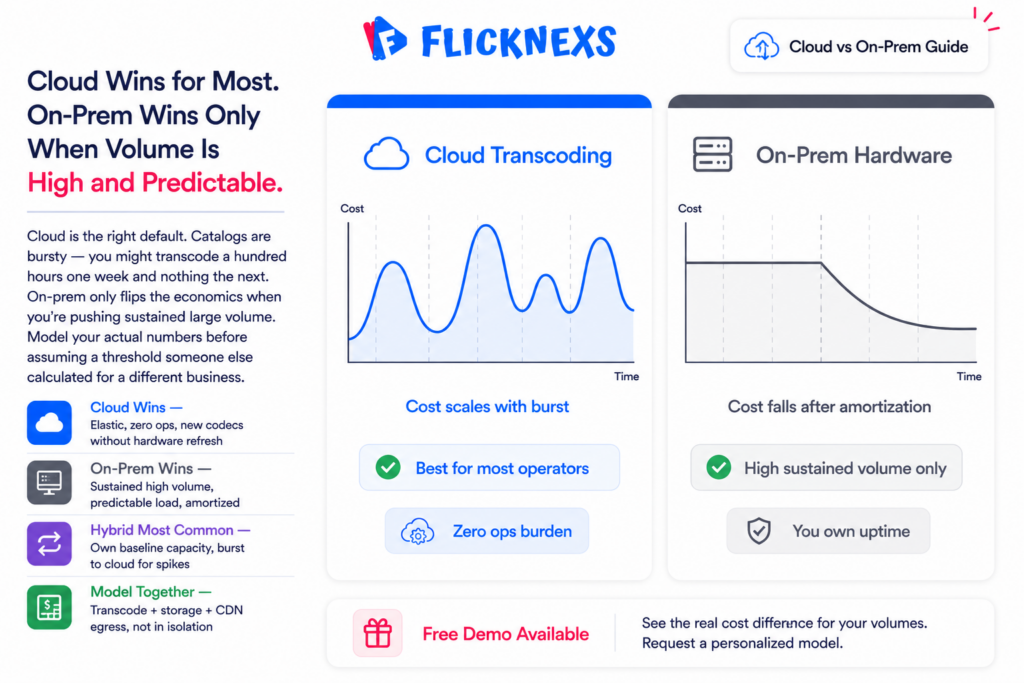
| Factor | Cloud transcoding | On-prem transcoding |
| Cost model | Pay per minute encoded (operating expense) | Buy/rent servers + GPUs (capital expense) |
| Scaling | Elastic; burst to hundreds of jobs instantly | Fixed capacity; queue or buy more hardware |
| Upfront cost | Near zero | High (hardware, racks, power) |
| Cost at high steady volume | Can get expensive per-minute | Cheaper once hardware is amortized |
| Ops burden | Provider handles maintenance | You own uptime, drivers, failover |
When cloud wins
Cloud is the right default for the vast majority of new and mid-size OTT services. Catalog ingests are bursty. You might transcode a hundred hours one week and nothing the next, and paying only for what you encode avoids idle hardware. Cloud providers also keep up with new codecs and presets so you get AV1 or improved HEVC without a hardware refresh. Until your encoding volume is both very high and very predictable, the elasticity and zero ops burden of cloud usually beat owning machines.
When on-prem (or hybrid) starts to make sense
On-prem starts to make sense once you’re pushing large, continuous encoding volume, think a back-catalog migration running into tens of thousands of hours, or a live 24/7 linear operation where per-minute cloud fees add up faster than amortized hardware ever would. GPU-accelerated encoders can push a lot of streams through a single box and at sustained utilization, the unit economics genuinely flip in your favor.
Most mature operators don’t pick one or the other. They land on a hybrid: own baseline capacity for the predictable load, then burst to the cloud when volume spikes. That break-even point is specific to your own volume and rates though, so model your actual numbers here. Don’t trust some generic industry threshold someone else came up with for a completely different business.
Don’t forget storage and delivery
Transcoding cost is only one line item. Every extra rendition and codec multiplies your storage and delivery (CDN egress) is frequently the largest streaming cost of all. A more efficient codec raises encode cost but lowers delivery cost, which is exactly why high-volume services invest in HEVC/AV1. Model transcoding, storage and CDN together, not in isolation. Our guide on CDN strategy and cutting delivery costs covers the delivery side in depth.
Quality, monitoring and common pitfalls
Bitrate alone does not equal quality. Use a perceptual quality metric (VMAF is the widely adopted open standard) to confirm each rung actually looks good rather than just hitting a target bitrate. Other things that quietly hurt operators:
- Keyframe (GOP) alignment. Segments must start on keyframes that line up across renditions, or adaptive switching produces glitches. Align your GOP to your segment duration.
- Audio handling. Normalize loudness and pick widely supported audio codecs (AAC is the safe baseline); broken or non-standard audio is a top cause of “it won’t play” tickets.
- Over-tall ladders. Shipping 4K when 90% of sessions are 480p mobile just inflates encode and storage bills.
- Ignoring packaging. The cleanest transcode still fails if HLS/DASH packaging is misconfigured. See HLS vs MPEG-DASH for protocol choices.
A capable video CMS should make most of this invisible: defining ladders, kicking off transcodes and tracking job status automatically. That is the difference between an operator who babysits FFmpeg jobs and one who just uploads and publishes. See what a video CMS should do for your OTT business for where transcoding fits into the wider workflow and explore the Flicknexs feature set to see managed transcoding in a full platform.
Frequently asked questions
Ready to build?
If you’re planning your next OTT project, Flicknexs handles the video infrastructure end-to-end — so you can ship in weeks, not months.
- launch an OTT service with Flicknexs
- check plan pricing
More OTT platform guides
Continue exploring more on this topic across the Flicknexs blog.
- The definitive guide: How to Start OTT Platform in 2026
- 5 Steps To Sell Online Videos With OTT Solution In 2023
- How to Build an OTT Platform: Step-by-Step Guide (2026)
- 5 Major Benefits of OTT Platform
Ready to build?
If you’re planning your next OTT project, Flicknexs handles the video infrastructure end-to-end — so you can ship in weeks, not months.
- launch an OTT service with Flicknexs
- check plan pricing
More OTT platform guides
Continue exploring more on this topic across the Flicknexs blog.
- The definitive guide: How to Start OTT Platform in 2026
- 5 Steps To Sell Online Videos With OTT Solution In 2023
- How to Build an OTT Platform: Step-by-Step Guide (2026)
- 5 Major Benefits of OTT Platform
Ready to build?
If you’re planning your next OTT project, Flicknexs handles the video infrastructure end-to-end — so you can ship in weeks, not months.
- launch an OTT service with Flicknexs
- check plan pricing
More OTT platform guides
Continue exploring more on this topic across the Flicknexs blog.
- The definitive guide: How to Start OTT Platform in 2026
- 5 Steps To Sell Online Videos With OTT Solution In 2023
- How to Build an OTT Platform: Step-by-Step Guide (2026)
- 5 Major Benefits of OTT Platform
Ready to build?
If you’re planning your next OTT project, Flicknexs handles the video infrastructure end-to-end — so you can ship in weeks, not months.
- launch an OTT service with Flicknexs
- check plan pricing
More OTT platform guides
Continue exploring more on this topic across the Flicknexs blog.
- The definitive guide: How to Start OTT Platform in 2026
- 5 Steps To Sell Online Videos With OTT Solution In 2023
- How to Build an OTT Platform: Step-by-Step Guide (2026)
- 5 Major Benefits of OTT Platform
Ready to build?
If you’re planning your next OTT project, Flicknexs handles the video infrastructure end-to-end — so you can ship in weeks, not months.
- launch an OTT service with Flicknexs
- check plan pricing
More OTT platform guides
Continue exploring more on this topic across the Flicknexs blog.
- The definitive guide: How to Start OTT Platform in 2026
- 5 Steps To Sell Online Videos With OTT Solution In 2023
- How to Build an OTT Platform: Step-by-Step Guide (2026)
- 5 Major Benefits of OTT Platform
Ready to build?
If you’re planning your next OTT project, Flicknexs handles the video infrastructure end-to-end — so you can ship in weeks, not months.
- launch an OTT service with Flicknexs
- check plan pricing
More OTT platform guides
Continue exploring more on this topic across the Flicknexs blog.
- The definitive guide: How to Start OTT Platform in 2026
- 5 Steps To Sell Online Videos With OTT Solution In 2023
- How to Build an OTT Platform: Step-by-Step Guide (2026)
- 5 Major Benefits of OTT Platform
Ready to build?
If you’re planning your next OTT project, Flicknexs handles the video infrastructure end-to-end — so you can ship in weeks, not months.
- launch an OTT service with Flicknexs
- check plan pricing
More OTT platform guides
Continue exploring more on this topic across the Flicknexs blog.
- The definitive guide: How to Start OTT Platform in 2026
- 5 Steps To Sell Online Videos With OTT Solution In 2023
- How to Build an OTT Platform: Step-by-Step Guide (2026)
- 5 Major Benefits of OTT Platform
Ready to build?
If you’re planning your next OTT project, Flicknexs handles the video infrastructure end-to-end — so you can ship in weeks, not months.
- launch an OTT service with Flicknexs
- check plan pricing
More OTT platform guides
Continue exploring more on this topic across the Flicknexs blog.
- The definitive guide: How to Start OTT Platform in 2026
- 5 Steps To Sell Online Videos With OTT Solution In 2023
- How to Build an OTT Platform: Step-by-Step Guide (2026)
- 5 Major Benefits of OTT Platform
Ready to build?
If you’re planning your next OTT project, Flicknexs handles the video infrastructure end-to-end — so you can ship in weeks, not months.
- launch an OTT service with Flicknexs
- check plan pricing
More OTT platform guides
Continue exploring more on this topic across the Flicknexs blog.
- The definitive guide: How to Start OTT Platform in 2026
- 5 Steps To Sell Online Videos With OTT Solution In 2023
- How to Build an OTT Platform: Step-by-Step Guide (2026)
- 5 Major Benefits of OTT Platform
Ready to build?
If you’re planning your next OTT project, Flicknexs handles the video infrastructure end-to-end — so you can ship in weeks, not months.
- launch an OTT service with Flicknexs
- check plan pricing
More OTT platform guides
Continue exploring more on this topic across the Flicknexs blog.
- The definitive guide: How to Start OTT Platform in 2026
- 5 Steps To Sell Online Videos With OTT Solution In 2023
- How to Build an OTT Platform: Step-by-Step Guide (2026)
- 5 Major Benefits of OTT Platform
Ready to build?
If you’re planning your next OTT project, Flicknexs handles the video infrastructure end-to-end — so you can ship in weeks, not months.
- launch an OTT service with Flicknexs
- check plan pricing
More OTT platform guides
Continue exploring more on this topic across the Flicknexs blog.
- The definitive guide: How to Start OTT Platform in 2026
- 5 Steps To Sell Online Videos With OTT Solution In 2023
- How to Build an OTT Platform: Step-by-Step Guide (2026)
- 5 Major Benefits of OTT Platform
Ready to build?
If you’re planning your next OTT project, Flicknexs handles the video infrastructure end-to-end — so you can ship in weeks, not months.
- launch an OTT service with Flicknexs
- check plan pricing
More OTT platform guides
Continue exploring more on this topic across the Flicknexs blog.
- The definitive guide: How to Start OTT Platform in 2026
- 5 Steps To Sell Online Videos With OTT Solution In 2023
- How to Build an OTT Platform: Step-by-Step Guide (2026)
- 5 Major Benefits of OTT Platform
Ready to build?
If you’re planning your next OTT project, Flicknexs handles the video infrastructure end-to-end — so you can ship in weeks, not months.
- launch an OTT service with Flicknexs
- check plan pricing
More OTT platform guides
Continue exploring more on this topic across the Flicknexs blog.
- The definitive guide: How to Start OTT Platform in 2026
- 5 Steps To Sell Online Videos With OTT Solution In 2023
- How to Build an OTT Platform: Step-by-Step Guide (2026)
- 5 Major Benefits of OTT Platform
Ready to build?
If you’re planning your next OTT project, Flicknexs handles the video infrastructure end-to-end — so you can ship in weeks, not months.
- launch an OTT service with Flicknexs
- check plan pricing
More OTT platform guides
Continue exploring more on this topic across the Flicknexs blog.
- The definitive guide: How to Start OTT Platform in 2026
- 5 Steps To Sell Online Videos With OTT Solution In 2023
- How to Build an OTT Platform: Step-by-Step Guide (2026)
- 5 Major Benefits of OTT Platform
Ready to build?
If you’re planning your next OTT project, Flicknexs handles the video infrastructure end-to-end — so you can ship in weeks, not months.
- launch an OTT service with Flicknexs
- check plan pricing
More OTT platform guides
Continue exploring more on this topic across the Flicknexs blog.
- The definitive guide: How to Start OTT Platform in 2026
- 5 Steps To Sell Online Videos With OTT Solution In 2023
- How to Build an OTT Platform: Step-by-Step Guide (2026)
- 5 Major Benefits of OTT Platform
Ready to build?
If you’re planning your next OTT project, Flicknexs handles the video infrastructure end-to-end — so you can ship in weeks, not months.
- launch an OTT service with Flicknexs
- check plan pricing
More OTT platform guides
Continue exploring more on this topic across the Flicknexs blog.
- The definitive guide: How to Start OTT Platform in 2026
- 5 Steps To Sell Online Videos With OTT Solution In 2023
- How to Build an OTT Platform: Step-by-Step Guide (2026)
- 5 Major Benefits of OTT Platform
Ready to build?
If you’re planning your next OTT project, Flicknexs handles the video infrastructure end-to-end — so you can ship in weeks, not months.
- launch an OTT service with Flicknexs
- check plan pricing
More OTT platform guides
Continue exploring more on this topic across the Flicknexs blog.
- The definitive guide: How to Start OTT Platform in 2026
- 5 Steps To Sell Online Videos With OTT Solution In 2023
- How to Build an OTT Platform: Step-by-Step Guide (2026)
- 5 Major Benefits of OTT Platform
Ready to build?
If you’re planning your next OTT project, Flicknexs handles the video infrastructure end-to-end — so you can ship in weeks, not months.
- launch an OTT service with Flicknexs
- check plan pricing
More OTT platform guides
Continue exploring more on this topic across the Flicknexs blog.
- The definitive guide: How to Start OTT Platform in 2026
- 5 Steps To Sell Online Videos With OTT Solution In 2023
- How to Build an OTT Platform: Step-by-Step Guide (2026)
- 5 Major Benefits of OTT Platform
Ready to build?
If you’re planning your next OTT project, Flicknexs handles the video infrastructure end-to-end — so you can ship in weeks, not months.
- launch an OTT service with Flicknexs
- check plan pricing
More OTT platform guides
Continue exploring more on this topic across the Flicknexs blog.
- The definitive guide: How to Start OTT Platform in 2026
- 5 Steps To Sell Online Videos With OTT Solution In 2023
- How to Build an OTT Platform: Step-by-Step Guide (2026)
- 5 Major Benefits of OTT Platform
Ready to build?
If you’re planning your next OTT project, Flicknexs handles the video infrastructure end-to-end — so you can ship in weeks, not months.
- launch an OTT service with Flicknexs
- check plan pricing
More OTT platform guides
Continue exploring more on this topic across the Flicknexs blog.
- The definitive guide: How to Start OTT Platform in 2026
- 5 Steps To Sell Online Videos With OTT Solution In 2023
- How to Build an OTT Platform: Step-by-Step Guide (2026)
- 5 Major Benefits of OTT Platform
Ready to build?
If you’re planning your next OTT project, Flicknexs handles the video infrastructure end-to-end — so you can ship in weeks, not months.
- launch an OTT service with Flicknexs
- check plan pricing
More OTT platform guides
Continue exploring more on this topic across the Flicknexs blog.
- The definitive guide: How to Start OTT Platform in 2026
- 5 Steps To Sell Online Videos With OTT Solution In 2023
- How to Build an OTT Platform: Step-by-Step Guide (2026)
- 5 Major Benefits of OTT Platform
Ready to build?
If you’re planning your next OTT project, Flicknexs handles the video infrastructure end-to-end — so you can ship in weeks, not months.
- launch an OTT service with Flicknexs
- check plan pricing
More OTT platform guides
Continue exploring more on this topic across the Flicknexs blog.
- The definitive guide: How to Start OTT Platform in 2026
- 5 Steps To Sell Online Videos With OTT Solution In 2023
- How to Build an OTT Platform: Step-by-Step Guide (2026)
- 5 Major Benefits of OTT Platform
Ready to build?
If you’re planning your next OTT project, Flicknexs handles the video infrastructure end-to-end — so you can ship in weeks, not months.
- launch an OTT service with Flicknexs
- check plan pricing
More OTT platform guides
Continue exploring more on this topic across the Flicknexs blog.
- The definitive guide: How to Start OTT Platform in 2026
- 5 Steps To Sell Online Videos With OTT Solution In 2023
- How to Build an OTT Platform: Step-by-Step Guide (2026)
- 5 Major Benefits of OTT Platform
Ready to build?
If you’re planning your next OTT project, Flicknexs handles the video infrastructure end-to-end — so you can ship in weeks, not months.
- launch an OTT service with Flicknexs
- check plan pricing
More OTT platform guides
Continue exploring more on this topic across the Flicknexs blog.
- The definitive guide: How to Start OTT Platform in 2026
- 5 Steps To Sell Online Videos With OTT Solution In 2023
- How to Build an OTT Platform: Step-by-Step Guide (2026)
- 5 Major Benefits of OTT Platform
Ready to build?
If you’re planning your next OTT project, Flicknexs handles the video infrastructure end-to-end — so you can ship in weeks, not months.
- launch an OTT service with Flicknexs
- check plan pricing
More OTT platform guides
Continue exploring more on this topic across the Flicknexs blog.
- The definitive guide: How to Start OTT Platform in 2026
- 5 Steps To Sell Online Videos With OTT Solution In 2023
- How to Build an OTT Platform: Step-by-Step Guide (2026)
- 5 Major Benefits of OTT Platform
Ready to build?
If you’re planning your next OTT project, Flicknexs handles the video infrastructure end-to-end — so you can ship in weeks, not months.
- launch an OTT service with Flicknexs
- check plan pricing
More OTT platform guides
Continue exploring more on this topic across the Flicknexs blog.
- The definitive guide: How to Start OTT Platform in 2026
- 5 Steps To Sell Online Videos With OTT Solution In 2023
- How to Build an OTT Platform: Step-by-Step Guide (2026)
- 5 Major Benefits of OTT Platform
Ready to build?
If you’re planning your next OTT project, Flicknexs handles the video infrastructure end-to-end — so you can ship in weeks, not months.
- launch an OTT service with Flicknexs
- check plan pricing
More OTT platform guides
Continue exploring more on this topic across the Flicknexs blog.
- The definitive guide: How to Start OTT Platform in 2026
- 5 Steps To Sell Online Videos With OTT Solution In 2023
- How to Build an OTT Platform: Step-by-Step Guide (2026)
- 5 Major Benefits of OTT Platform
Ready to build?
If you’re planning your next OTT project, Flicknexs handles the video infrastructure end-to-end — so you can ship in weeks, not months.
- launch an OTT service with Flicknexs
- check plan pricing
More OTT platform guides
Continue exploring more on this topic across the Flicknexs blog.
- The definitive guide: How to Start OTT Platform in 2026
- 5 Steps To Sell Online Videos With OTT Solution In 2023
- How to Build an OTT Platform: Step-by-Step Guide (2026)
- 5 Major Benefits of OTT Platform
Ready to build?
If you’re planning your next OTT project, Flicknexs handles the video infrastructure end-to-end — so you can ship in weeks, not months.
- launch an OTT service with Flicknexs
- check plan pricing
More OTT platform guides
Continue exploring more on this topic across the Flicknexs blog.
- The definitive guide: How to Start OTT Platform in 2026
- 5 Steps To Sell Online Videos With OTT Solution In 2023
- How to Build an OTT Platform: Step-by-Step Guide (2026)
- 5 Major Benefits of OTT Platform
Ready to build?
If you’re planning your next OTT project, Flicknexs handles the video infrastructure end-to-end — so you can ship in weeks, not months.
- launch an OTT service with Flicknexs
- check plan pricing
More OTT platform guides
Continue exploring more on this topic across the Flicknexs blog.
- The definitive guide: How to Start OTT Platform in 2026
- 5 Steps To Sell Online Videos With OTT Solution In 2023
- How to Build an OTT Platform: Step-by-Step Guide (2026)
- 5 Major Benefits of OTT Platform
Ready to build?
If you’re planning your next OTT project, Flicknexs handles the video infrastructure end-to-end — so you can ship in weeks, not months.
- launch an OTT service with Flicknexs
- check plan pricing
More OTT platform guides
Continue exploring more on this topic across the Flicknexs blog.
- The definitive guide: How to Start OTT Platform in 2026
- 5 Steps To Sell Online Videos With OTT Solution In 2023
- How to Build an OTT Platform: Step-by-Step Guide (2026)
- 5 Major Benefits of OTT Platform
Ready to build?
If you’re planning your next OTT project, Flicknexs handles the video infrastructure end-to-end — so you can ship in weeks, not months.
- launch an OTT service with Flicknexs
- check plan pricing
More OTT platform guides
Continue exploring more on this topic across the Flicknexs blog.
- The definitive guide: How to Start OTT Platform in 2026
- 5 Steps To Sell Online Videos With OTT Solution In 2023
- How to Build an OTT Platform: Step-by-Step Guide (2026)
- 5 Major Benefits of OTT Platform
Ready to build?
If you’re planning your next OTT project, Flicknexs handles the video infrastructure end-to-end — so you can ship in weeks, not months.
- launch an OTT service with Flicknexs
- check plan pricing
More OTT platform guides
Continue exploring more on this topic across the Flicknexs blog.
- The definitive guide: How to Start OTT Platform in 2026
- 5 Steps To Sell Online Videos With OTT Solution In 2023
- How to Build an OTT Platform: Step-by-Step Guide (2026)
- 5 Major Benefits of OTT Platform
Ready to build?
If you’re planning your next OTT project, Flicknexs handles the video infrastructure end-to-end — so you can ship in weeks, not months.
- launch an OTT service with Flicknexs
- check plan pricing
More OTT platform guides
Continue exploring more on this topic across the Flicknexs blog.
- The definitive guide: How to Start OTT Platform in 2026
- 5 Steps To Sell Online Videos With OTT Solution In 2023
- How to Build an OTT Platform: Step-by-Step Guide (2026)
- 5 Major Benefits of OTT Platform
Ready to build?
If you’re planning your next OTT project, Flicknexs handles the video infrastructure end-to-end — so you can ship in weeks, not months.
- launch an OTT service with Flicknexs
- check plan pricing
More OTT platform guides
Continue exploring more on this topic across the Flicknexs blog.
- The definitive guide: How to Start OTT Platform in 2026
- 5 Steps To Sell Online Videos With OTT Solution In 2023
- How to Build an OTT Platform: Step-by-Step Guide (2026)
- 5 Major Benefits of OTT Platform
Ready to build?
If you’re planning your next OTT project, Flicknexs handles the video infrastructure end-to-end — so you can ship in weeks, not months.
- launch an OTT service with Flicknexs
- check plan pricing
More OTT platform guides
Continue exploring more on this topic across the Flicknexs blog.
- The definitive guide: How to Start OTT Platform in 2026
- 5 Steps To Sell Online Videos With OTT Solution In 2023
- How to Build an OTT Platform: Step-by-Step Guide (2026)
- 5 Major Benefits of OTT Platform
Ready to build?
If you’re planning your next OTT project, Flicknexs handles the video infrastructure end-to-end — so you can ship in weeks, not months.
- launch an OTT service with Flicknexs
- check plan pricing
More OTT platform guides
Continue exploring more on this topic across the Flicknexs blog.
- The definitive guide: How to Start OTT Platform in 2026
- 5 Steps To Sell Online Videos With OTT Solution In 2023
- How to Build an OTT Platform: Step-by-Step Guide (2026)
- 5 Major Benefits of OTT Platform
Ready to build?
If you’re planning your next OTT project, Flicknexs handles the video infrastructure end-to-end — so you can ship in weeks, not months.
- launch an OTT service with Flicknexs
- check plan pricing
More OTT platform guides
Continue exploring more on this topic across the Flicknexs blog.
- The definitive guide: How to Start OTT Platform in 2026
- 5 Steps To Sell Online Videos With OTT Solution In 2023
- How to Build an OTT Platform: Step-by-Step Guide (2026)
- 5 Major Benefits of OTT Platform
Ready to build?
If you’re planning your next OTT project, Flicknexs handles the video infrastructure end-to-end — so you can ship in weeks, not months.
- launch an OTT service with Flicknexs
- check plan pricing
More OTT platform guides
Continue exploring more on this topic across the Flicknexs blog.
- The definitive guide: How to Start OTT Platform in 2026
- 5 Steps To Sell Online Videos With OTT Solution In 2023
- How to Build an OTT Platform: Step-by-Step Guide (2026)
- 5 Major Benefits of OTT Platform
Ready to build?
If you’re planning your next OTT project, Flicknexs handles the video infrastructure end-to-end — so you can ship in weeks, not months.
- launch an OTT service with Flicknexs
- check plan pricing
More OTT platform guides
Continue exploring more on this topic across the Flicknexs blog.
- The definitive guide: How to Start OTT Platform in 2026
- 5 Steps To Sell Online Videos With OTT Solution In 2023
- How to Build an OTT Platform: Step-by-Step Guide (2026)
- 5 Major Benefits of OTT Platform
Ready to build?
If you’re planning your next OTT project, Flicknexs handles the video infrastructure end-to-end — so you can ship in weeks, not months.
- launch an OTT service with Flicknexs
- check plan pricing
More OTT platform guides
Continue exploring more on this topic across the Flicknexs blog.
- The definitive guide: How to Start OTT Platform in 2026
- 5 Steps To Sell Online Videos With OTT Solution In 2023
- How to Build an OTT Platform: Step-by-Step Guide (2026)
- 5 Major Benefits of OTT Platform
Ready to build?
If you’re planning your next OTT project, Flicknexs handles the video infrastructure end-to-end — so you can ship in weeks, not months.
- launch an OTT service with Flicknexs
- check plan pricing
More OTT platform guides
Continue exploring more on this topic across the Flicknexs blog.
- The definitive guide: How to Start OTT Platform in 2026
- 5 Steps To Sell Online Videos With OTT Solution In 2023
- How to Build an OTT Platform: Step-by-Step Guide (2026)
- 5 Major Benefits of OTT Platform
Ready to build?
If you’re planning your next OTT project, Flicknexs handles the video infrastructure end-to-end — so you can ship in weeks, not months.
- launch an OTT service with Flicknexs
- check plan pricing
More OTT platform guides
Continue exploring more on this topic across the Flicknexs blog.
- The definitive guide: How to Start OTT Platform in 2026
- 5 Steps To Sell Online Videos With OTT Solution In 2023
- How to Build an OTT Platform: Step-by-Step Guide (2026)
- 5 Major Benefits of OTT Platform
Ready to build?
If you’re planning your next OTT project, Flicknexs handles the video infrastructure end-to-end — so you can ship in weeks, not months.
- launch an OTT service with Flicknexs
- check plan pricing
More OTT platform guides
Continue exploring more on this topic across the Flicknexs blog.
- The definitive guide: How to Start OTT Platform in 2026
- 5 Steps To Sell Online Videos With OTT Solution In 2023
- How to Build an OTT Platform: Step-by-Step Guide (2026)
- 5 Major Benefits of OTT Platform
Ready to build?
If you’re planning your next OTT project, Flicknexs handles the video infrastructure end-to-end — so you can ship in weeks, not months.
- launch an OTT service with Flicknexs
- check plan pricing
More OTT platform guides
Continue exploring more on this topic across the Flicknexs blog.
- The definitive guide: How to Start OTT Platform in 2026
- 5 Steps To Sell Online Videos With OTT Solution In 2023
- How to Build an OTT Platform: Step-by-Step Guide (2026)
- 5 Major Benefits of OTT Platform
Ready to build?
If you’re planning your next OTT project, Flicknexs handles the video infrastructure end-to-end — so you can ship in weeks, not months.
- launch an OTT service with Flicknexs
- check plan pricing
More OTT platform guides
Continue exploring more on this topic across the Flicknexs blog.
- The definitive guide: How to Start OTT Platform in 2026
- 5 Steps To Sell Online Videos With OTT Solution In 2023
- How to Build an OTT Platform: Step-by-Step Guide (2026)
- 5 Major Benefits of OTT Platform
Ready to build?
If you’re planning your next OTT project, Flicknexs handles the video infrastructure end-to-end — so you can ship in weeks, not months.
- launch an OTT service with Flicknexs
- check plan pricing
More OTT platform guides
Continue exploring more on this topic across the Flicknexs blog.
- The definitive guide: How to Start OTT Platform in 2026
- 5 Steps To Sell Online Videos With OTT Solution In 2023
- How to Build an OTT Platform: Step-by-Step Guide (2026)
- 5 Major Benefits of OTT Platform
Ready to build?
If you’re planning your next OTT project, Flicknexs handles the video infrastructure end-to-end — so you can ship in weeks, not months.
- launch an OTT service with Flicknexs
- check plan pricing
More OTT platform guides
Continue exploring more on this topic across the Flicknexs blog.
- The definitive guide: How to Start OTT Platform in 2026
- 5 Steps To Sell Online Videos With OTT Solution In 2023
- How to Build an OTT Platform: Step-by-Step Guide (2026)
- 5 Major Benefits of OTT Platform
Ready to build?
If you’re planning your next OTT project, Flicknexs handles the video infrastructure end-to-end — so you can ship in weeks, not months.
- launch an OTT service with Flicknexs
- check plan pricing
More OTT platform guides
Continue exploring more on this topic across the Flicknexs blog.
- The definitive guide: How to Start OTT Platform in 2026
- 5 Steps To Sell Online Videos With OTT Solution In 2023
- How to Build an OTT Platform: Step-by-Step Guide (2026)
- 5 Major Benefits of OTT Platform
Ready to build?
If you’re planning your next OTT project, Flicknexs handles the video infrastructure end-to-end — so you can ship in weeks, not months.
- launch an OTT service with Flicknexs
- check plan pricing
More OTT platform guides
Continue exploring more on this topic across the Flicknexs blog.
- The definitive guide: How to Start OTT Platform in 2026
- 5 Steps To Sell Online Videos With OTT Solution In 2023
- How to Build an OTT Platform: Step-by-Step Guide (2026)
- 5 Major Benefits of OTT Platform
Ready to build?
If you’re planning your next OTT project, Flicknexs handles the video infrastructure end-to-end — so you can ship in weeks, not months.
- launch an OTT service with Flicknexs
- check plan pricing
More OTT platform guides
Continue exploring more on this topic across the Flicknexs blog.
- The definitive guide: How to Start OTT Platform in 2026
- 5 Steps To Sell Online Videos With OTT Solution In 2023
- How to Build an OTT Platform: Step-by-Step Guide (2026)
- 5 Major Benefits of OTT Platform
Ready to build?
If you’re planning your next OTT project, Flicknexs handles the video infrastructure end-to-end — so you can ship in weeks, not months.
- launch an OTT service with Flicknexs
- check plan pricing
More OTT platform guides
Continue exploring more on this topic across the Flicknexs blog.
- The definitive guide: How to Start OTT Platform in 2026
- 5 Steps To Sell Online Videos With OTT Solution In 2023
- How to Build an OTT Platform: Step-by-Step Guide (2026)
- 5 Major Benefits of OTT Platform
Ready to build?
If you’re planning your next OTT project, Flicknexs handles the video infrastructure end-to-end — so you can ship in weeks, not months.
- launch an OTT service with Flicknexs
- check plan pricing
More OTT platform guides
Continue exploring more on this topic across the Flicknexs blog.
- The definitive guide: How to Start OTT Platform in 2026
- 5 Steps To Sell Online Videos With OTT Solution In 2023
- How to Build an OTT Platform: Step-by-Step Guide (2026)
- 5 Major Benefits of OTT Platform
Ready to build?
If you’re planning your next OTT project, Flicknexs handles the video infrastructure end-to-end — so you can ship in weeks, not months.
- launch an OTT service with Flicknexs
- check plan pricing
More OTT platform guides
Continue exploring more on this topic across the Flicknexs blog.
- The definitive guide: How to Start OTT Platform in 2026
- 5 Steps To Sell Online Videos With OTT Solution In 2023
- How to Build an OTT Platform: Step-by-Step Guide (2026)
- 5 Major Benefits of OTT Platform
Ready to build?
If you’re planning your next OTT project, Flicknexs handles the video infrastructure end-to-end — so you can ship in weeks, not months.
- launch an OTT service with Flicknexs
- check plan pricing
More OTT platform guides
Continue exploring more on this topic across the Flicknexs blog.
- The definitive guide: How to Start OTT Platform in 2026
- 5 Steps To Sell Online Videos With OTT Solution In 2023
- How to Build an OTT Platform: Step-by-Step Guide (2026)
- 5 Major Benefits of OTT Platform
Ready to build?
If you’re planning your next OTT project, Flicknexs handles the video infrastructure end-to-end — so you can ship in weeks, not months.
- launch an OTT service with Flicknexs
- check plan pricing
More OTT platform guides
Continue exploring more on this topic across the Flicknexs blog.
- The definitive guide: How to Start OTT Platform in 2026
- 5 Steps To Sell Online Videos With OTT Solution In 2023
- How to Build an OTT Platform: Step-by-Step Guide (2026)
- 5 Major Benefits of OTT Platform
Ready to build?
If you’re planning your next OTT project, Flicknexs handles the video infrastructure end-to-end — so you can ship in weeks, not months.
- launch an OTT service with Flicknexs
- check plan pricing
More OTT platform guides
Continue exploring more on this topic across the Flicknexs blog.
- The definitive guide: How to Start OTT Platform in 2026
- 5 Steps To Sell Online Videos With OTT Solution In 2023
- How to Build an OTT Platform: Step-by-Step Guide (2026)
- 5 Major Benefits of OTT Platform
Ready to build?
If you’re planning your next OTT project, Flicknexs handles the video infrastructure end-to-end — so you can ship in weeks, not months.
- launch an OTT service with Flicknexs
- check plan pricing
More OTT platform guides
Continue exploring more on this topic across the Flicknexs blog.
- The definitive guide: How to Start OTT Platform in 2026
- 5 Steps To Sell Online Videos With OTT Solution In 2023
- How to Build an OTT Platform: Step-by-Step Guide (2026)
- 5 Major Benefits of OTT Platform
Ready to build?
If you’re planning your next OTT project, Flicknexs handles the video infrastructure end-to-end — so you can ship in weeks, not months.
- launch an OTT service with Flicknexs
- check plan pricing
More OTT platform guides
Continue exploring more on this topic across the Flicknexs blog.

