
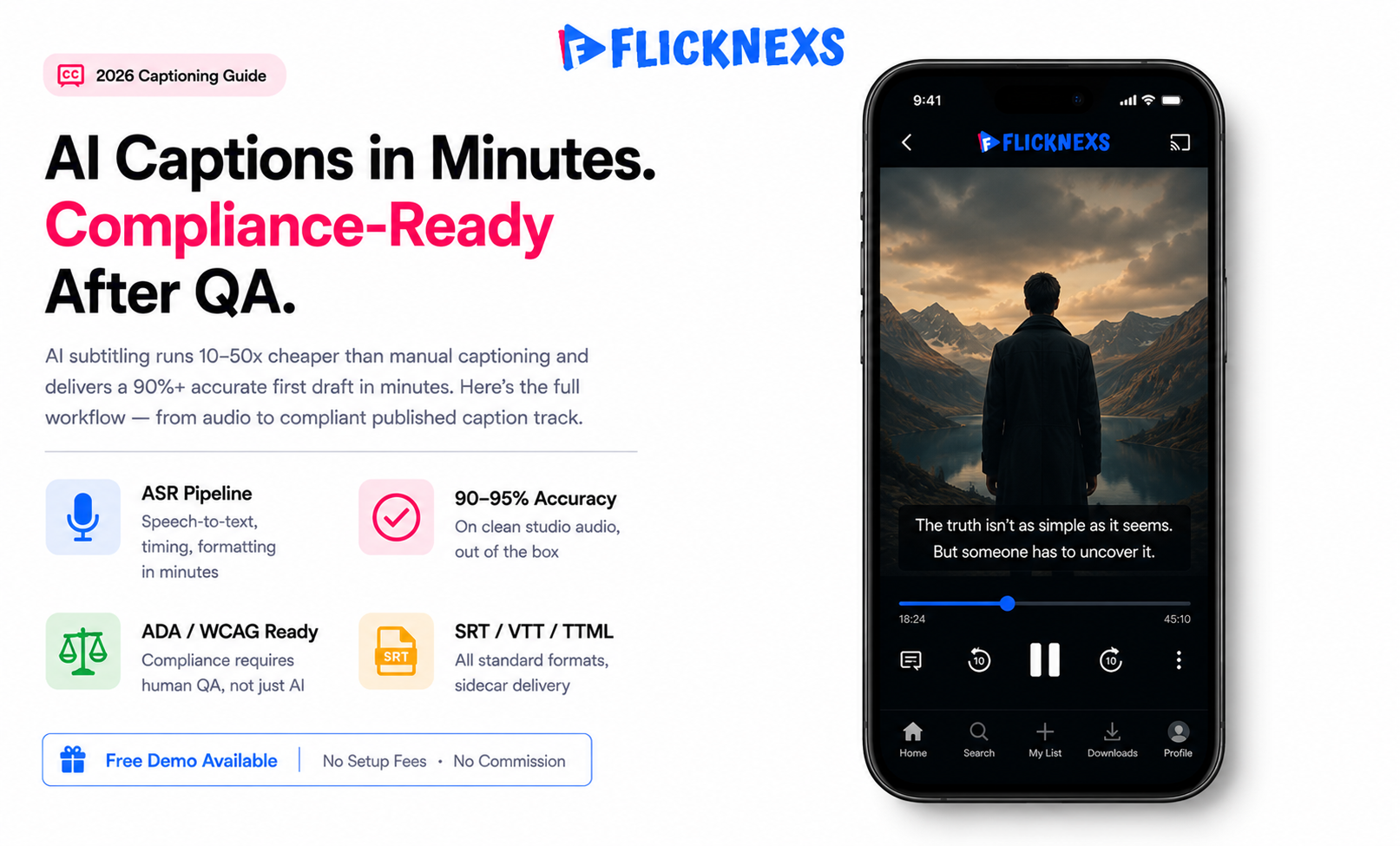
AI subtitling runs automatic speech recognition against your video’s audio, lines the output up with timecodes and spits out caption files in SRT, VTT or TTML format in minutes. Compare that to the days it used to take doing this by hand and the appeal is obvious.
For clean, single-speaker English audio, modern ASR models land around 90 to 95% word accuracy straight out of the box no tweaking. The moment you introduce noise, accents or multiple speakers talking over each other, that number drops and drops in ways that genuinely need a human to catch before anything ships.
The real win here isn’t really the accuracy number though. It’s cost and speed. AI captioning can run ten to fifty times cheaper than doing it fully manually and that math is hard to argue with at any real scale.
One thing worth being straight about: if you’re trying to ship captions that actually meet accessibility requirements like the ADA or WCAG, you still need a light human QA pass. Accuracy, speaker labels, punctuation then someone needs to actually check it.What the AI gives you as a first draft. Not the final thing you publish.
By the Flicknexs team. We build white-label OTT/VOD/IPTV streaming platforms, so this is written from hands-on streaming-platform experience.
Captions stopped being a nice-to-have a while ago. They drive watch time on muted social feeds, expand your addressable audience, satisfy accessibility law, and feed search and recommendation engines with clean text. The blocker was always cost and turnaround. AI subtitling collapses both, but only if you understand where it’s accurate and what compliance actually requires. This guide walks through the full workflow the way we’d set it up on a real streaming catalog.
How AI subtitling actually works
AI subtitling is a pipeline, not a single button. Once you know the stages, you know where errors creep in and where to spend your QA budget.
The four stages of the pipeline
- Speech-to-text (ASR): An acoustic plus language model converts spoken audio into raw text. This is where accuracy is won or lost.
- Segmentation and timing: The transcript gets split into caption lines (typically 32–42 characters per line, 1–2 lines on screen) and aligned to start/end timecodes so text appears in sync with speech.
- Formatting: Punctuation, capitalization, speaker labels,and non-speech cues (for example, [applause]) are added. Output is written to a standard caption format.
- Optional translation: For foreign-language subtitles, machine translation runs on the cleaned transcript. That’s a separate accuracy problem and usually needs heavier review.
Captions vs. subtitles vs. SDH
People throw these three around like they mean the same thing. They don’t and getting it wrong, actually matters once compliance enters the picture:
- Subtitles assume the viewer can already hear fine. They’re just translating or transcribing the dialogue, nothing more added.
- Closed captions (CC) exist for viewers who genuinely couldn’t hear the audio. Speaker IDs and sound effects, the works and they switch on and off whenever you want them to.
- SDH (Subtitles for the Deaf and Hard of hearing) sits in between subtitle-style formatting but with caption-level detail like sound cues built in. Usually shows up when a player only handles subtitle tracks and has no real CC support.
Accuracy: what to actually expect
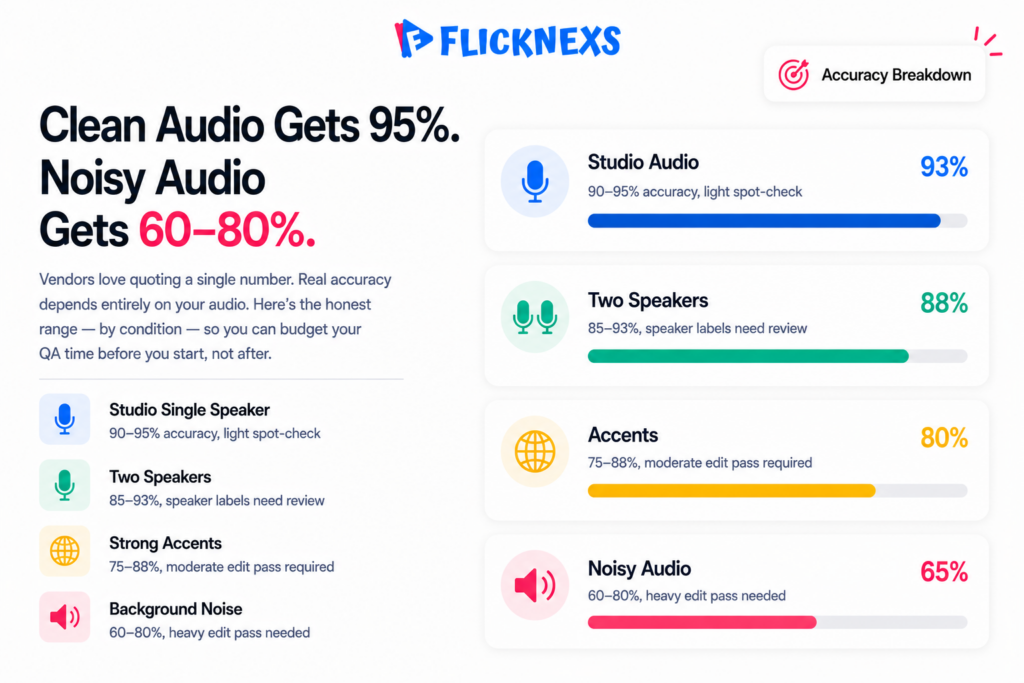
Vendors love to quote a single accuracy number. Reality is conditional. The honest framing is a range that depends on your audio.
| Audio condition | Typical AI accuracy (qualified range) | Review needed |
|---|---|---|
| Clean studio, single speaker, standard accent | ~90–95%+ | Light spot-check |
| Clear interview, two speakers | ~85–93% | Speaker labels + spot-check |
| Strong accents / non-native speakers | ~75–88% | Moderate edit pass |
| Background music, crowd, overlapping speech | ~60–80% | Heavy edit pass |
| Technical jargon, names, brands | Variable. Terms often wrong | Glossary + targeted review |
Accuracy usually gets measured through Word Error Rate, basically the percentage of words inserted, deleted or swapped out compared to a perfect human transcript. 5% WER, 95% accuracy, simple enough math.
Here’s where it falls apart though. WER treats every single word the same. Getting a person’s name wrong or botching a key number scores identically to dropping a stray “the” somewhere. Except one of those actually ruins the caption for whoever’s reading it and the other one barely registers. For captions, also watch timing accuracy (do captions appear in sync?) and readability (line breaks, reading speed in characters per second). A transcript can be 98% word-accurate and still be a poor caption if it scrolls past too fast to read. We’ve seen “accurate” tracks bounce back from QA purely because a long sentence got crammed into a one-second window.
How to lift accuracy before you even run ASR
- Feed it the best audio you have. Use the original mix or a dialogue stem, not a compressed export with the music baked in loud.
- Supply a glossary. Most serious ASR engines accept custom vocabulary. Load show names, character names, brands and recurring jargon up front.
- Pick the right language model. A model tuned for your language or dialect beats a generic one. Don’t run a US-English model on heavily accented content and then blame the AI.
- Chunk long files sensibly. Very long single files can drift; sane segmentation improves timing alignment.
Cost: where the savings come from
Manual captioning gets priced per minute of content and you’re typically looking at multiple dollars per minute depending on the language, how fast you need it back and whatever accuracy guarantee they’re putting on it.
AI subtitling is priced per minute too, but you’re talking an order of magnitude cheaper, often just cents per minute for the ASR step itself. Sounds like an easy decision on paper.
Except the number that actually matters for a streaming operator isn’t that headline rate at all. It’s total cost of ownership, once you factor in everything that happens after the AI spits out its first draft.
The real cost model
- ASR compute: cheap and fast, the bulk of the savings.
- Human QA: the variable you control. A five-minute clean clip might need 2 minutes of review a noisy five-minute clip might need 20. Budget review time by audio quality, not runtime.
- Rework: shipping bad captions costs more than reviewing. You pay for it in viewer complaints, re-encodes and compliance exposure.
Here’s the real takeaway. AI doesn’t get rid of the human in this process, it just moves them somewhere more useful. Your reviewer isn’t transcribing from a blank page anymore. They’re correcting a draft that’s already 90% there.
For a large back-catalogue, that’s not a minor efficiency gain. It’s the actual difference between getting everything captioned this quarter versus never getting around to it at all, which is honestly where most operators were stuck before this became viable.
We’ve seen this play out the same way across pretty much every customer with a deep library. The AI-first workflow is what actually makes full-catalogue captioning realistic, not just theoretically possible but something you can budget for and finish.
One thing worth flagging early though, because it catches people off guard: QA on a genuinely noisy archive can eat into your savings faster than you’d expect. Old recordings, bad audio, multiple speakers talking over each other. It’s worth triaging by audio quality first, before you commit a budget you think you’ve already calculated properly.
Compliance: the part you can’t skip
Captions aren’t only a UX feature. For many operators they’re a legal requirement. The exact obligations depend on your jurisdiction and content type, so confirm with counsel, but the common reference points are well established.
What the major standards expect
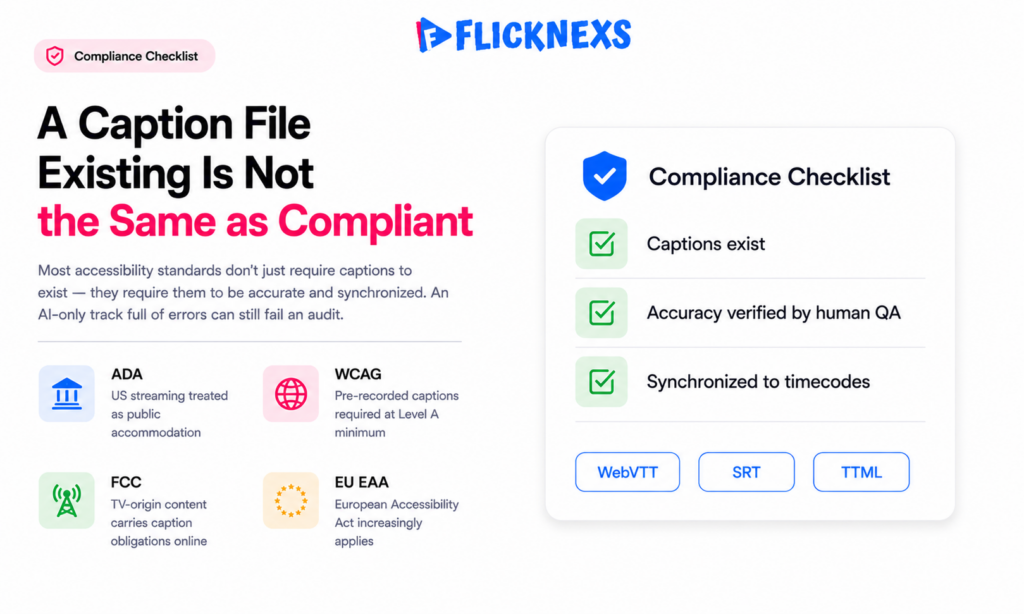
- WCAG (Web Content Accessibility Guidelines): the de facto global accessibility benchmark. Captions for pre-recorded audio are a Level A requirement live captions and audio description sit at AA. The W3C WCAG overview is the authoritative source.
- ADA (US): courts have repeatedly treated websites and streaming services as places of public accommodation, with captioning as a reasonable accommodation. See the U.S. Department of Justice’s guidance on web accessibility under the ADA.
- FCC (US): programming shown on TV that moves to the internet generally carries caption obligations, with rules on accuracy, synchronicity, completeness and placement.
- EU EAA / national laws: the European Accessibility Act and country-specific rules increasingly require accessible media services.
Here’s the part that actually trips people up. Most of these standards don’t just ask for captions to exist, they require them to be accurate and synchronized. An auto-generated track full of obvious errors can still fail an audit even though technically caption file is sitting right there. Which is exactly why skipping human QA on AI output isn’t really an option once you’re dealing with regulated content. The AI gets you to “present.” It takes a person to actually get you to “compliant.”
File formats and player support
Your captions are only useful if the player renders them. Stick to widely supported, standards-based formats.
| Format | Best for | Notes |
|---|---|---|
| WebVTT (.vtt) | HTML5 / HLS / web players | Native to the web; supports styling and positioning. The web standard. |
| SRT (.srt) | Broad interchange, downloads | Simplest, most portable; minimal styling. |
| TTML / IMSC | Broadcast, premium VOD, DASH | Rich styling and positioning; common in pro distribution. |
| CEA-608/708 | Broadcast-origin streams | Embedded captions carried in the video stream itself. |
For most streaming platforms, WebVTT delivered as a sidecar track in your HLS or DASH manifest is the path of least resistance. The MDN WebVTT documentation is a solid reference for what the format can do.
A practical workflow for streaming operators
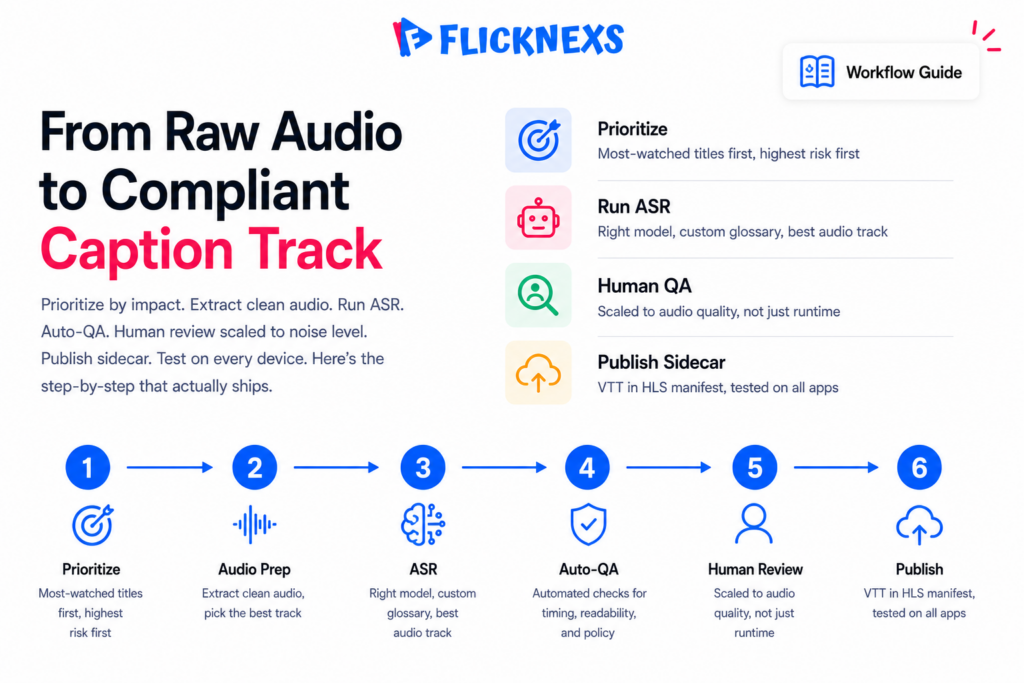
Here’s the workflow we recommend for taking a catalog from zero captions to compliant captions without drowning in manual labor.
- Prioritize by impact. Caption your most-watched and newest titles first, they pull in the most engagement and carry the heaviest compliance risk if something goes wrong.
- Extract the best audio track and put together a glossary of names and terms for that title or series before anything else happens.
- Run AI ASR with the right language model and get a draft VTT or SRT out the other end.
- Auto-QA pass: check reading speed, line length, overlap and timing programmatically, before any human even opens the file.
- Human review scaled to audio quality, light touch for clean audio, heavier review for noisy stuff. Fix names, numbers, speaker labels and non-speech cues here.
- Publish as a sidecar track in your manifest and actually confirm it renders across every app, web, mobile, TV. That last check matters more than it sounds like it should, a track can look flawless in your web player and still land in the wrong spot, or not show up at all, on some older smart-TV app. Once the source caption’s locked, that’s when translations for your top markets come in.
If you’re localizing further, AI captioning pairs naturally with AI dubbing for OTT platforms. Same source transcript, different output. And clean caption text is a free input for AI metadata tagging that improves catalog discovery. Platforms like ours bundle these AI media tools so you’re not stitching point solutions together. See the Flicknexs platform features for how captioning fits a broader OTT toolchain.
Frequently asked questions
Related guides
- Flicknexs OTT & streaming blog (hub)
- AI Dubbing for OTT: Localize Your Video Library in Any Language at Scale
- AI Metadata Tagging: Auto-Organize Your Video Catalog for Discovery
- AI-Generated Thumbnails & Trailers: Lift Click-Through on Your OTT Catalog
Planning your own platform? Learn how to create your own OTT platform with Flicknexs — VOD, live, DRM, multi-device apps and hybrid monetization.
Ready to build?
If you’re planning your next AI in OTT project, Flicknexs handles the video infrastructure end-to-end — so you can ship in weeks, not months.

